Fehlende Windows Studio-Effekte auf einem Dell Laptop
Summary: Erfahren Sie, wie Sie Windows Studio-Effekte wiederherstellen, die auf einem Dell Laptop fehlen.
This article applies to
This article does not apply to
This article is not tied to any specific product.
Not all product versions are identified in this article.
Symptoms
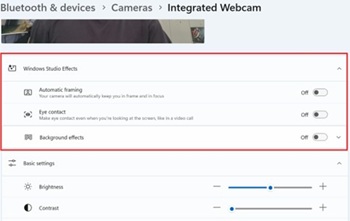
Windows Studio-Effektoptionen fehlen möglicherweise im Abschnitt USB-Videogerät in den Einstellungen.
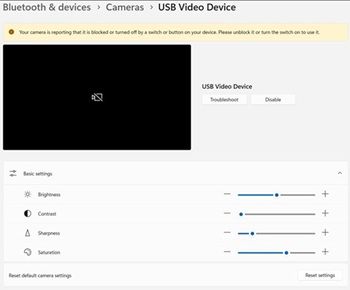
Betroffene Plattformen:
- Dell 14 DC14255
- Dell Pro 14 Essential PV14255
- Dell Pro 14 PC14255
- Dell Pro 16 PC16255
Cause
Keine Information zur Ursache verfügbar.
Resolution
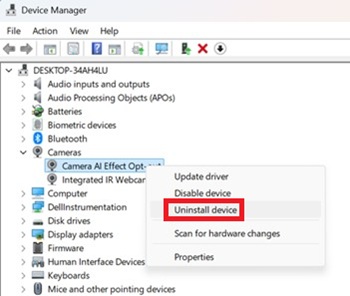
- Öffnen Sie den Geräte-Manager. Klicken Sie mit der rechten Maustaste auf Opt-out für Kamera-AI-Effekt und wählen Sie Gerät deinstallieren.
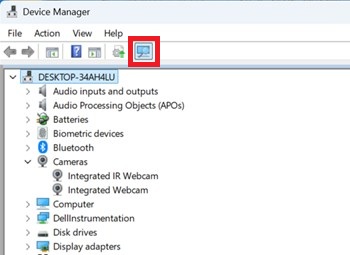
- Drücken Sie die Scan-Taste, um sicherzustellen, dass die integrierte IR-Webcam vorhanden ist.
- Überprüfen Sie, ob die Windows Studio-Effektoptionen in den Einstellungen verfügbar sind.
Affected Products
Dell 14 DC14255, Dell Pro 14 PC14255, Dell Pro 16 PC16255, Dell Pro 14 Essential PV14255Article Properties
Article Number: 000407521
Article Type: Solution
Last Modified: 09 Jan 2026
Version: 1
Find answers to your questions from other Dell users
Support Services
Check if your device is covered by Support Services.