Efectos de Windows Studio faltantes en una laptop Dell
Summary: Obtenga información sobre cómo restaurar Windows Studio Effects que faltan en una laptop Dell.
This article applies to
This article does not apply to
This article is not tied to any specific product.
Not all product versions are identified in this article.
Symptoms
Es posible que falten opciones de Windows Studio Effects en la sección Dispositivo de video USB en Configuración.
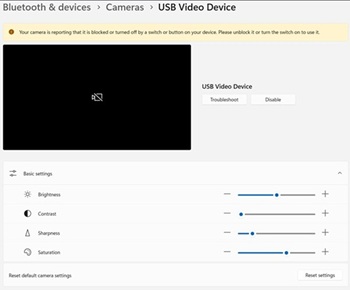
Plataformas afectadas:
- Dell 14 DC14255
- Dell Pro 14 Essential PV14255
- Dell Pro 14 PC14255
- Dell Pro 16 PC16255
Cause
No hay información disponible sobre la causa.
Resolution
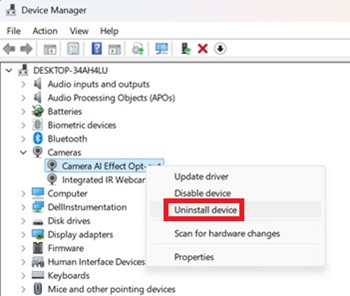
- Abra el Administrador de dispositivos. Haga clic con el botón secundario en Camera AI Effect Opt-out y seleccione Uninstall device.
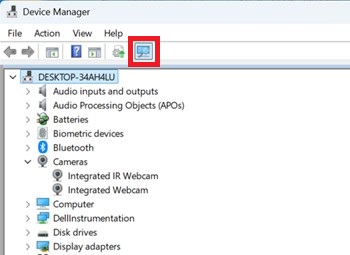
- Presione el botón de escaneo para asegurarse de que exista la cámara web IR integrada .
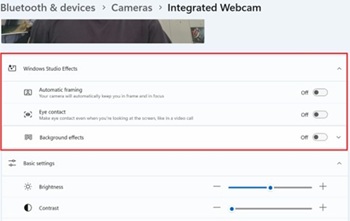
- Confirme si las opciones de Windows Studio Effects están disponibles en Configuración.
Affected Products
Dell 14 DC14255, Dell Pro 14 PC14255, Dell Pro 16 PC16255, Dell Pro 14 Essential PV14255Article Properties
Article Number: 000407521
Article Type: Solution
Last Modified: 09 Jan 2026
Version: 1
Find answers to your questions from other Dell users
Support Services
Check if your device is covered by Support Services.