Windows Studio -tehosteet puuttuvat Dellin kannettavasta tietokoneesta
Summary: Katso, miten voit palauttaa Dellin kannettavasta tietokoneesta puuttuvat Windows Studio -tehosteet.
This article applies to
This article does not apply to
This article is not tied to any specific product.
Not all product versions are identified in this article.
Symptoms
Windows Studio -tehosteiden vaihtoehdot saattavat puuttua asetusten USB Video Device -osasta.
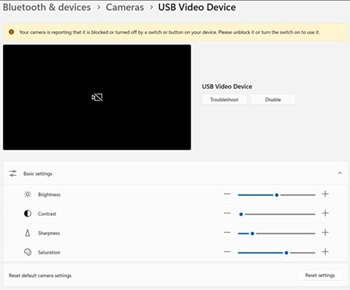
Ympäristöt, joita tämä koskee:
- Dell 14 DC14255
- Dell Pro 14 Essential -PV14255
- Dell Pro 14 PC14255
- Dell Pro 16 PC16255
Cause
Ei tietoja syystä.
Resolution
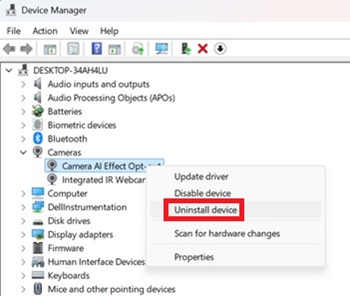
- Avaa Laitehallinta. Napsauta hiiren kakkospainikkeella kohtaa Camera AI Effect Opt-out ja valitse Poista laitteen asennus.
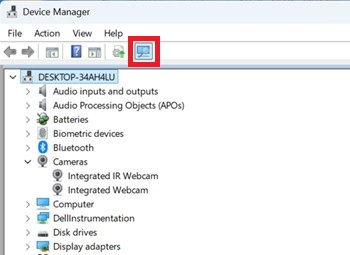
- Varmista skannauspainikkeella, että sisäinen IR-verkkokamera on käytettävissä.
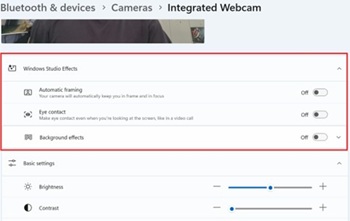
- Tarkista, ovatko Windows Studio -tehosteet käytettävissä Asetuksissa.
Affected Products
Dell 14 DC14255, Dell Pro 14 PC14255, Dell Pro 16 PC16255, Dell Pro 14 Essential PV14255Article Properties
Article Number: 000407521
Article Type: Solution
Last Modified: 09 Jan 2026
Version: 1
Find answers to your questions from other Dell users
Support Services
Check if your device is covered by Support Services.