Effetti di Windows Studio mancanti su un notebook Dell
Summary: Informazioni su come ripristinare gli effetti di Windows Studio mancanti su un notebook Dell.
This article applies to
This article does not apply to
This article is not tied to any specific product.
Not all product versions are identified in this article.
Symptoms
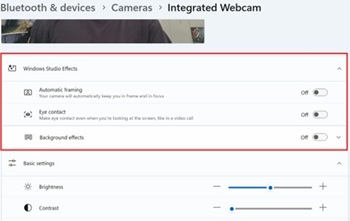
Le opzioni di Windows Studio Effects potrebbero non essere disponibili nella sezione Dispositivo video USB in Impostazioni.
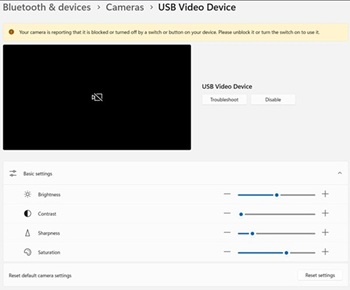
Piattaforme interessate:
- Dell 14 DC14255
- Dell Pro 14 Essential PV14255
- Dell Pro 14 PC14255
- Dell Pro 16 PC16255
Cause
Non sono disponibili informazioni sulla causa.
Resolution
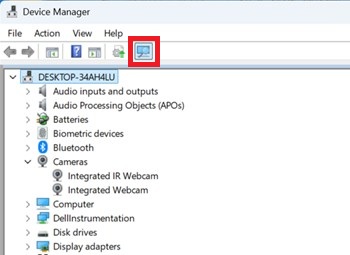
- Aprire Gestione dispositivi. Cliccare con il pulsante destro del mouse su Camera AI Effect Opt-out e selezionare Uninstall device.

- Premere il pulsante di scansione per verificare che la webcam IR integrata esista.
- Verificare che le opzioni di Windows Studio Effects siano disponibili in Impostazioni.
Affected Products
Dell 14 DC14255, Dell Pro 14 PC14255, Dell Pro 16 PC16255, Dell Pro 14 Essential PV14255Article Properties
Article Number: 000407521
Article Type: Solution
Last Modified: 09 Jan 2026
Version: 1
Find answers to your questions from other Dell users
Support Services
Check if your device is covered by Support Services.