Windows Studio-effecten ontbreken op een Dell laptop
Summary: Informatie over het herstellen van Windows Studio-effecten die ontbreken op een Dell laptop.
This article applies to
This article does not apply to
This article is not tied to any specific product.
Not all product versions are identified in this article.
Symptoms
Windows Studio Effects-opties ontbreken mogelijk in het gedeelte USB-videoapparaat in Instellingen.
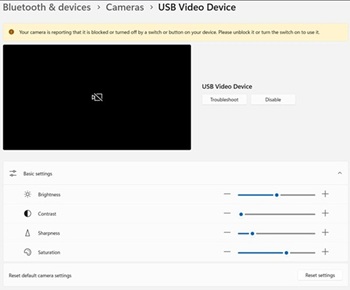
Betreffende platforms:
- Dell 14 DC14255
- Dell Pro 14 Essential PV14255
- Dell Pro 14 PC14255
- Dell Pro 16 PC16255
Cause
Er is geen informatie over de oorzaak beschikbaar.
Resolution
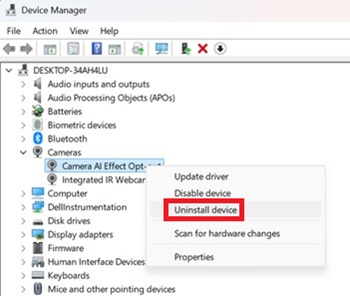
- Open Apparaatbeheer. Klik met de rechtermuisknop op Afmelden camera-AI-effect en selecteer Apparaat verwijderen.
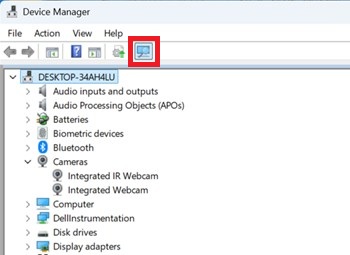
- Druk op de scanknop om ervoor te zorgen dat de geïntegreerde IR-webcam bestaat.
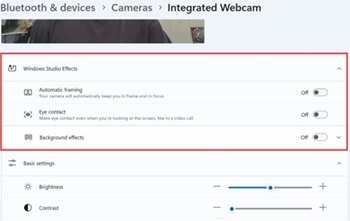
- Controleer of de opties voor Windows Studio-effecten beschikbaar zijn in Instellingen.
Affected Products
Dell 14 DC14255, Dell Pro 14 PC14255, Dell Pro 16 PC16255, Dell Pro 14 Essential PV14255Article Properties
Article Number: 000407521
Article Type: Solution
Last Modified: 09 Jan 2026
Version: 1
Find answers to your questions from other Dell users
Support Services
Check if your device is covered by Support Services.