На ноутбуке Dell отсутствуют эффекты Windows Studio
Summary: Узнайте, как восстановить отсутствующие эффекты Windows Studio на ноутбуке Dell.
This article applies to
This article does not apply to
This article is not tied to any specific product.
Not all product versions are identified in this article.
Symptoms
В разделе «USB-видеоустройство» в настройках могут отсутствовать параметры эффектов Windows Studio.
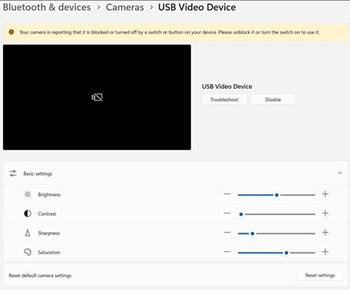
Затронутые платформы:
- 14-дюймовый DC14255 Dell
- Dell Pro 14 Essential PV14255
- Dell Pro 14 PC14255
- Dell Pro 16 PC16255
Cause
Информация о причине отсутствует.
Resolution
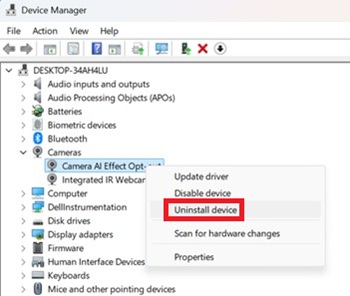
- Откройте Диспетчер устройств. Нажмите правой кнопкой мыши на пункт Отказ от эффекта искусственного интеллекта камеры и выберите Удалить устройство.
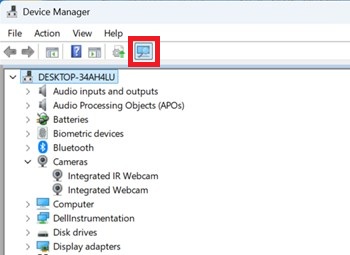
- Нажмите кнопку сканирования, чтобы убедиться в наличии встроенной ИК-веб-камеры .
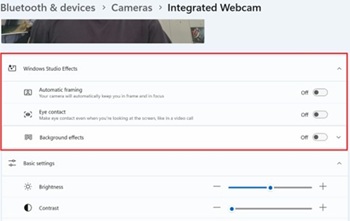
- Убедитесь, что в меню «Параметры» доступны параметры эффектов Windows Studio.
Affected Products
Dell 14 DC14255, Dell Pro 14 PC14255, Dell Pro 16 PC16255, Dell Pro 14 Essential PV14255Article Properties
Article Number: 000407521
Article Type: Solution
Last Modified: 09 Jan 2026
Version: 1
Find answers to your questions from other Dell users
Support Services
Check if your device is covered by Support Services.