戴尔笔记本电脑上缺少 Windows Studio 效果
Summary: 了解如何还原戴尔笔记本电脑上缺少的 Windows Studio 效果。
This article applies to
This article does not apply to
This article is not tied to any specific product.
Not all product versions are identified in this article.
Symptoms
“设置”中的“USB 视频设备”部分中可能缺少 Windows Studio 效果选项。
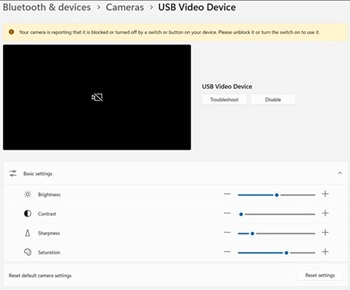
受影响的平台:
- 戴尔 14 DC14255
- 戴尔 Pro 14 Essential PV14255
- 戴尔 Pro 14 PC14255
- 戴尔 Pro 16 PC16255
Cause
无可用的原因信息。
Resolution
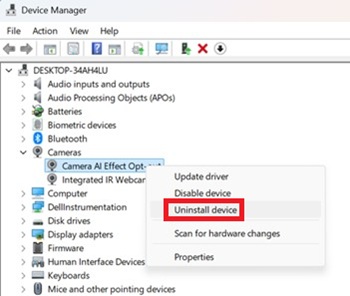
- 打开设备管理器。右键单击 摄像头 AI 效果选择退出 ,然后选择 卸载设备。
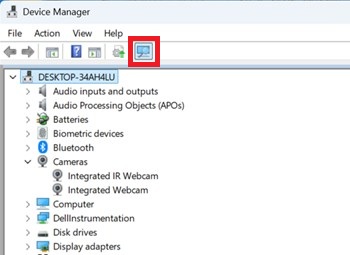
- 按下扫描按钮以确保 存在集成式红外网络摄像头 。
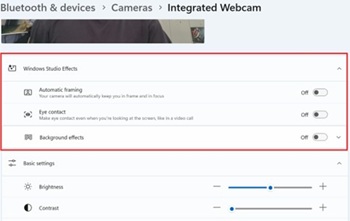
- 确认“设置”中的“Windows Studio 效果”选项是否可用。
Affected Products
Dell 14 DC14255, Dell Pro 14 PC14255, Dell Pro 16 PC16255, Dell Pro 14 Essential PV14255Article Properties
Article Number: 000407521
Article Type: Solution
Last Modified: 09 Jan 2026
Version: 1
Find answers to your questions from other Dell users
Support Services
Check if your device is covered by Support Services.