如何在 Windows 上強制進行 Dell Encryption 掃掠
Summary: 本文說明如何使用 Dell Encryption Enterprise (之前稱為 Dell Data Protection |Enterprise Edition) 或 Dell Encryption Personal (先前稱為 Dell Data Protection |個人版)。
This article applies to
This article does not apply to
This article is not tied to any specific product.
Not all product versions are identified in this article.
Symptoms
受影響的產品:
- Dell Encryption Enterprise
- 戴爾數據保護 |企業
- Dell Encryption Personal
- Dell Data Protection | Personal Edition
受影響的作業系統:
- Windows
Cause
不適用
Resolution
Dell Encryption Enterprise 和 Dell Encryption Personal 可使用 Windows 系統探測器 (WSProbe.exe) 強制掃掠整個電腦,以確保符合最新的加密原則。
警告:加密掃掠可能會導致效能輕微下降。Dell Technologies 建議僅執行
WSProbe.exe 根據需要。
若要執行WSProbe.exe:
- 前往
C:\Program Files\Dell\Dell Data Protection\Encryption.
注意:
- 如果在安裝過程中變更目錄,目錄可能會有所不同。
WSProbe.exe僅在軟體的版本 7.3 及更高版本中。如需更早版本,請聯絡 Dell Data Security ProSupport。
- 按兩下
WSProbe.exe。
注意:如果使用 CLI,則應指定磁碟機代號 (例如:
WSProbe.exe C:\)。
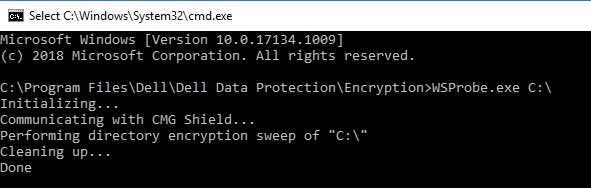
圖 1:(僅英文)類型 WSProbe.exe C:\
如要聯絡支援部門,請參閱 Dell Data Security 國際支援電話號碼。
請前往 TechDirect,以線上產生技術支援要求。
如需更多深入見解與資源,請加入 Dell 安全性社群論壇。
Affected Products
Dell EncryptionArticle Properties
Article Number: 000130499
Article Type: Solution
Last Modified: 03 abr 2024
Version: 11
Find answers to your questions from other Dell users
Support Services
Check if your device is covered by Support Services.