PowerEdge:在戴尔第 16 代英特尔服务器上启用英特尔 TDX
Summary: 在戴尔第 16 代英特尔 PowerEdge 服务器上启用英特尔信任域扩展 (TDX) 的前提条件
This article applies to
This article does not apply to
This article is not tied to any specific product.
Not all product versions are identified in this article.
Symptoms
默认情况下,BIOS 设置中的英特尔 TDX 选项在戴尔第 16 代 PowerEdge 服务器上不可选择或不可用。

Cause
- 配备第四代至强可扩展处理器的第 16 代 Dell PowerEdge 服务器不支持英特尔 TDX 功能。
- 配备第五代英特尔至强可扩展处理器的第 16 代 Dell PowerEdge 服务器支持英特尔 TDX。
- 启用英特尔 TDX 需要满足特定的硬件支持标准和 BIOS 配置前提条件。
Resolution
有关英特尔 TDX 的详细信息,请参阅 英特尔信任域扩展 (TDX) 
英特尔 TDX 的硬件要求:
- 支持英特尔 TDX 的第五代英特尔至强可扩展处理器或更高版本
- 有关特定处理器支持的信息,请参阅 英特尔文章 91103
- 有关特定处理器支持的信息,请参阅 英特尔文章 91103
- 内存配置:每个插槽 8 或 16 个 DIMM
Intel TDX 所需的 BIOS 设置:
- 内存设置:
- 禁用节点交叉存取
- 处理器设置:
- 启用 x2APIC 模式
- 禁用 CPU 物理地址限制
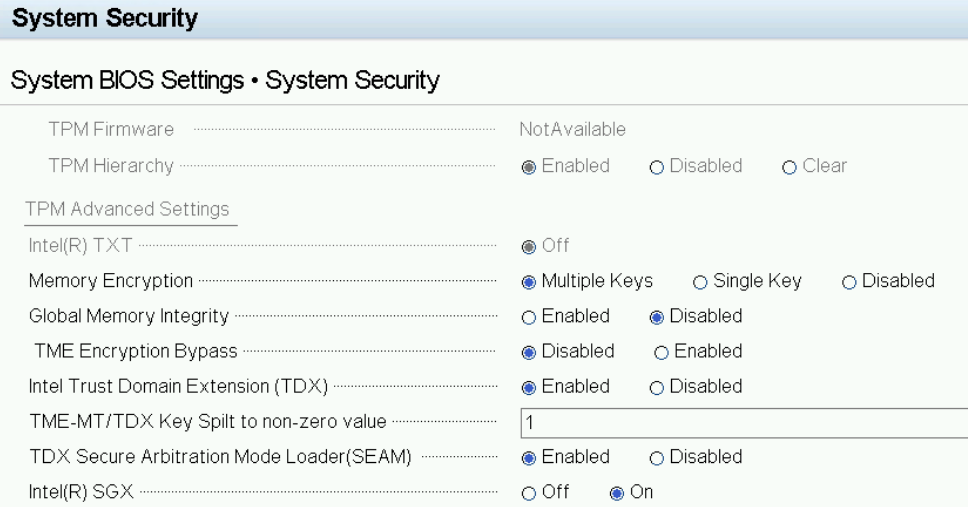
- 系统安全:
- 将 内存加密 设置为 多个密钥。
- 禁用 全局内存完整性。
- 启用英特尔可信域扩展 (TDX)。
- 将 TME-MT/TDX Key Split设置为非零值e(例如 1)
- 启用 TDX 安全仲裁模式加载程序 (SEAM)。
- 启用 Intel(R) SGX。
Affected Products
PowerEdge C6620, PowerEdge MX760c, PowerEdge R660, PowerEdge R660xs, PowerEdge R760, PowerEdge R760XA, PowerEdge R760xd2, PowerEdge R760xs, PowerEdge R860, PowerEdge R960Products
PowerEdge T360, PowerEdge T560, PowerEdge XE8640, PowerEdge XE9640, PowerEdge XE9680, PowerEdge XR5610, PowerEdge XR7620, PowerEdge XR8610t, PowerEdge XR8620tArticle Properties
Article Number: 000226452
Article Type: Solution
Last Modified: 08 Nov 2025
Version: 6
Find answers to your questions from other Dell users
Support Services
Check if your device is covered by Support Services.