"PCIe- Training warning on device" Warning on Alienware or Dell Desktop in Ediag with NVIDIA GeForce RTX 5060 Ti
Summary: Learn what to do if a "PCIe- Training warning on device" warning is received in Ediag with a NVIDIA GeForce RTX 5060 Ti graphics card.
This article applies to
This article does not apply to
This article is not tied to any specific product.
Not all product versions are identified in this article.
Symptoms
An error message of "PCIe- Training warning on device PCI tag-0100 VendorID-10DE DeviceID-2D04 SVid-1028 SDid-5363 Link Degraded, maxWidth =x16, negWidth =x8" is seen when running Ediag.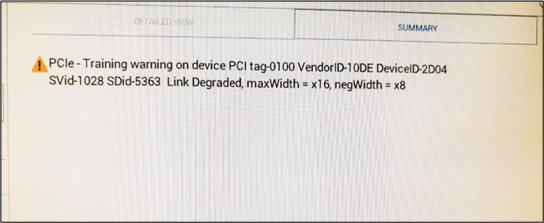
Affected Platforms:
- Alienware Aurora ACT1250
Dell Pro Max Tower T2 FCT2250Dell Tower ECT1250Dell Tower Plus EBT2250
Affected Graphics Card:
- NVIDIA GeForce RTX 5060 Ti
Cause
Ediag detects a mismatch between the NVIDIA RTX 5060 Ti MaxLinkWidth and NegLinkWidth. This causes the warning message.
Resolution
Updating the BIOS on the computer resolves the issue.
- Alienware Aurora ACT1250: Update to BIOS 1.5.2 or later.
Dell Pro Max Tower T2 FCT2250: Update to BIOS 1.5.2 or later.Dell Tower ECT1250: Update to BIOS 1.7.0 or later.Dell Tower Plus EBT2250: Update to BIOS 1.6.1 or later.
To download and install the BIOS, refer to the BIOS Update Guide.
Affected Products
Alienware Aurora ACT1250, Dell Tower Plus EBT2250, Dell Tower ECT1250, Dell Pro Max Tower T2 FCT2250Article Properties
Article Number: 000328476
Article Type: Solution
Last Modified: 13 Nov 2025
Version: 4
Find answers to your questions from other Dell users
Support Services
Check if your device is covered by Support Services.