iSM Install Button Removed from iDRAC GUI Starting with Version 7.20.60.50
Summary: Starting with iDRAC version 7.20.60.50, the Integrated Dell Remote Access Controller (iDRAC) GUI no longer includes the iSM Install button on the iSM setup page. This change reflects the deprecation of the feature that previously allowed installation of iDRAC Service Module (iSM) via iDRAC. ...
This article applies to
This article does not apply to
This article is not tied to any specific product.
Not all product versions are identified in this article.
Symptoms
After upgrading to iDRAC version 7.20.60.50, the iSM Install button is no longer visible on the iSM setup page within the iDRAC GUI. 
Previous iDRAC versions display the iSM Install button on the iSM setup page as shown below. 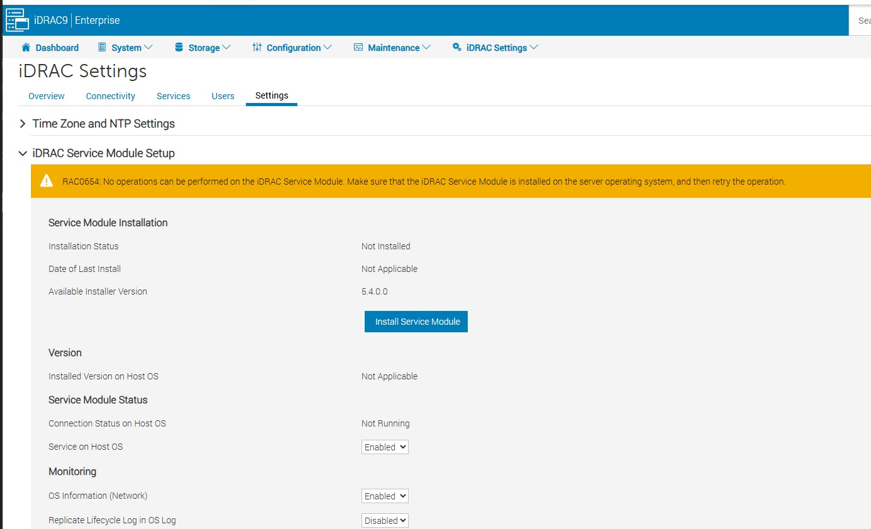
Cause
The development team has deprecated the functionality that utilizes the iDRAC storage partition to store the iSM DUP package. This change applies starting with iDRAC firmware version 7.20.60.50 and later. The feature is no longer supported in these versions.
Resolution
Use alternative installation methods for iSM:
-
- Operating System-based installation:
- For Linux environments, use the Dell Linux Repository:
- For Windows environments, use OS DUP or package manager.
- Remote deployment tools:
- OpenManage Enterprise or other supported management solutions.
- Operating System-based installation:
Review existing scripts or automation to ensure compatibility with updated iDRAC versions.
Affected Products
iDRAC10 - 1.20.xx Series, iDRAC9 - 7.xx SeriesProducts
iDRAC9Article Properties
Article Number: 000396891
Article Type: Solution
Last Modified: 27 Nov 2025
Version: 1
Find answers to your questions from other Dell users
Support Services
Check if your device is covered by Support Services.