BIOS 비밀번호를 재설정, 제거 또는 복구하는 방법
Summary: BIOS에서 관리자, 시스템 또는 HDD 암호를 잊으셨습니까? BIOS 설정, 점퍼 또는 Dell 비밀번호 해제 코드를 통해 비밀번호를 쉽게 재설정하거나 지우는 안전한 방법에 대해 알아보십시오.
Instructions
BIOS 암호가 기억나지 않거나 제거하는 데 도움이 필요하십니까? 이 가이드에서는 시스템 암호, 관리자 암호 설정 또는 하드 드라이브 암호 설정 여부에 관계없이 사용 가능한 옵션에 대해 설명합니다.
BIOS 비밀번호 유형 이해
Dell 컴퓨터에는 세 가지 유형의 BIOS 비밀번호가 있을 수 있습니다.
- 시스템 비밀번호: 컴퓨터 부팅을 중지합니다.
- 설정 비밀번호: 권한이 없는 사용자가 BIOS 설정을 변경하지 못하도록 방지
- 하드 드라이브 비밀번호: 드라이브 및 데이터 잠금
세 가지 유형 모두 아래와 동일한 방법을 사용하여 지울 수 있습니다.
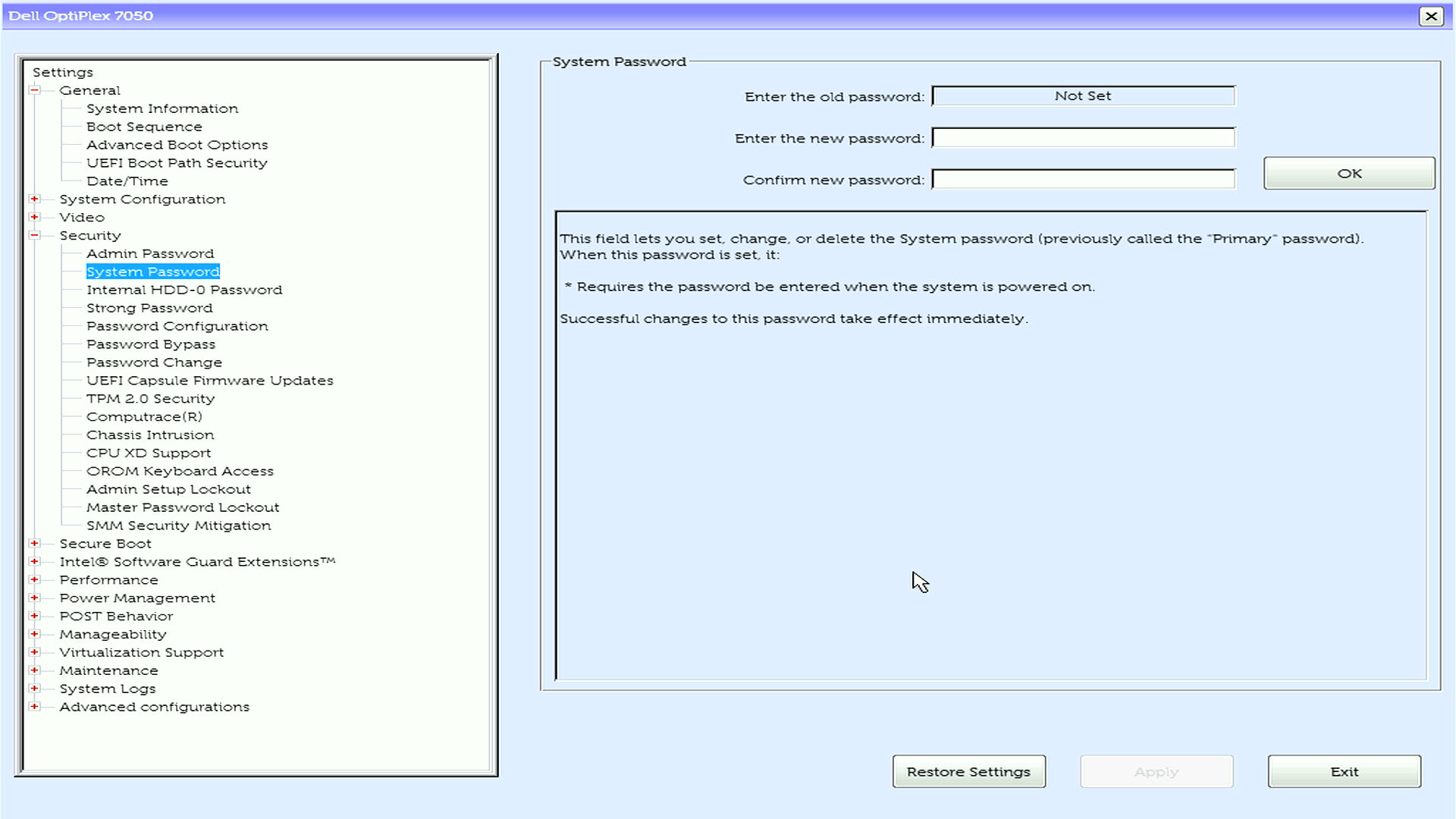
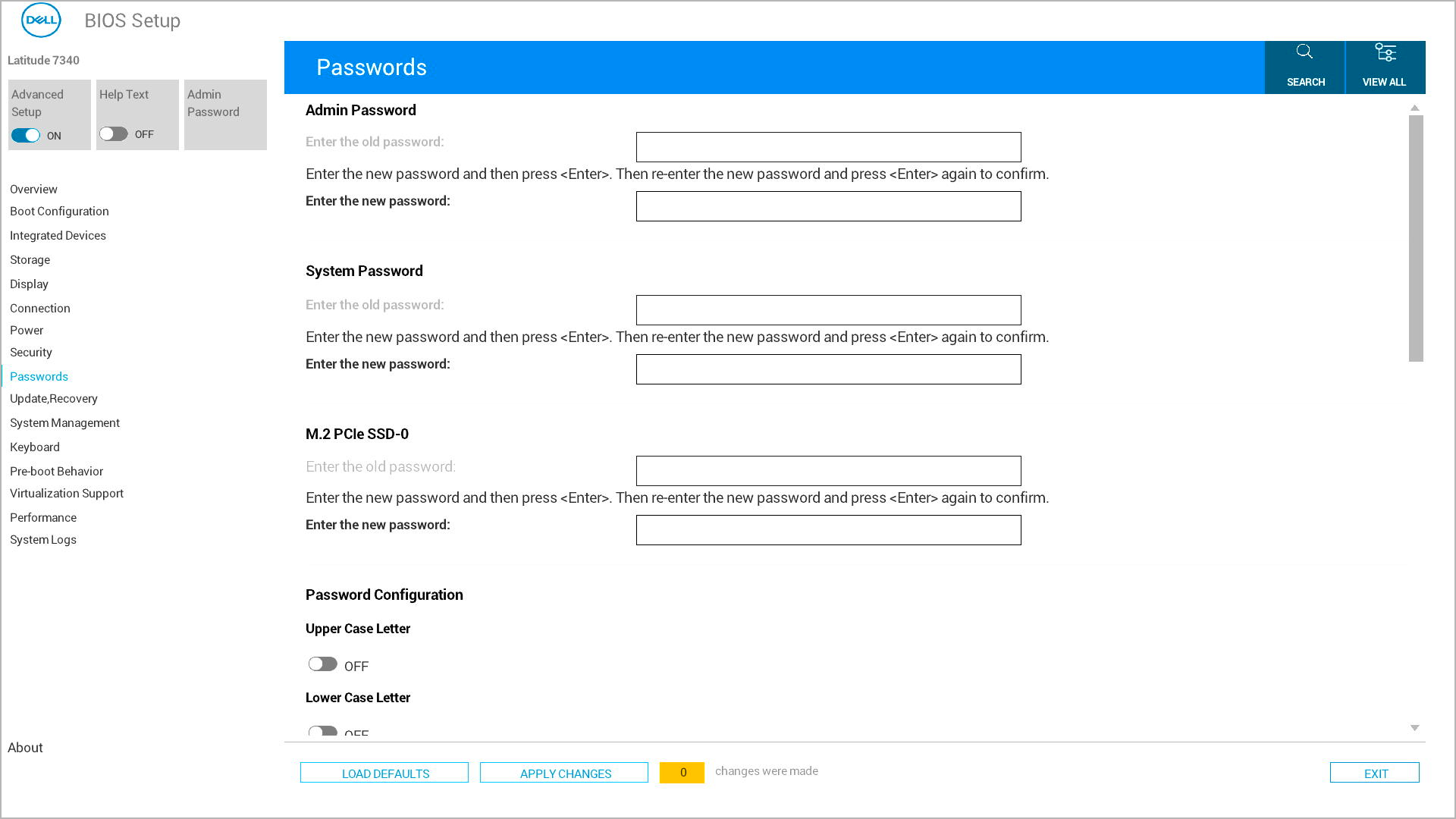
암호를 알고 있는 경우
BIOS 비밀번호를 기억하는 경우 BIOS 설정을 통해 쉽게 제거하거나 변경할 수 있습니다.
- 컴퓨터를 켭니다.
- Dell 로고가 표시되면 F2 키를 반복해서 누릅니다.
- 현재 비밀번호를 입력하세요
- 보안 섹션으로 이동합니다.
- 제거할 암호를 선택합니다
- Enter 키를 누르고 새 비밀번호 필드를 비워 둡니다.
- Enter 키를 다시 눌러 확인합니다
- Save changes를 누르고 종료합니다.
이제 암호가 제거되었습니다.
비밀번호를 잊어버린 경우
BIOS 비밀번호를 잊어버린 경우 컴퓨터 모델에 따라 두 가지 복구 옵션이 있습니다.
옵션 1: 점퍼를 통해 지우는 방법(데스크탑)
이 기능은 대부분의 Dell 데스크탑에서 작동합니다. 노트북에는 점퍼가 없습니다.
필수 항목:
- 드라이버
- 컴퓨터의 서비스 설명서
단계:
- 컴퓨터 전원을 끄고 모든 케이블을 뽑습니다.
- Dell 지원에서 서비스 설명서 다운로드
- 설명서에서 암호 점퍼 위치("PSWD" 또는 "PASSWORD"로 표시됨)를 찾습니다.
- 컴퓨터 케이스 열기
- 암호 점퍼에서 작은 플라스틱 캡을 제거합니다
- 점퍼 캡 없이 컴퓨터 켜기
- 완전히 부팅한 다음 전원을 끕니다.
- 점퍼 캡을 장착합니다.
- 케이스를 닫고 케이블을 다시 연결합니다.
옵션 2: Dell 비밀번호 해제 코드 가져오기
이 옵션은 모든 Dell 컴퓨터에서 작동 하며 노트북 또는 점퍼가 없는 컴퓨터에서만 사용할 수 있습니다.
단계:
- 컴퓨터를 켭니다.
- 오류 코드가 표시될 때까지 잘못된 암호를 3-5번 입력합니다.
- 정확한 오류 코드를 기록해 둡니다.
- Dell 기술 지원 부서에 문의
- 오류 코드 및 소유권 증명을 제공합니다.
- Dell에서 컴퓨터의 잠금을 해제할 수 있는 릴리스 코드를 제공해드립니다.
비밀번호 해제 코드 사용
- Dell에서 확인 후 릴리스 코드를 제공합니다.
- 주어진 대로 정확하게 코드를 적어 두십시오.
- 컴퓨터의 비밀번호 프롬프트에서 비밀번호 해제 코드를 입력합니다
- 컴퓨터의 잠금이 해제 되고 정상적으로 부팅되어야 합니다.
- 원하는 경우 BIOS 설정(시작 중에 F2)에 액세스하여 새 암호를 설정합니다.
서비스 설명서를 사용해야 하는 경우
다음과 같은 경우 항상 서비스 설명서를 확인하십시오.
- 비밀번호 점퍼를 찾을 수 없습니다.
- 단계가 컴퓨터와 일치하지 않습니다.
- 모델에 대한 특정 지침이 필요합니다.
Dell 지원에서 컴퓨터의 서비스 태그 또는 익스프레스 서비스 코드를 사용하여 설명서를 다운로드합니다.
도움이 더 필요하십니까?
- 컴퓨터를 보호할 준비가 되셨습니까? 알아보기: BIOS 비밀번호 유형 이해
- 새 비밀번호를 생성하려면 관리자 비밀번호, 시스템 비밀번호 또는 하드 드라이브 비밀번호 설정에 대한 가이드를 참조하십시오.
FAQ(Frequently Asked Questions)
1. BIOS 비밀번호를 직접 재설정할 수 있습니까?
답: 일부 데스크탑 모델에서는 점퍼 재설정이 가능하지만 많은 노트북에는 Dell 지원에서 제공하는 암호 해제 코드가 필요합니다.
2. 암호를 지우면 내 파일이 지워집니까?
답: 아니요. BIOS의 비밀번호에만 영향을 줍니다.
3. Dell은 항상 HDD 암호를 재설정할 수 있습니까?
답: 항상 그런 것은 아니며, 특히 NVMe SSD에서 Dell은 NVMe SSD에 대한 암호 릴리스 코드를 생성할 수 없습니다.
Additional Information
권장 문서
다음은 사용자가 관심 있을 만한, 이 주제와 관련된 몇 가지 권장 문서입니다.
- 일반 하드 드라이브 및 BIOS 암호 정보
- BIOS 비밀번호 분실에 대한 Dell 지원
- Dell 컴퓨터에서 BIOS 또는 CMOS 리셋을 수행하고 NVRAM을 지우는 방법
- 점퍼를 사용하여 Dell 데스크탑 컴퓨터에서 BIOS 비밀번호를 리셋하는 방법
- Dell BIOS 업데이트
Microsoft Windows 로그인 비밀번호 문제에 대한 도움이 필요한 경우 Dell 기술 자료 문서 Windows 10 로컬 계정 비밀번호 또는 Microsoft 계정 문제를 참조하십시오.
 보증이 만료되었습니까? 걱정하지 마십시오. Dell.com/support 웹사이트를 방문하여 Dell 서비스 태그를 입력하고 서비스를 확인하십시오.