How to Get Support for CyberLink Products Sold at Dell
Summary: This article covers how to obtain support for CyberLink products sold directly through Dell.
Instructions
Affected Products:
- CyberLink PowerDVD
- CyberLink Power Director
- CyberLink Photo Director
- CyberLink Media Suite Essentials
- CyberLink Photoshop Elements
- CyberLink Premier Elements
CyberLink develops a series of multimedia software that is available for purchase directly with a Dell computer or separately through Dell.com. CyberLink products that are purchased separately through Dell include only limited software support on:
- Accessing the product
- Activating the product
Self-Help Options
Most technical information can be found by referencing the Dell Knowledge Base.
To obtain support:
- Go to https://www.dell.com/support/home.
- To the right of the page, select Contact Us and then click either:
- Contact Technical Support if you have a Dell service tag available.
- Contact Order Support: If you do not have a Dell service tag, and need assistance gaining access to the software.
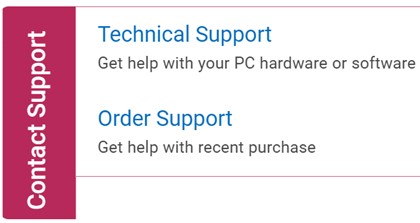
Figure 1: (English Only) Click Contact Us
- Service Tag is only available for CyberLink products that are purchased with a Dell computer. For more information, reference Locate your Service Tag or Serial Number.
- If you are unable to locate the appropriate service tag, reach out to your sales agent for assistance.
Technical Support
- Click Enter service tag.

Figure 2: (English Only) Identify your device
- Type your Service Tag and then click Submit.

Figure 3: (English Only) Enter your Service Tag and click Submit
- On prompt, select either International Support or Support in [REGION].

Figure 4: (English Only) Choose your Region
- [REGION] is based on the country or region that the product was purchased at.
- Your [REGION] may differ from the above screenshot.
- From the drop-down menu, select Software and 3rd party applications and then click Next.
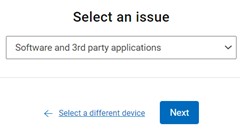
Figure 5: (English Only) Select Software and 3rd party applications
- Select an available contact option.

Figure 6: (English Only) Select contact option
Order Support
- Type your Order Number and then click Find My Order.

Figure 7: (English Only) Click Find My Order
- To the right of the page, click Contact Customer Support.
Figure 8: (English Only) Click Contact Customer Support
- From the drop-down, select Missing or Wrong Items.

Figure 9: (English Only) Select Missing or Wrong Items
- Select an available contact option.

Figure 10: (English Only) Select contact option
- Contact options may differ by your region.
- Reference this article (000188059) when contacting technical support.