在自动驱动程序扫描期间显示“Driver Detection not Available”
Summary: 了解戴尔支持驱动程序下载页面上显示的“Driver Detection not Available”消息。
This article applies to
This article does not apply to
This article is not tied to any specific product.
Not all product versions are identified in this article.
Symptoms
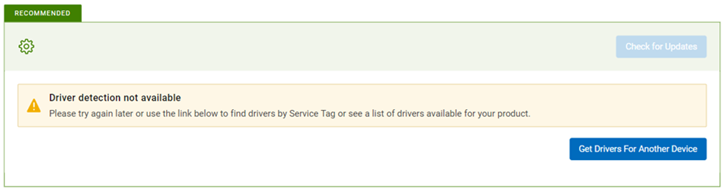
当您单击戴尔驱动程序和下载页面上的单击以获取更新按钮时,将显示消息“驱动程序检测不可用”:“请稍后重试或使用以下链接按服务编号查找驱动程序或查看适用于您的产品的驱动程序列表。”
Cause
服务已停止或不可用。
Resolution
- 使您的个人计算机保持最新的 SupportAssist 版本。请参阅系统要求。
- 确保您以 管理员身份登录。
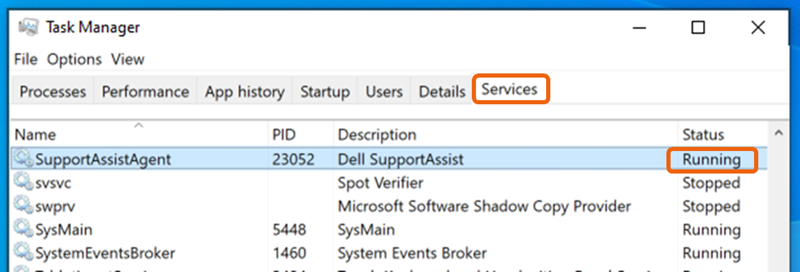
- 打开询问管理器,切换到 “服务 ”选项卡并检查“SupportAssistAgent” 和“DellClientManagementService” 服务是否处于“正在运行”状态。这两种服务都应处于正在运行状态,以便驱动程序扫描正常工作。
如果系统已开机或重新启动,请等待至少 5 分钟,然后再重新访问支持网站以检查更新。
这允许两个服务完全运行,以允许驱动程序扫描功能。等待 5 分钟后,如果任何或两项服务的状态仍显示为“已停止”,请右键单击并选择“启动”。
如果两项服务都显示为“Running”,请转至步骤 3。
- 重新加载或刷新网页,然后再次尝试检查更新。
- 重新启动系统并等待至少 5 分钟,然后重新访问支持网站以 检查更新。
- 检查驱动程序扫描功能是否在 SupportAssist 应用程序中正常工作。
- 确保防火墙或防病毒应用程序未阻止 SupportAssist 应用程序。
- 将 SupportAssist 应用程序设置为自动定期运行,以使服务及时更新保持自动扫描平稳运行所需的任何更改。SupportAssist 应用程序 >设置 >自动执行扫描和优化 > 更新驱动程序和软件:每周通过将扫描设置为立即运行,实时检查更新。
- 如果按照上述所有步骤操作无法解决问题,请卸载 SupportAssist 应用程序并重新安装。
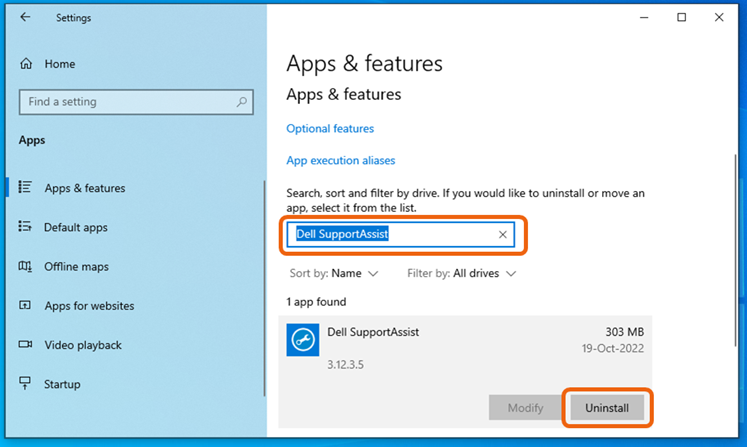
- 在 Windows 10 上:转至开始 > > 设置应用程序,在“应用程序和功能”下搜索“Dell SupportAssist”,然后选择并单击卸载。
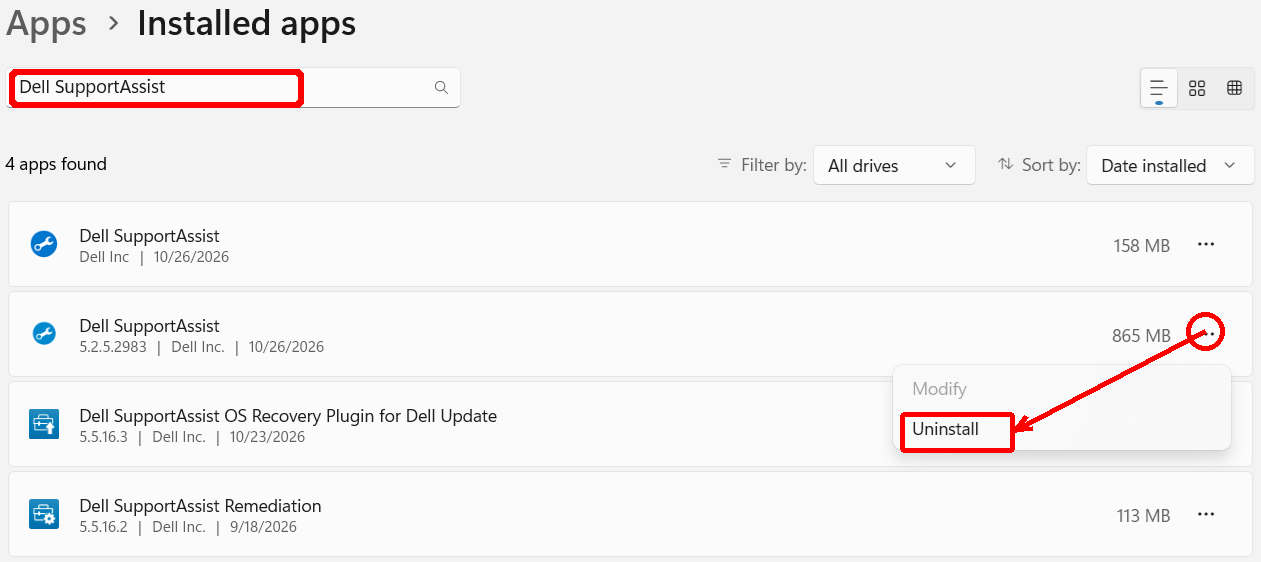
- 在 Windows 11 上:转至 开始 > 设置 > 应用程序 > 已安装的应用程序,搜索 “Dell SupportAssist”, 单击右侧的三个点 (...),然后选择卸载提醒:无需卸载 Dell SupportAssist 操作系统恢复插件和 Dell SupportAssist 修复。
- SupportAssist 卸载完成后,重新启动系统。
- 重新访问 支持网站并触发“检查更新”,这将触发 SupportAssist 的全新安装。
- 在 Windows 10 上:转至开始 > > 设置应用程序,在“应用程序和功能”下搜索“Dell SupportAssist”,然后选择并单击卸载。
Affected Products
Alienware, Dell Pro All-in-One, Dell Pro Max Micro, Dell Pro Max Slim, Dell Pro Max Tower, Dell Pro Micro, Dell Pro Slim, Dell Pro Tower, Dell Slim, Dell Tower, Inspiron, OptiPlex, Vostro, XPS, G Series, G Series, Alienware, Dell Plus, Dell Pro
, Dell Pro Max, Dell Pro Plus, Dell Pro Premium, Inspiron, Latitude, Dell Pro Rugged, Vostro, XPS, Fixed Workstations, Mobile Workstations, Surface Pro 4
...
Article Properties
Article Number: 000200106
Article Type: Solution
Last Modified: 28 Oct 2026
Version: 18
Find answers to your questions from other Dell users
Support Services
Check if your device is covered by Support Services.