ViPR SRM: Conflict Errors in DPA Collecting Logs
Summary: Customer is seeing conflict Errors in DPA Collecting Logs
This article applies to
This article does not apply to
This article is not tied to any specific product.
Not all product versions are identified in this article.
Symptoms
There are errors in the DPA collecting logs that indicate a conflict with either a report, schedule, time period or time period window. This will cause not all the required reports chosen in the SRM SolutionPack to be created on the DPA GUI.
In this example Recoverpoint, Data Domain and NetBackup were chosen in the SolutionPack, but only NetBackup appeared in the list of reports on the DPA GUI. Following are examples of the different errors seen in the collecting logs:
WARNING -- [2017-03-31 11:20:17 CDT] -- HttpRequestGroup::handleResponse(): Unable to connect to host xxx.xxx.xxx.com (409) for request @{protocol}://@{host}:@{port}/apollo-api/schedules. Server returned the following message: Conflict
SEVERE -- [2017-03-31 11:20:17 CDT] -- HttpRequestRetriever::execute(): Unable to retrieve stream on any configured request group!
SEVERE -- [2017-03-31 11:20:17 CDT] -- AbstractJobExecutor::executeJobRunner(): Error while executing job DDSchedules -> HttpRequestRetriever removing it from the queue
com.watch4net.apg.concurrent.JobExecutionException: Unexpected error when running step in job DDSchedules -> HttpRequestRetriever
at com.watch4net.apg.ubertext.parsing.concurrent.SimpleStreamHandlerJob.step(SimpleStreamHandlerJob.java:65)
at com.watch4net.apg.concurrent.executor.DefaultScheduledJobExecutor$ScheduledJob.step(DefaultScheduledJobExecutor.java:249)
at com.watch4net.apg.concurrent.executor.AbstractJobExecutor.executeJobRunner(AbstractJobExecutor.java:124)
at com.watch4net.apg.concurrent.executor.AbstractJobExecutor.access$500(AbstractJobExecutor.java:24)
at com.watch4net.apg.concurrent.executor.AbstractJobExecutor$JobRunnerImpl.run(AbstractJobExecutor.java:276)
at java.util.concurrent.ThreadPoolExecutor.runWorker(ThreadPoolExecutor.java:1142)
at java.util.concurrent.ThreadPoolExecutor$Worker.run(ThreadPoolExecutor.java:617)
at java.lang.Thread.run(Thread.java:745)
Caused by: com.watch4net.apg.concurrent.JobExecutionException: SimpleStreamHandlerJob produced a null StreamHandlerStep during execution!
at com.watch4net.apg.ubertext.parsing.concurrent.SimpleStreamHandlerJob.step(SimpleStreamHandlerJob.java:50)
... 7 more
WARNING -- [2017-03-31 11:20:17 CDT] -- HttpRequestGroup::handleResponse(): Unable to connect to host xxx.xxx.xxx.com (409) for request @{protocol}://@{host}:@{port}/apollo-api/schedules. Server returned the following message: Conflict
SEVERE -- [2017-03-31 11:20:17 CDT] -- HttpRequestRetriever::execute(): Unable to retrieve stream on any configured request group!
SEVERE -- [2017-03-31 11:20:17 CDT] -- AbstractJobExecutor::executeJobRunner(): Error while executing job RPSchedules -> HttpRequestRetriever removing it from the queue
com.watch4net.apg.concurrent.JobExecutionException: Unexpected error when running step in job RPSchedules -> HttpRequestRetriever
at com.watch4net.apg.ubertext.parsing.concurrent.SimpleStreamHandlerJob.step(SimpleStreamHandlerJob.java:65)
at com.watch4net.apg.concurrent.executor.DefaultScheduledJobExecutor$ScheduledJob.step(DefaultScheduledJobExecutor.java:249)
at com.watch4net.apg.concurrent.executor.AbstractJobExecutor.executeJobRunner(AbstractJobExecutor.java:124)
at com.watch4net.apg.concurrent.executor.AbstractJobExecutor.access$500(AbstractJobExecutor.java:24)
at com.watch4net.apg.concurrent.executor.AbstractJobExecutor$JobRunnerImpl.run(AbstractJobExecutor.java:276)
at java.util.concurrent.ThreadPoolExecutor.runWorker(ThreadPoolExecutor.java:1142)
at java.util.concurrent.ThreadPoolExecutor$Worker.run(ThreadPoolExecutor.java:617)
at java.lang.Thread.run(Thread.java:745)
Caused by: com.watch4net.apg.concurrent.JobExecutionException: SimpleStreamHandlerJob produced a null StreamHandlerStep during execution!
Cause
When the DPA SolutionPack is reconfigured or restarted it attempts to build and schedule reports in the DPA GUI for the collections the customer has chosen in the SP. In this case, there are already reports, schedules or time periods and time period windows configured in the GUI that conflict with the tasks SRM is attempt to complete.
Resolution
The conflicting SRM (W4N) reports, schedules or time periods and time period windows need to be deleted from the DPA GUI. (It will be best to delete all these W4N objects.)
The first step is to stop of SRM DPA Collector. This can be done in the SRM GUI or through /opt/APG/bin/manage-modules while logged into the collector server.
To delete W4N reports:
- Go to DPA GUI-> Reports->Report Jobs->Scheduled Report.
- Click on the show Filter icon .. search for the W4N reports.
- Highlight each report and hit the Delete button.
- Now check the Dashboard Scheduled Content tab for W4N reports.
- Recheck that no W4N reports exist in either tab.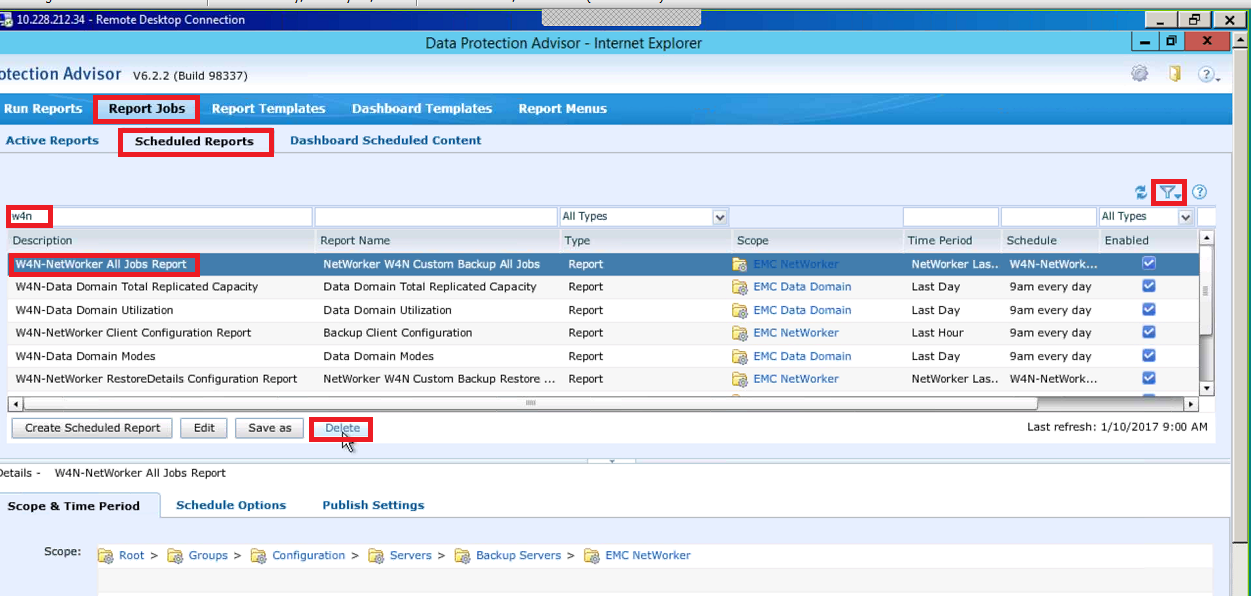
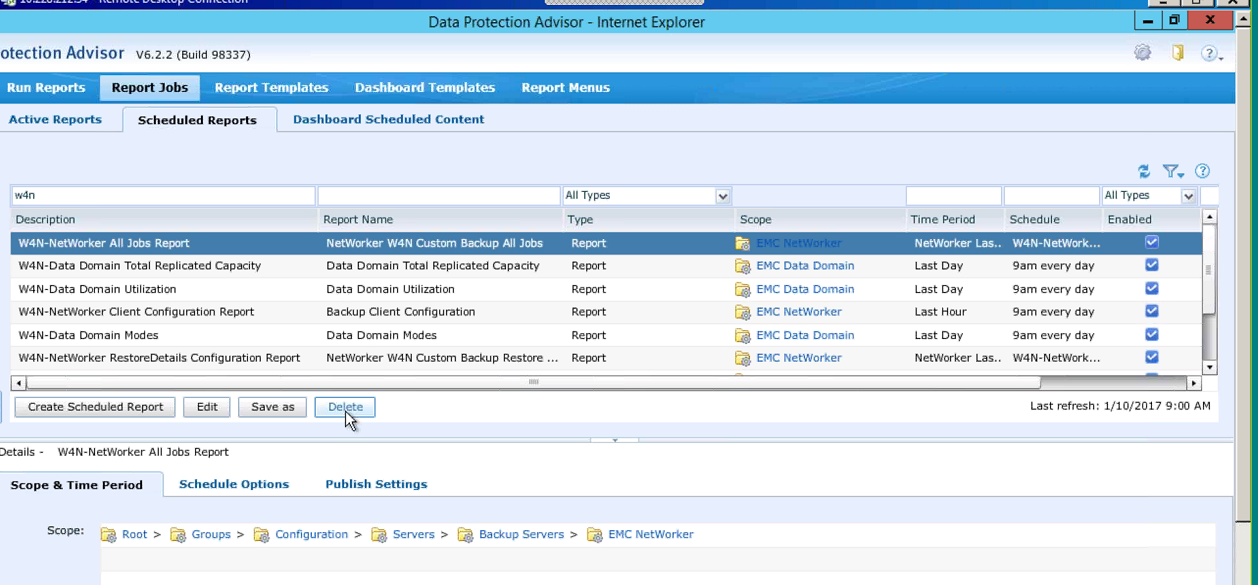
To delete SRM Customized Reports
- Go to DPA GUI->Reports->Report Templates->Custom Report Templates.
- Click on the show Filter icon .. search for the W4N reports.
- Highlight each report and hit the Delete button.
- Now check the System Report Templates tab for W4N reports.
- Recheck that no W4N reports exist in either tab.
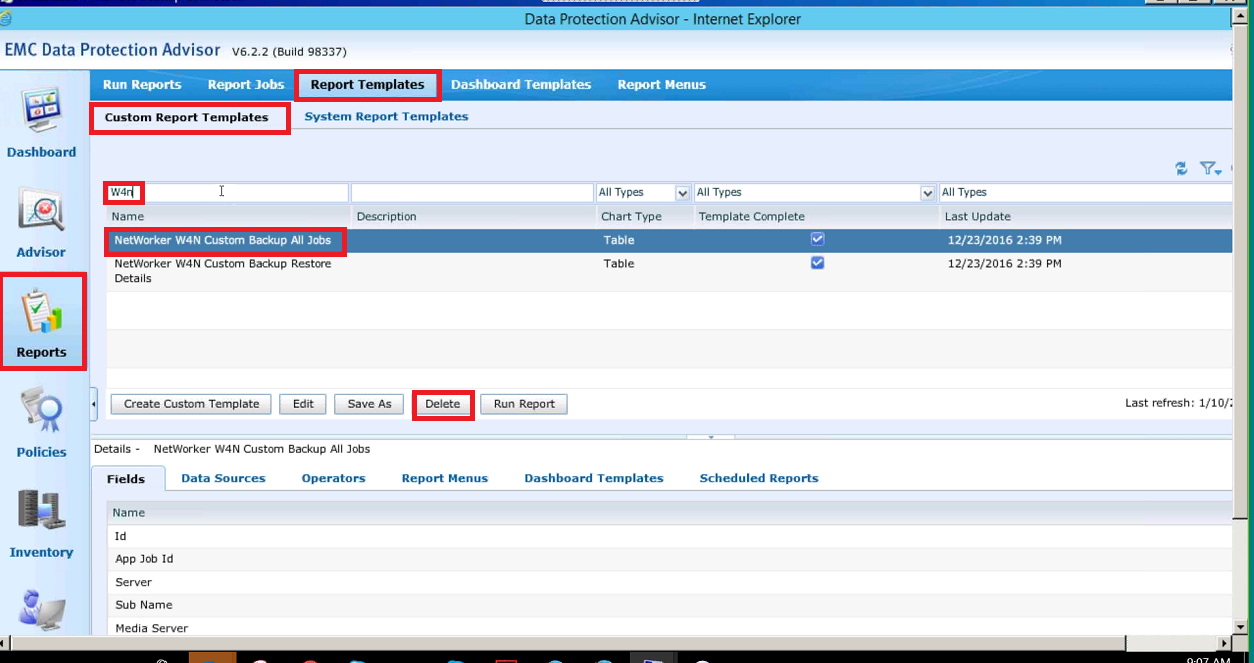
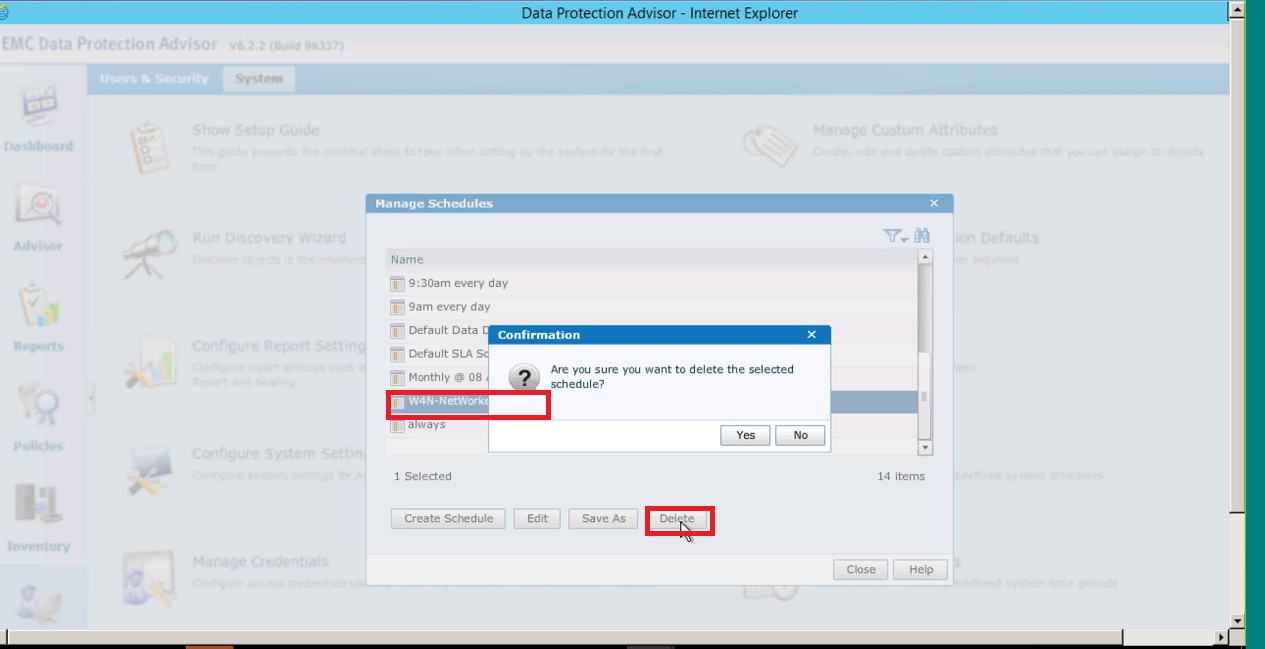
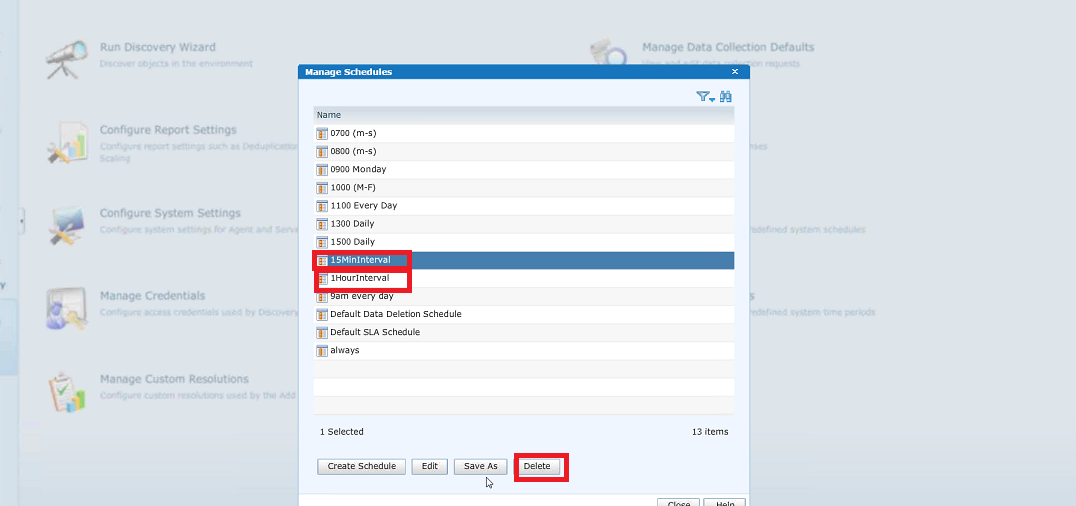
To delete SRM Schedules:
- Go to DPA GUI->Admin->System->Manage Schedules.
- Look thru or filter the list of schedules for W4N schedules for Avamar, NetBackup, NetWorker or Tivoli.
- For Recoverpoint and Data Domain, look for 15MinInterval, 1HourInterval or 5MinIntervalDPA.
- Delete them.
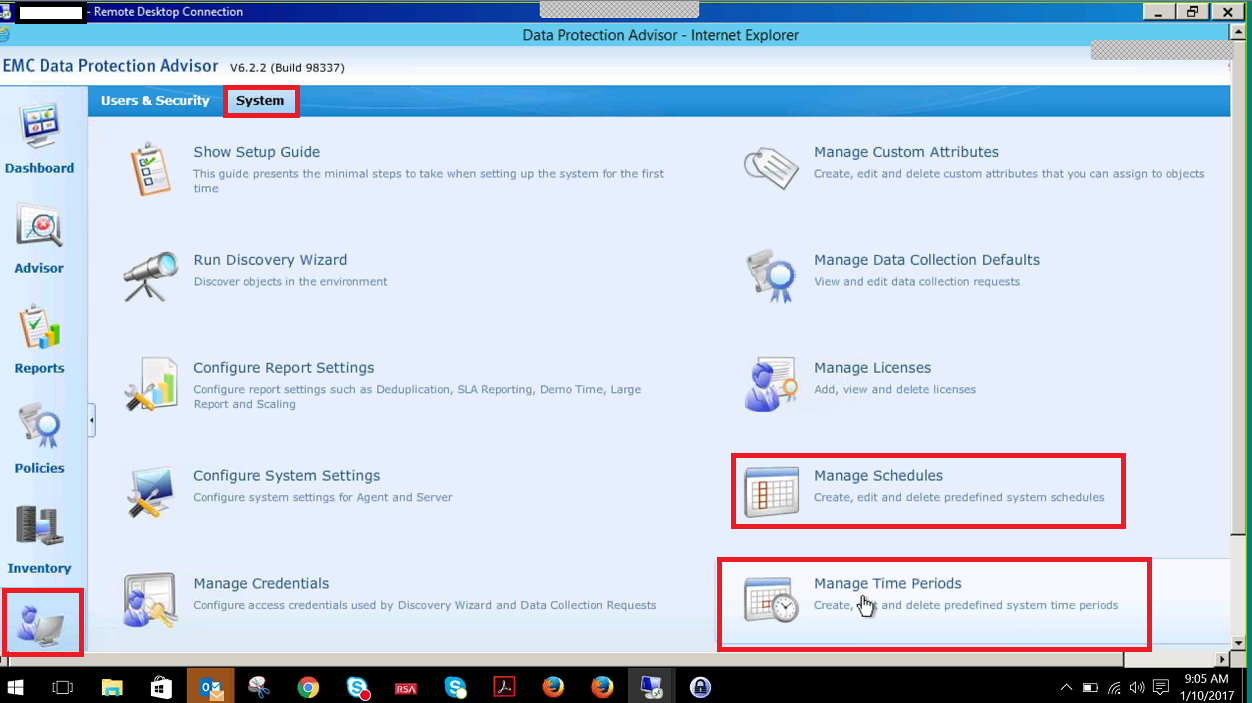
To delete SRM Time Periods and Time Period Windows:
- Go to DPA GUI->Admin->System->Manage Time Periods.
- The names of time periods and time period windows do not contain W4N, but do include Avamar, Netbackup and Networker ... see the list below
- Look thru the list of time periods for the above names or use the filter function.
- Time periods cannot be deleted if there is an existing time period window associated with the time period .. see example error below.
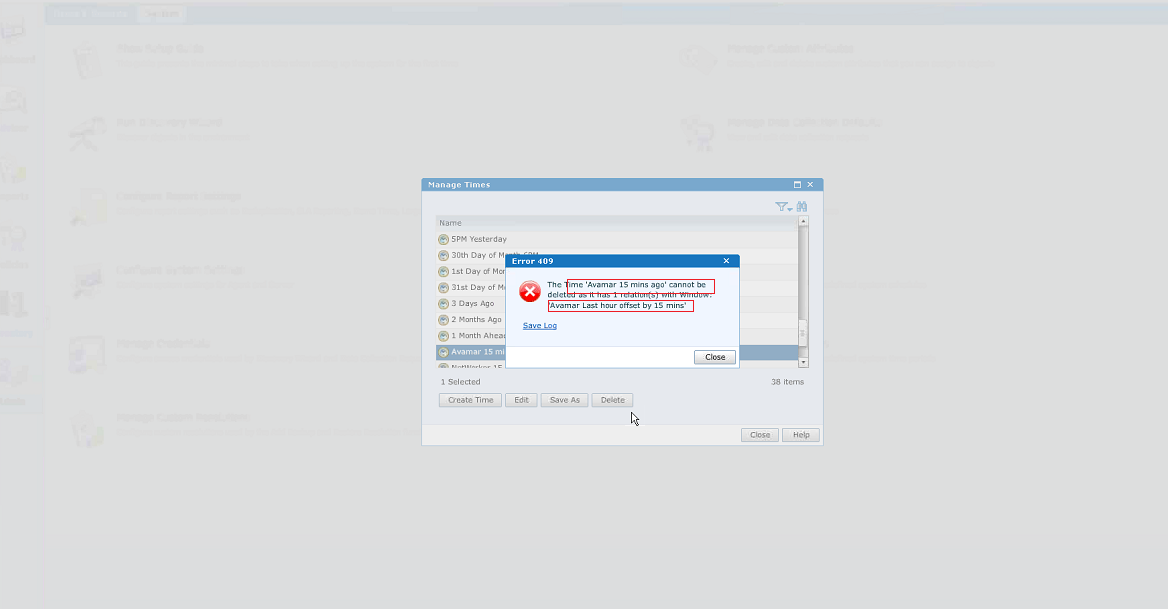
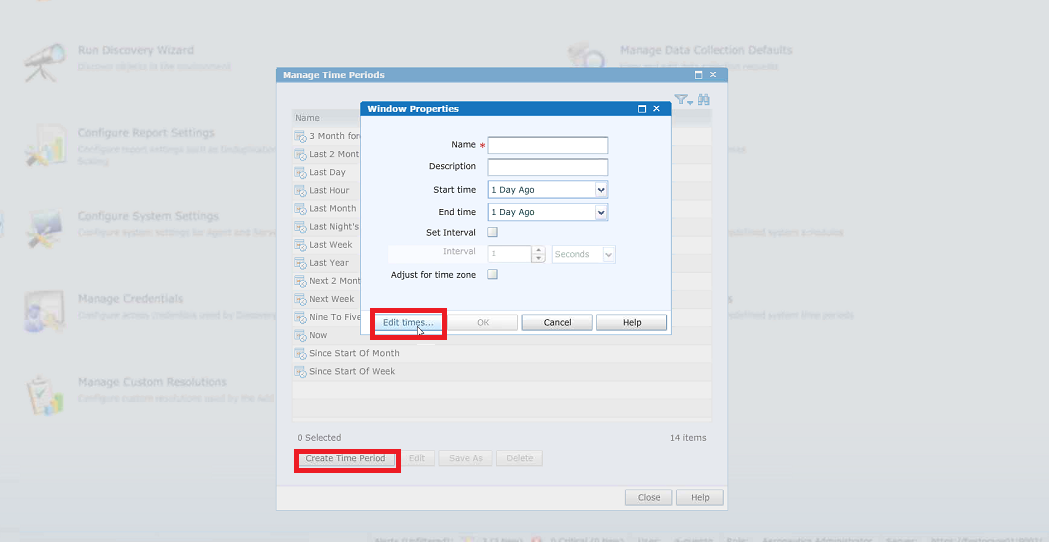
- Time period windows are difficult to find. These need to be checked even if you do not see the above error. Following is our current method:
- in the Manage Time Periods window click "Create Time Period".
- in the new Windows Properties window click Edit times.
- there should now be a list of time period windows.
- delete any Avamar, Netbackup and Networker time windows that include "last hour offset by 15 mins".
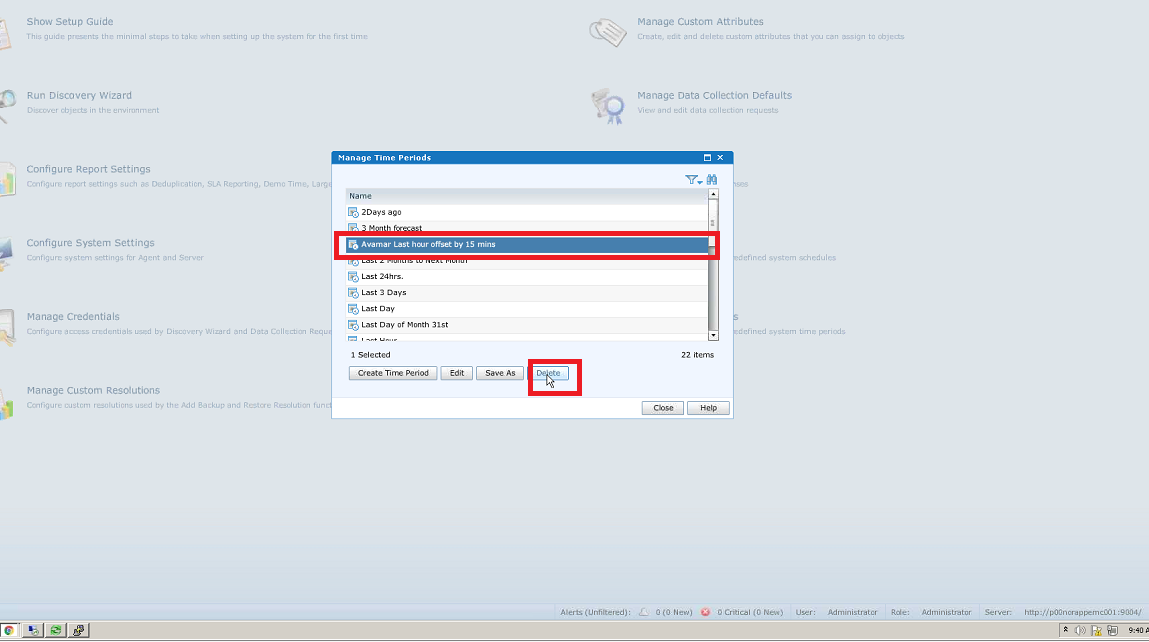
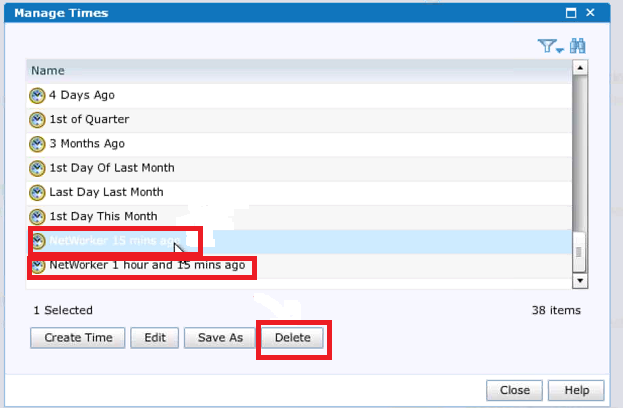
- In the Manage Time Periods window, delete any references to Avamar, Netbackup and Networker that include "15 mins ago or "1 hour and 15 mins ago".
The last step is to restart the SRM DPA Collector, Again, this can be done in the SRM GUI or through /opt/APG/bin/manage-modules while logged into the collector server. Once the GUI has been restart, go back to the DPA GUI and do a refresh. All the reports for the the options the customer chosen in the DPA SolutionPack should now be available.
For reference, following is a list of reports, schedules and time periods that could potentially be found in the DPA GUI:
Scheduled Reports
Avamar
- W4N-Avamar All Jobs Report
- W4N-Avamar RestoreDetails Configuration Report
- W4N-Avamar Server Configuration Report
- W4N-Avamar Client Configuration Report
- W4N-Avamar Client Configuration Report
Data Domain
- W4N-Data Domain Boost File Replication Statistics
- W4N-Data Domain Modes
- W4N-Data Domain Daily Compression Statistics
- W4N-Data Domain Utilization
- W4N-Data Domain Fibre Channel Port Performance
- W4N-Host Configuration
- W4N-Network Interface Performance by Node
- W4N-Replication Source Performance
- W4N-Replication Target Performance
- W4N-Replication Status
- W4N-Data Domain Total Replicated Capacity
- W4N-Data Domain Total Throughput
NetBackup
- W4N-NetBackup All Jobs Report
- W4N-NetBackup Chargeback Details Configuration Report
- W4N-NetBackup Client Configuration Report
- W4N-NetBackup Disk Volume Configuration Report
- W4N-NetBackup Disk Volume Status Report
- W4N-NetBackup Restore Details
- W4N-NetBackup Server Configuration Report
- W4N-NetBackup Storage Unit Configuration Report
NetWorker
- W4N-NetWorker All Jobs Report
- W4N-NetWorker Chargeback Details Report
- W4N-NetWorker Client Configuration Report
- W4N-NetWorker RestoreDetails Configuration Report
- W4N-NetWorker Server Configuration Report
Tivoli
- W4N-Tivoli All Jobs Report
- W4N-Tivoli Chargeback Details Report
- W4N-Tivoli Client Configuration Report
- W4N-Tivoli RestoreDetails Configuration Report
- W4N-Tivoli RestoreDetails Configuration Report
Recoverpoint
- W4N-RecoverPoint Chargeback Details
- W4N-RecoverPoint Consistency Group Incoming Write Rates
- W4N-RecoverPoint Consistency Group Data Lag
- W4N-RecoverPoint Performance Time Lag Statistics
- W4N-RecoverPoint Change Details
- W4N-Recover Point Consistency Group Details
- W4N-RecoverPoint Consistency Group High Load Ratio
- W4N-RecoverPoint Consistency Group Throughput
- W4N-RecoverPoint Consistency Group Time Lag
- W4N-RecoverPoint Events Overview report
- W4N-RecoverPoint Journal Utilization
- W4N-RecoverPoint RPA Packet Loss
- W4N-RecoverPoint Consistency Group Copy Details
- W4NRecoverPoint Consistency Group Copy Status
- W4N-RecoverPoint RPA Compression
- W4N-RecoverPoint RPA Details
- W4N-RecoverPoint RPA Throughput
- W4N-RecoverPoint RPA Writes
- W4N-RecoverPoint Replication Set Configuration
- W4N-RecoverPoint Splitter Details
- W4N-Recoverability Detailed Exposures
- W4N-Remote Replication RPO for MV/A
- W4N-Copy of Remote Replication RPO forecast for SRDF/A
- W4N-Replication RPO Compliance
- W4N-Recoverability Unprotected Nodes
Report Templates
Avamar
- Avamar W4N Custom Backup All Jobs
- Avamar W4N Custom Backup Restore Details
NetBackup
- NetBackup W4N Custom Backup All Jobs
- NetBackup W4N Custom Backup Restore Details
NetWorker
- NetWorker W4N Custom Backup All Jobs
- NetWorker W4N Custom Backup Restore Details
Tivoli
- Tivoli W4N Custom Backup All Jobs
- Tivoli W4N Custom Backup Restore Details
Schedules
Avamar
- W4N-Avamar-1HourInveral
NetBackup
- W4N-NBU-1HourInterval
Data Domain
- 15MinInterval
- 5MinIntervalDPA
NetWorker
- W4N-NetWorker-1HourInterval
Tivoli
- W4N-Tivoli-1HourInterval
Recoverpoint
- 15MinInterval
- 5MinIntervalDPA
Times
Avamar
- Avamar 15 mins ago
- Avamar 1 hour and 15 mins ago
NetBackup
- NetBackup 15 mins ago
- NetBackup 1 hour and 15 mins ago
NetWorker
- NetWorker 15 mins ago
- NetWorker 1 hour and 15 mins ago
Tivoli
- Tivoli 15 mins ago
- Tivoli 15 mins ago
- Tivoli 1 hour and 15 mins ago
Windows
Avamar
- Avamar Last hour offset by 15 mins
NetBackup
- NetBackup Last hour offset by 15 mins
NetWorker
- NetWorker Last hour offset by 15 mins
Tivoli
- Tivoli Last hour offset by 15 mins
Affected Products
Data Backup & Protection Storage, Storage Software, Avamar Client, Avamar Server, NetWorkerArticle Properties
Article Number: 000057127
Article Type: Solution
Last Modified: 03 Oct 2025
Version: 4
Find answers to your questions from other Dell users
Support Services
Check if your device is covered by Support Services.