OpenManage System Administrator: How to Modify Automated System Recovery (ASR) Settings
Summary: This article provides information about how to modify Automated System Recovery (ASR) settings in OpenManage System Administrator (OMSA).
This article applies to
This article does not apply to
This article is not tied to any specific product.
Not all product versions are identified in this article.
Instructions
How to Modify Automated System Recovery (ASR) Settings in OpenManage System Administrator (OMSA)
- Start OMSA and click System
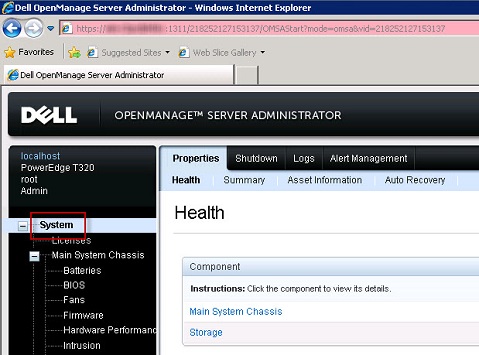
- Click Auto Recovery at the top

- Choose if you want ASR to be disabled, or enabled and what options

Note: Automatic System Recovery options may not be available if the operating system watchdog timer is enabled in the BIOS. To configure the auto recovery options, the operating system watchdog timer must be disabled.
Note: Automatic System Recovery actions may not execute exactly per the time-out period (n seconds) when the watchdog identifies a system that has stopped responding. The action execution-time ranges from
n-h+1 to n+1 seconds, where n is the time-out period and h is the heart beat interval. The value of the heart beat interval is 7 s when n<30 and 15 s when n > 30.
Affected Products
C Series, HS Series, Modular Infrastructure, Rack Servers, Tower Servers, XE Servers, XR Servers, OpenManage Server Administrator, OEM Server SolutionsArticle Properties
Article Number: 000134464
Article Type: How To
Last Modified: 11 Jun 2025
Version: 6
Find answers to your questions from other Dell users
Support Services
Check if your device is covered by Support Services.