NetWorker 19.8 Server Must be in "Disaster Recovery" State to Run NSRDR Command.
Summary: This article describes the change of the NSRDR steps in NetWorker 19.8 server with the introduction of the State Feature.
This article applies to
This article does not apply to
This article is not tied to any specific product.
Not all product versions are identified in this article.
Symptoms
In NetWorker 19.8, the following error messages may occur when running the NSRDR command on a production NetWorker server.
204591:nsrmmdbasm: Cannot run media database recovery: Action 'Media Database Recovery' refused because the server is currently in the 'active' state.  To run this action the server must be in the 'disaster recovery' state.
87420:uasm: ASM 'nsrmmdbasm' cannot be invoked or died unexpectedly.
87429:uasm: Unable to run nsrmmdbasm, cannot recover file '/nsr/mm/mmvolrel/'.
Cause
The State Feature is introduced in NetWorker 19.8. In NetWorker 19.8, by default, the networker server is in Active state. Meanwhile, the NSRDR command is only allowed when the NetWorker server is in Disaster Recovery state. The above error is reported when the NSRDR command is triggered while the NetWorker server is in Active state.
This is also mentioned in NetWorker 19.8 Disaster Recovery guide.
NOTE: To ensure that the media database is recovered, place the server in the Disaster Recovery state by updating the server state in the
NSR resource.
Resolution
- You must manually set the NetWorker server to the Disaster Recovery state before the
NSRDRcommand. This can be done either in the NMC user interface or with theNSRADMINcommand.
NMC UI:
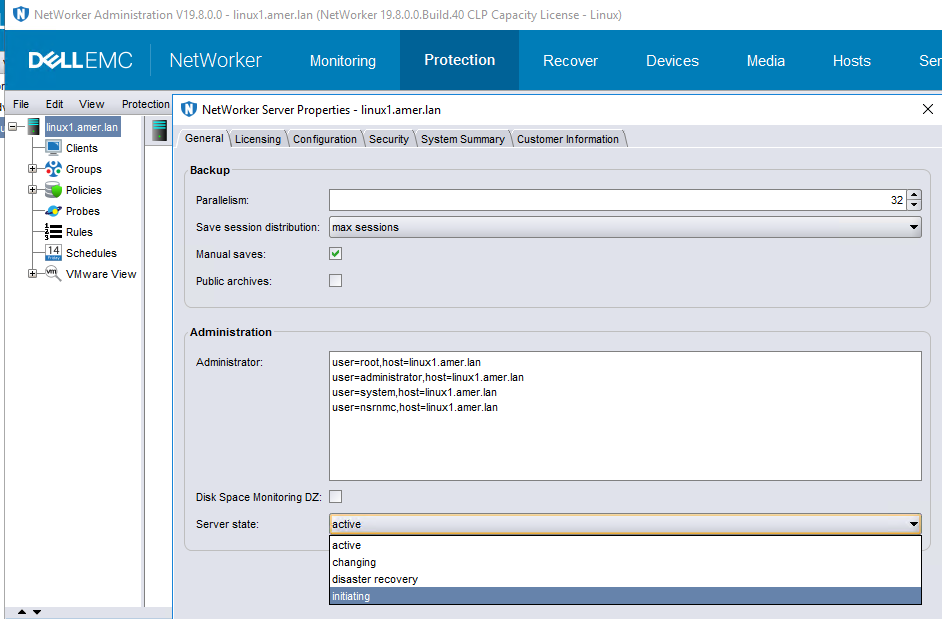
Example of NSRADMIN command:
[root@linux1 sbin]# nsradmin -p nsrd
nsradmin> . type:NSR
Current query set
nsradmin> update server state:disaster recovery
                server state: disaster recovery;
Update? y
updated resource id 3.0.87.14.0.0.0.0.31.161.16.95.192.168.9.101(288)
- Follow the normal procedure to do the
NSRDoperation. Refer to the NetWorker 19.8 disaster recovery guide or articles for details. - At the completion of the
NSRDRcommand, verify the NetWorker server state again. The server should be in Active state for daily operation.
Article Properties
Article Number: 000210914
Article Type: Solution
Last Modified: 17 Nov 2025
Version: 5
Find answers to your questions from other Dell users
Support Services
Check if your device is covered by Support Services.