菊花链显示器无法通过具有 MFDP 端口的戴尔坞站显示双视频
Summary: 有关连接到某些戴尔坞站的多功能 DisplayPort (MFDP) 时,双菊花链显示器不显示视频的信息。
This article applies to
This article does not apply to
This article is not tied to any specific product.
Not all product versions are identified in this article.
Symptoms
在显示器的屏上显示 (OSD) 菜单中启用多数据流传输 (MST) 功能时,双菊花链显示器无法显示视频。
受影响的坞站:
- WD19
- WD19S
- WD19DC
- WD19DCS
- WD19TB
- WD19TBS
- WD22TB4
Cause
高速接口 IC 在 8 位/10 位内部对齐功能方面存在限制,这可能会导致向显示器发送错误信息,从而导致问题。
Resolution
坞站 DisplayPort
您应将外接显示器连接到坞站上的本机 DisplayPort (DP) 1.4 端口以解决此问题,因为不建议将 MFDP 端口用于包含菊花链的 MST 拓扑。
以下是要在坞站上使用的端口的示例。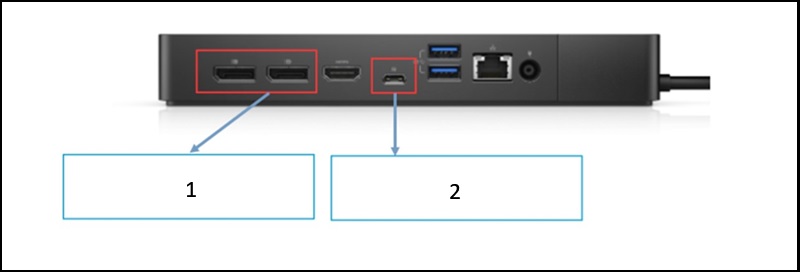
- DP 1.4 在具有显示流压缩 (DSC) 的显示器上支持 MST 模式。
- 在具有 DSC 的显示器上,MFDP 不支持 MST 模式。
Affected Products
Dell Dock WD19, Dell Performance Dock - WD19DC, Dell Performance Dock – WD19DCS, Dell Dock – WD19S, Dell Thunderbolt Dock - WD19TB, Dell Thunderbolt Dock – WD19TBS, Dell Thunderbolt Dock – WD22TB4Article Properties
Article Number: 000309382
Article Type: Solution
Last Modified: 13 May 2025
Version: 2
Find answers to your questions from other Dell users
Support Services
Check if your device is covered by Support Services.