Dell Pro AI Studio Model Fails to Install and Displays Not Support or Compromised
Summary: Dell Pro AI Studio Model fails to install with a message of Dell Pro AI Studio (DPAS) is not supported in this model, or the Model.zip is compromised.
Symptoms
Affected Products:
- Dell Pro AI Studio
The user may see a message that states DPAIS is not supported in this Model, or that, The Model.zip is Compromised, using the msiexec command when running the msi installer,
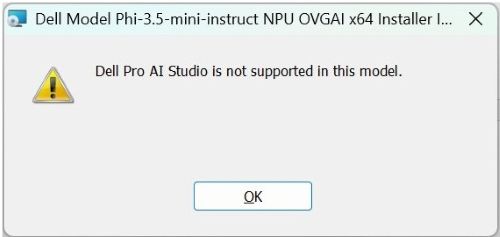
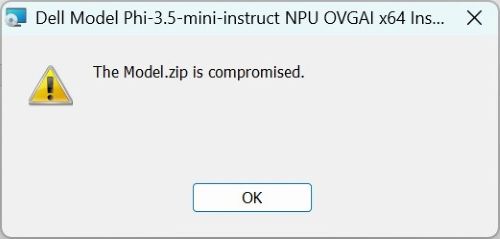
If msi logging is enabled and set to verbose, the user sees these messages at the end of the msi log:
FindValidZip - Searching C:\Windows\System32 for *.zip at top level only.
FindValidZip - Found 0 zip files at C:\Windows\System32.
FindValidZip - C:\Windows\System32 does not contain any zip files.
PropagateProperty - Cannot find a valid zip in C:\Windows\System32, and remove: FALSE, is not an uninstallation.
Cause
The current installer assumes that the current directory matches the location of the MSI and model .zip file so on execution, it looks for the model .zip file in the current location where the install command was run from.
For example, if the current directory is set to C:\Windows\System32 and the msiexec command used the /i to indicate the location of the installer file, such as:
msiexec /i C:\DPAIS\Dell.Model.Phi-3.5-mini-instruct.NPU.OVGAI.x64.msi the installer looks for the associated model .zip file in C:\Windows\System32 and not in the location of the msi causing an error to be displayed to the user and installation to fail.
Resolution
Ensure when running the msiexec command, the current directory matches the location of the msi and model .zip file;
Example - Current directory set to C:\DPAIS and the msiexec command is:
msiexec /i C:\DPAIS\Dell.Model.Phi-3.5-mini-instruct.NPU.OVGAI.x64.msi
The installer looks for the associated model .zip file in C:\DPAIS and allows the installation to move forward without throwing the not supported or compromised message.