NetWorker: Troubleshooting Media Mounting Problems
Summary: This article is intended to assist Supporters and administrators in determining the causes for problems reading a label on a tape or disk device.
Symptoms
If the library configuration worked previously and suddenly encounters an issue, consider possible changes that may affect label reads, and mounts:
- Robot, switch or adapter firmware, driver or configuration change
- Addition, replacement or removal of drives, tape cartridges or other library components
- Changes or events to any encryption components (for example Decru or encryption key managers)
- Change of NetWorker software version or Operating System patches
- Any hardware event such as power loss or reboot of any component in the data path
- Discrepancies between NetWorker configuration and library (for example, tape cartridges moved outside of NetWorker's control)
If the labeling or volume mounting has never worked - confirm that the drive hardware is supported in the NetWorker Hardware Compatibility Guide. Remember that it is possible for a device to be partially functional; discovery alone does not guarantee usability or supportability.
- Sporadic or consistent errors attempting to load or mount media
- Unable to perform mount or label operations on specific media
- Inability to properly use either removable or disk-based media
- Static media such as disk-based devices not being used
- Volumes being marked as 'unlabeled' in the NSR Jukebox object
- Volumes having their location field marked as NULL despite being in a tape library
- Media mounting, labeling, or scannering errors:
"Unexpected volume, wanted <volume_name>, got <different_volume_name>""Unexpected volid, wanted <mm_volid>, got <different_volid>"Duplicate volume name `<volume_name>'. Select a new name or remove the original volume.""scanner: Read -1 bytes""scanner: unexpected file number, wanted 2, got <different_number>""Opening the file '<disk_device_path>/volhdr' failed ([5004] nothing matched)""Waiting for <number> writable volume(s) to backup pool '<pool>' disk(s) or tape(s) on <storage_node>"Warning: Required volume <volume>'s status is off-line"
A NetWorker 'mount' operation consists of several suboperations. Review to determine what stage of the mount is failing:
- NetWorker selecting a volume for the operation: See Troubleshooting Media Selection Problems in NetWorker for more details.
- NetWorker loading the selected volume into the device, if required: See Troubleshooting Tape Library Load Problems in NetWorker for more details.
- Attempt to read the label:
- Disk device - the
volhdrlabel file at the root of the disk device directory - Tape device (after load operation) - rewind and read Beginning Of Media 32KB label block
- Tape device (after Writing, Idle, already loaded) - backspace one file and read block header of first record
- Disk device - the
- If the label read fails for any reason, NetWorker prevents the volume from being used in any retry attempt:
- Disk or standalone tape device: unmounts the volume
- Library tape device: Unload the volume, update the volume label entry in the nsr jukebox object to *- (not in media index), and update the media database location field to NULL
- If the read succeeds, compare the label details against 'expected' values (those in media database volume record for the selected volume):
- Volume name
- Volume ID
- Media type
- Pool
- If validated, the volume is 'mounted' and considered available for read or write operations by NetWorker:
- The nsr device object performing the mount has its volume fields updated (for example volume name, volume id, so forth).
- If the volumes (and device) are members of a tape library, the nsr jukebox object has its appropriate fields updated (for example loaded volumes, loaded slots, loaded barcodes).
- If validation fails, an 'unexpected' error is returned:
- "Unexpected volume, wanted
<volume_name>, got<different_volume_name>" - "Unexpected
volid, wanted<mm_volid>, got<different_volid> - Library tape device: Unload the volume, and update the volume label entry in the nsr jukebox object to *- (not in media index)
- "Unexpected volume, wanted
Mounting media is logically separate and distinct from loading media. Loading applies solely to the logical (and potentially physical) operation of moving media into a device. Mounting concerns validating the media and its label, and making it logically available for use by NetWorker. Library operations (nsrlcpd / NSR Jukebox) concern the drive element:host:device handle mappings and the physical move. Drive operations (nsrmmd / NSR Device) handle all read and write tape device I/O. Label read and write operations are handled by nsrsnmd. Thus what appear to be library load failures may be drive, media or media database mount failures (or conversely).
Note: For disk media which is already mounted, a new save session causes nsrmmd to verify the label before proceeding with save stream writes. This can cause disk-based volumes to periodically become unmounted if the save-time label check fails.
Note as well that this simple summary does not include representation of volume, node, or device selection logic.
Cause
There are many possible causes for label read failures:
- Damaged volume
- Label overwritten by rewind
- Drive ordering issues
- Media database mismatches
- CDI bugs
- Failure to decrypt an encrypted volume
- Network or environmental issues causing transient volhdr file read failure
- Incompatibility between libDDBoost library and DD OS versions
Resolution
To troubleshoot label read and mount problems, after considering the last known changes (if any), go to troubleshoot by devolving the process to its primitive constituents and testing them individually.
While useful data is collected by NSRGet, most of these operations require manual execution.
Library Robotics: Communications
- Again, ensure that the library is responsive and ready before proceeding. If not:
Troubleshooting Tape Library Access Problems in NetWorker
Troubleshooting Tape Library Detection Problems in NetWorker
Troubleshooting Tape Library Load Problems in NetWorker
Library Load without Mount: Logical Operation and Drive Ordering
Once we have established that physical operations are error free (at least superficially), we can attempt to trace the problem within NetWorker.
- Unload all tape cartridges from all devices in the library - it is critical to ensure that only one volume is mounted to avoid confusion.
nsrjb [<-j library_name>] -HH
- or -
nsrjb [<-j library_name>] -uvvvvv
- Determine the library's layout and ensure its readiness, comparing the NSR Jukebox state information against the robot's tape cartridge information:
nsrjb [<-j library_name>] -C
sjirdtag <changer address>
- Attempt to load (without mount) an affected tape into an affected drive in high verbosity, and then confirm that drive handle reports a volume is present:
nsrjb [<-j library_name>] -lnvvvvv -f <device_handle> -S <slot_number>
mt -f <device_handle> status
mt confirms the device handle reports no volume. This usually indicates drive‑ordering issues, especially if an unexpected handle appears loaded. Continue in Troubleshooting Drive Ordering Issues with NetWorker instead.
Media Label Reading: Logical Verification
- Perform a standalone label verification, to test to see if the label read failure was transient, or is consistent:
nsrmm -pvvvvv -f <device_handle>
- If the label is indeed readable, then the issue is more likely related to the logical aspects of library load operations - refer to Troubleshooting Tape Library Load Problems in NetWorker.
- Run the scanner command to determine if any issues exist in the label portion of the volume:
- Mark the loaded device in service mode to prevent it being unmounted
- Run the command:
scanner -nvvvvvv <device_handle>(capture to file and cancel after 10 seconds) - Review the scanner output for key items:
8936:scanner: scanning LTO Ultrium-3 tape 3FO3GR02 on /dev/rmt0.1
96367:scanner: volume id xxxxxxxx record size 262144 bytes created  7/10/13  1:01:24 expires  7/10/15  1:01:24
9003:scanner: /dev/rmt0.1: rewinding
9067:scanner: Rewinding done
8973:scanner: setting position from fn 0, rn 0 to fn 2, rn 0
9000:scanner: /dev/rmt0.1: opened for reading
- Check the scanner output for the critical pieces of information; these represent the conflicting elements if there is duplicate label errors.
wanted 2, got <not_2>, then the problem is likely that the label has been overwritten following a rewind, which is almost always the result of a SCSI reset. Follow Troubleshooting Overwritten Labels and SCSI Resets in NetWorker.
Media Label Reading: Physical Verification (Tape)
nsrmm -p, verify that the beginning of the tape is formatted correctly:
- Rewind the tape using standard
mtcommand (port available in Windows as well):mt -f <device> rewind - Download and run the
t_readerutility and extract (use the appropriate platform - all are included).t_readeris available on NetWorker Tools (Requires Dell support-account sign-in) - Run the utility, providing the local handle and optionally, the largest block size on the tape, For example:
t_reader/t_reader_AIX /dev/rmt0.1 262144
- Allow to run for a few seconds in order to get a screen full of output. Confirm that the beginning of the tape is formatted like a NetWorker label with the expected data block sizes:
Found block size: 32768
File Mark encountered
Found block size: 32768
File Mark encountered
If the label structure seems to be intact - see if it can be read, or appears to be encrypted or otherwise compromised:
dd if=<device> of=<output file> bs=32768 count=2
The label should contain in some plain text the volume name, volume ID, and pool if it is legible and unencrypted.
See How to use the t_reader utility for more details.
Media Label Reading: Physical Verification (Disk)
If verification fails for both scanner and nsrmm -p, check the integrity of the NetWorker label file, volhdr:
- Check to ensure that the volhdr file is accessible from the Storage Node host having problems:
- If the disk device is a local AFTD, ensure that the account configured in the nsr device resource can read and copy the
volhdrfile. - If the disk device is a remote CIFS/NFS, ensure the account configured in the nsr device resource can read and copy the
volhdrfile.
- If the disk device is a local AFTD, ensure that the account configured in the nsr device resource can read and copy the
- If the
volhdrfile is present and readable, open it and review: The label should contain in some plain text the volume name, volume ID, and pool if it is legible and unencrypted.
If the label tests described above succeed for affected devices and media, yet load (and mount) operations continue to fail in production, refer back to Troubleshooting Tape Library Load Problems in NetWorker to continue troubleshooting.
If none of the above suggestions help, engage support as appropriate from your Library vendor if the evidence collected from the debug suggests any internal anomalies, as per Troubleshooting Tape Library Detection Problems in NetWorker and Troubleshooting Tape Library Access Problems in NetWorker; otherwise, ensure that the debug output is escalated within NetWorker Support to pursue the possibility of a code defect.
Additional Information
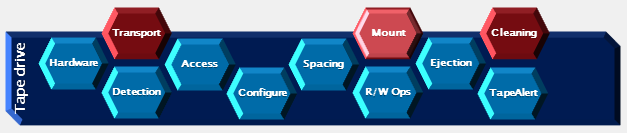
This article is one of a series in Troubleshooting Media Problems with NetWorker. The list is here:
NetWorker: Troubleshooting Tape Libraries home page