DPA:執行 NetWorker Job Monitor 要求時發生未預期的 EOF 錯誤
Summary: 本文說明在 Dell Data Protection Advisor (DPA) 中執行 NetWorker job monitor 資料收集期間遇到的錯誤「在 NetWorkerHostname 上執行需求 networker: jobmonitor 時,從工作者程序中未預期的 EOF」,並提供解決此問題的步驟。
This article applies to
This article does not apply to
This article is not tied to any specific product.
Not all product versions are identified in this article.
Symptoms
DPA 中的 NetWorker 工作監控資料收集失敗,並出現下列錯誤:
-
unexpected EOF from worker process while running request networker: jobmonitor on NetWorkerHostname
Cause
數據傳輸期間超時會導致錯誤。當收集的數據量增加超過以前處理的數據量,並且預設超時不足以完成操作時,就會發生這種情況。
Resolution
在 DPA 中增加 NetWorker Job Monitor 的命令逾時:
- 登入 DPA。
- 導航到 清單>物件庫。

- 選取 應用程式 標籤。
- 找到並選取受影響的 NetWorker 伺服器。
- 按一下資料 收集。
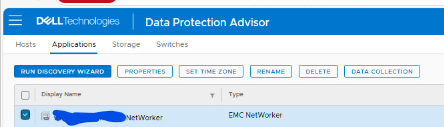
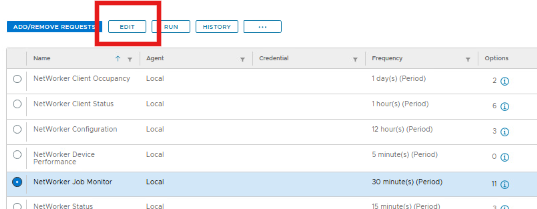
- 選取 NetWorker Job Monitor,然後按一下 編輯。
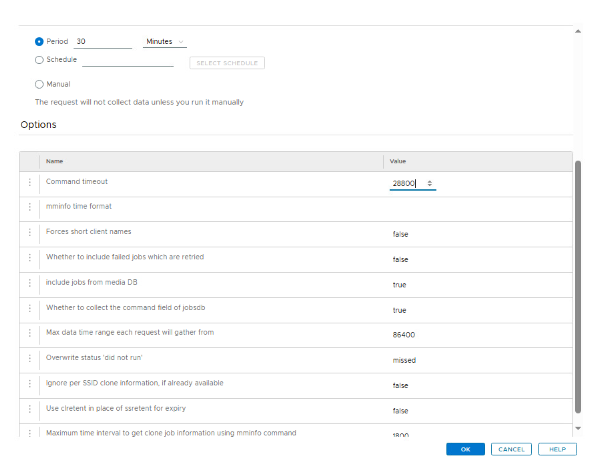
- 在 選項下,將 命令逾時 的值增加到
28800秒。 - 按一下 確定 兩次以儲存並退出。
後續步驟:
- 等待大約一個小時,以便進行下一次排定的收集,或
- 從內容視窗手動執行 NetWorker Job Monitor 工作。
如果在增加逾時時間並重新執行工作後問題仍然存在,請聯絡 Dell 支援並提出服務要求 (SR)。
Article Properties
Article Number: 000384795
Article Type: Solution
Last Modified: 31 Oct 2025
Version: 1
Find answers to your questions from other Dell users
Support Services
Check if your device is covered by Support Services.