NetWorker: HTTP 400 또는 403 오류와 함께 AUTHC 연결 실패
Summary: AUTHC(NetWorker Authentication Service)에 대한 연결이 실패합니다. 보고된 오류는 HTTP 400(잘못된 요청) 또는 HTTP 403(사용할 수 없음)입니다
Symptoms
The NetWorker nsrlogin HTTP 400 또는 403에서 명령이 실패합니다.
nsrlogin -u administrator
130136:nsrlogin: Please enter password:
117849:nsrlogin: Authentication library error: CONNECT tunnel failed, response 403
Server Message : Make sure that server is running
또는
nsrlogin -u Administrator
130136:nsrlogin: Please enter password:
117849:nsrlogin: Authentication library error: CONNECT tunnel failed, response 400
Server Message : Make sure that server is running
NetWorker 인증 및 인증 서비스에 연결하려는 다른 시도도 비슷한 오류로 인해 실패합니다.
nsrauthtrust -H NETWORKER_SERVER_NAME -P 9090
125927:nsrauthtrust: Failed to retrieve certificate: CONNECT tunnel failed, response 403
NMC(NetWorker Management Console) 및 NWUI(NetWorker Web User Interface) 업그레이드(Windows) 및 업그레이드 후 스크립트(Linux)는 AUTHC 포트의 연결 실패를 보고합니다.
Cause
이 문제는 NetWorker 외부에서 발생합니다. The NetWorker nsrlogin 또한 환경에 HTTPS 프록시가 구성되어 있기 때문에 명령에서 "Connect Tunnel Failed"를 보고했습니다. 이는 다음을 사용하여 확인할 수 있습니다. curl 명령어로 확인할 수 있습니다.
curl https://NETWORKER_SERVER_ADDRESS:9090
curl -v https://NETWORKER_SERVER_ADDRESS:9090
* Rebuilt URL to: https://NETWORKER_SERVER_ADDRESS:9090/
* Uses proxy env variable no_proxy == 'HTTP_PROXY_HOSTNAME'
* Uses proxy env variable https_proxy == 'http://HTTP_PROXY_HOSTNAME:8080'
*   Trying HTTP_PROXY_IP...
* TCP_NODELAY set
* Connected to HTTP_PROXY_HOSTNAME (HTTP_PROXY_IP) port 8080 (#0)
* allocate connect buffer!
* Establish HTTP proxy tunnel to NETWORKER_SERVER_ADDRESS:9090
> CONNECT NETWORKER_SERVER_ADDRESS:9090 HTTP/1.1
> Host: NETWORKER_SERVER_ADDRESS:9090
> User-Agent: curl/7.61.1
> Proxy-Connection: Keep-Alive

< HTTP/1.1 403 Forbidden
< Server: squid/3.5.20
< Mime-Version: 1.0
< Date: Thu, 03 Jul 2025 15:36:25 GMT
< Content-Type: text/html;charset=utf-8
< Content-Length: 3548
< X-Squid-Error: ERR_ACCESS_DENIED 0
< Vary: Accept-Language
< X-Cache: MISS from HTTP_PROXY_HOSTNAME
< X-Cache-Lookup: NONE from HTTP_PROXY_HOSTNAME:8080
< Via: 1.1 HTTP_PROXY_HOSTNAME (squid/3.5.20)
< Proxy-Connection: Keep-Alive
* Received HTTP code 403 from proxy after CONNECT
* Closing connection 0
* Curl: (56) Received HTTP code 403 from proxy after CONNECT
또는
curl -v https://NETWORKER_SERVER_ADDRESS:9090
* Uses proxy env variable https_proxy == 'http://HTTP_PROXY_HOSTNAME:443'
*   Trying HTTP_PROXY_IP:443...
* Connected to HTTP_PROXY_HOSTNAME (HTTP_PROXY_IP) port 443 (#0)
* allocate connect buffer!
* Establish HTTP proxy tunnel to NETWORKER_SERVER_ADDRESS:9090
> CONNECT NETWORKER_SERVER_ADDRESS:9090 HTTP/1.1
> Host: NETWORKER_SERVER_ADDRESS:9090
> User-Agent: curl/7.76.1
> Proxy-Connection: Keep-Alive
>
< HTTP/1.1 400 Bad Request
< Server: openresty
< Date: Thu, 03 Jul 2025 14:11:12 GMT
< Content-Type: text/html
< Content-Length: 154
< Connection: close
<
* Received HTTP code 400 from proxy after CONNECT
* CONNECT phase completed!
* Closing connection 0
반환되는 특정 오류는 사용된 특정 프록시 공급업체 및 구성에 따라 달라질 수 있습니다. 공통점은 AUTHC(NetWorker Authentication) 포트(기본값 9090)에 대한 통신이 HTTPS 프록시 호스트를 통해 리디렉션된다는 것입니다. 반환된 오류는 HTTP 4xx 오류입니다. 400(잘못된 요청) 또는 403(사용할 수 없음)입니다.
Resolution
포트 9090의 인증 트래픽에 대한 HTTPS 프록시 사용은 지원되는 구성으로 명시적으로 문서화되거나 테스트되지 않습니다. NetWorker 구성 요소에서는 일반적으로 서비스 간의 직접적인 통신이 필요하며, 특히 인증을 위해서는 통신이 필요합니다.
NetWorker Server에서 HTTP/HTTPS 프록시 구성을 제거합니다. 또한 NetWorker Server의 포트 9090과 통신하는 모든 NetWorker 호스트에서 이를 제거해야 합니다. 자세한 내용은 다음을 참조하십시오. NetWorker 프로세스 및 포트
NetWorker Server에서 다음을 실행합니다.
unset https_proxy
unset http_proxy
curl 연결 출력. 변수를 식별할 수 없는 경우 시스템 관리자에게 문의하거나 프록시 공급업체 설명서를 참조하십시오. HTTPS 프록시 요청을 비활성화하려면 추가 변경이 필요할 수 있습니다. 이 구성은 NetWorker 소프트웨어 또는 구성의 외부에 있습니다.
변수가 설정 해제되면 다음을 시도하십시오. nsrlogin 다시. 성공하면 다음을 실행합니다. nsrlogout파일의 무결성을 확인합니다.
[admin@lnx-srvr01 root]$ nsrlogin -u Administrator
130136:nsrlogin: Please enter password:
Authentication succeeded

[admin@lnx-srvr01 root]$ nsrlogout
이는 NetWorker AUTHC 서비스와의 통신이 정상적으로 작동하고 있음을 나타냅니다. NetWorker 인증 또는 포트 9090을 통한 통신과 관련된 다른 프로세스는 성공할 것으로 예상됩니다.
Additional Information
이 unset command는 현재 셸 세션에 대한 변수만 설정 해제합니다. 시스템 또는 프로파일 변수로 설정된 경우 터미널을 열거나 시스템을 재부팅하거나 새 셸 세션을 시작할 때 자동으로 로드됩니다. 변수가 다음 세션 또는 재부팅 시에 로드되지 않도록 하려면 다음 작업을 수행해야 합니다.
Windows: SYSTEM 또는 USER 변수를 확인하고 HTTP/HTTPS 프록시 호스트를 정의하는 데 사용되는 모든 변수를 제거합니다.
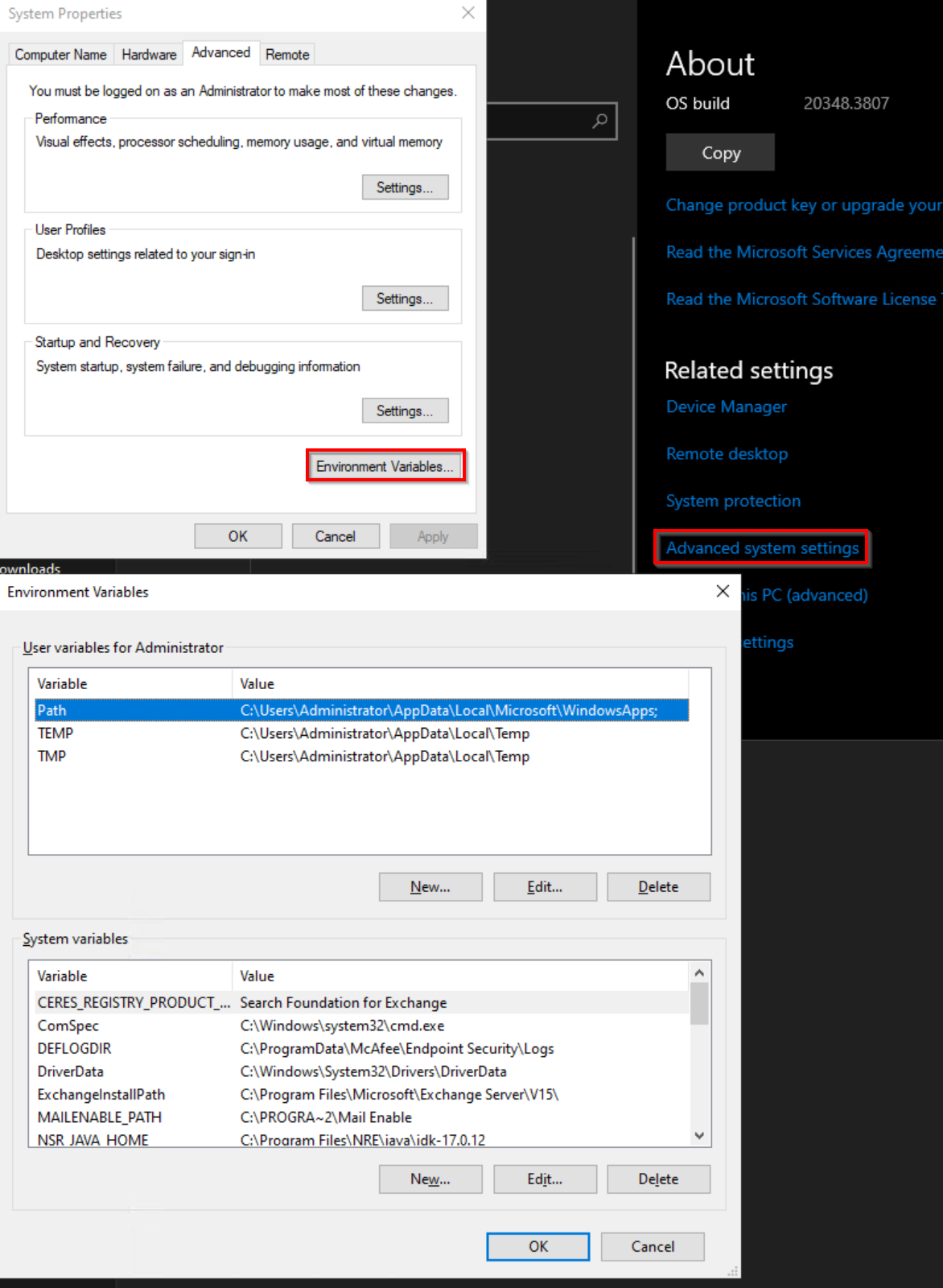
Linux: 다음 파일에서 HTTP/HTTPS 변수 설정이 있는지 확인하고 제거합니다.
- ~/.Bashrc
- ~/.bash_profile
- ~/.프로필
- /etc/environment
- /etc/프로필
- /etc/profile.d/*.sh