NetWorker:AUTHC 連線失敗,並出現 HTTP 400 或 403 錯誤
Summary: 與 NetWorker Authentication Service (AUTHC) 的連線失敗。報告的錯誤為 HTTP 400(錯誤請求)或 HTTP 403(禁止訪問)
Symptoms
The NetWorker nsrlogin 命令失敗,並顯示 HTTP 400 或 403:
nsrlogin -u administrator
130136:nsrlogin: Please enter password:
117849:nsrlogin: Authentication library error: CONNECT tunnel failed, response 403
Server Message : Make sure that server is running
或:
nsrlogin -u Administrator
130136:nsrlogin: Please enter password:
117849:nsrlogin: Authentication library error: CONNECT tunnel failed, response 400
Server Message : Make sure that server is running
NetWorker 驗證和其他連線至驗證服務的嘗試失敗,並出現類似的錯誤。
nsrauthtrust -H NETWORKER_SERVER_NAME -P 9090
125927:nsrauthtrust: Failed to retrieve certificate: CONNECT tunnel failed, response 403
NetWorker Management Console (NMC) 和 NetWorker Web 使用者介面 (NWUI) 升級 (Windows) 和升級後指令檔 (Linux) 會報告 AUTHC 連接埠上的連線失敗。
Cause
此問題發生在 NetWorker 之外。The NetWorker nsrlogin 命令也回報「Connect Tunnel Failed」,因為環境中已設定 HTTPS 代理。您可以使用 curl 命令:
curl https://NETWORKER_SERVER_ADDRESS:9090
curl -v https://NETWORKER_SERVER_ADDRESS:9090
* Rebuilt URL to: https://NETWORKER_SERVER_ADDRESS:9090/
* Uses proxy env variable no_proxy == 'HTTP_PROXY_HOSTNAME'
* Uses proxy env variable https_proxy == 'http://HTTP_PROXY_HOSTNAME:8080'
*   Trying HTTP_PROXY_IP...
* TCP_NODELAY set
* Connected to HTTP_PROXY_HOSTNAME (HTTP_PROXY_IP) port 8080 (#0)
* allocate connect buffer!
* Establish HTTP proxy tunnel to NETWORKER_SERVER_ADDRESS:9090
> CONNECT NETWORKER_SERVER_ADDRESS:9090 HTTP/1.1
> Host: NETWORKER_SERVER_ADDRESS:9090
> User-Agent: curl/7.61.1
> Proxy-Connection: Keep-Alive

< HTTP/1.1 403 Forbidden
< Server: squid/3.5.20
< Mime-Version: 1.0
< Date: Thu, 03 Jul 2025 15:36:25 GMT
< Content-Type: text/html;charset=utf-8
< Content-Length: 3548
< X-Squid-Error: ERR_ACCESS_DENIED 0
< Vary: Accept-Language
< X-Cache: MISS from HTTP_PROXY_HOSTNAME
< X-Cache-Lookup: NONE from HTTP_PROXY_HOSTNAME:8080
< Via: 1.1 HTTP_PROXY_HOSTNAME (squid/3.5.20)
< Proxy-Connection: Keep-Alive
* Received HTTP code 403 from proxy after CONNECT
* Closing connection 0
* Curl: (56) Received HTTP code 403 from proxy after CONNECT
或:
curl -v https://NETWORKER_SERVER_ADDRESS:9090
* Uses proxy env variable https_proxy == 'http://HTTP_PROXY_HOSTNAME:443'
*   Trying HTTP_PROXY_IP:443...
* Connected to HTTP_PROXY_HOSTNAME (HTTP_PROXY_IP) port 443 (#0)
* allocate connect buffer!
* Establish HTTP proxy tunnel to NETWORKER_SERVER_ADDRESS:9090
> CONNECT NETWORKER_SERVER_ADDRESS:9090 HTTP/1.1
> Host: NETWORKER_SERVER_ADDRESS:9090
> User-Agent: curl/7.76.1
> Proxy-Connection: Keep-Alive
>
< HTTP/1.1 400 Bad Request
< Server: openresty
< Date: Thu, 03 Jul 2025 14:11:12 GMT
< Content-Type: text/html
< Content-Length: 154
< Connection: close
<
* Received HTTP code 400 from proxy after CONNECT
* CONNECT phase completed!
* Closing connection 0
傳回的特定錯誤可能會因所使用的特定代理廠商和組態而有所不同。共同點是您會看到透過 HTTPS 代理主機重新導向至 NetWorker 驗證 (AUTHC) 連接埠 (預設為 9090) 的通訊。返回的錯誤是 HTTP 4xx 錯誤;400(錯誤請求)或 403(禁止訪問)。
Resolution
專門用於埠 9090 上的身份驗證流量的 HTTPS 代理未顯式記錄或測試為受支援的配置。NetWorker 元件通常期望在服務之間直接通信,尤其是用於身份驗證。
移除 NetWorker 伺服器上的 HTTP/HTTPS 代理組態。這也必須從與 NetWorker 伺服器上的連接埠 9090 通訊的任何 NetWorker 主機移除。請參閱:NetWorker 程序和連接埠
在 NetWorker 伺服器上執行:
unset https_proxy
unset http_proxy
curl 連線輸出。如果無法識別變數,請諮詢系統管理員或代理供應商文檔。可能需要進行其他變更,才能停用 HTTPS 代理要求。此組態為 NetWorker 軟體或組態外部。
變數取消設定後,請嘗試 nsrlogin 再次。如果成功,請執行 nsrlogout。
[admin@lnx-srvr01 root]$ nsrlogin -u Administrator
130136:nsrlogin: Please enter password:
Authentication succeeded

[admin@lnx-srvr01 root]$ nsrlogout
這表示與 NetWorker AUTHC 服務的通訊正常運作。其他涉及 NetWorker 驗證或透過連接埠 9090 進行通訊的程序預期會成功。
Additional Information
可使用 unset 命令僅取消設置當前shell會話的變數。如果設置為系統或配置檔變數,則當您打開終端、重新啟動系統或啟動新的shell會話時,它們會自動載入。必須執行以下操作以防止在下一個會話中載入變數或重新啟動。
Windows: 檢查 SYSTEM 或 USER 變數,並移除任何用於定義 HTTP/HTTPS 代理主機的變數。
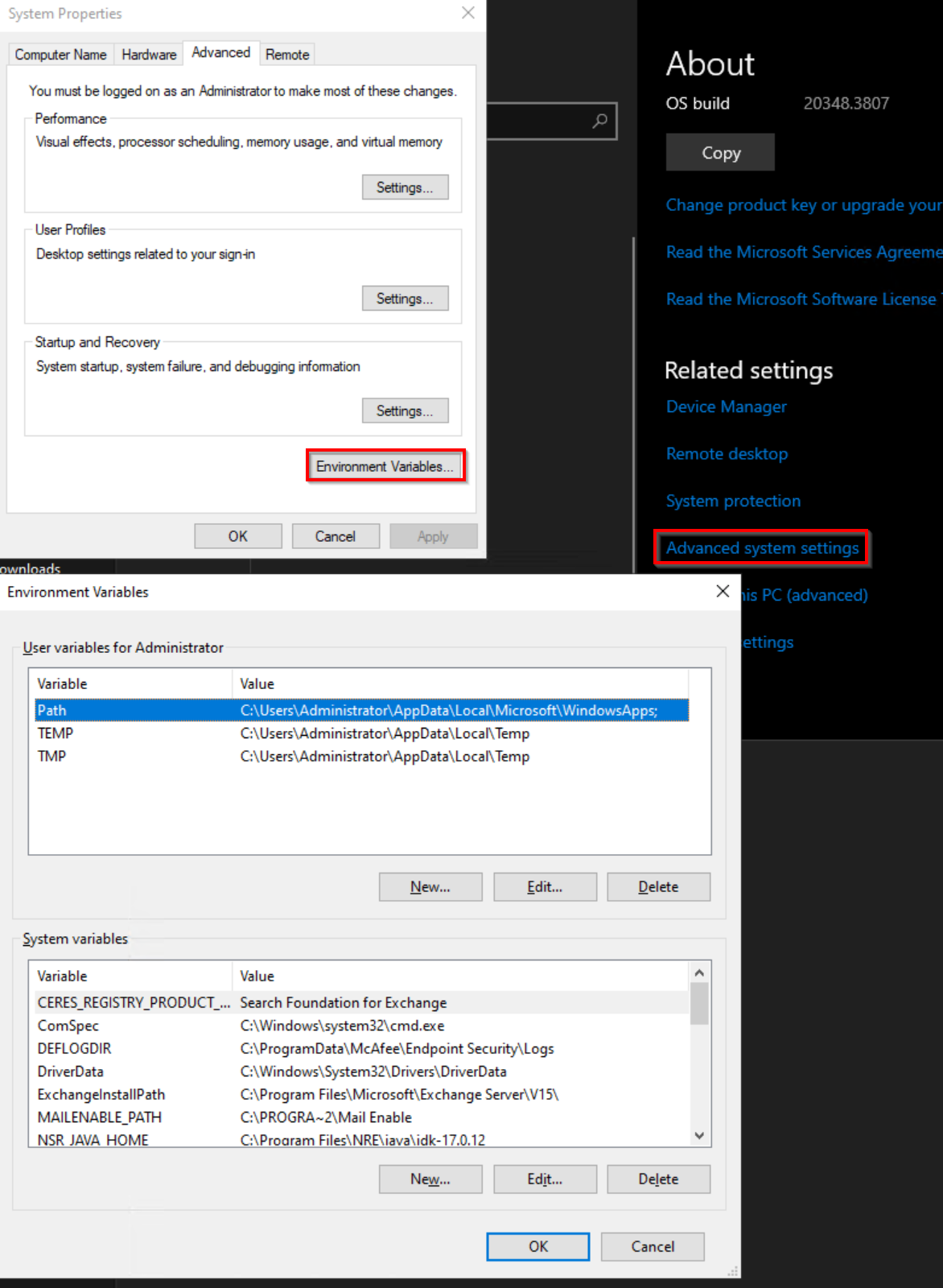
Linux:檢查下列檔案是否有任何 HTTP/HTTPS 變數設定,並將其移除:
- ~/.巴什爾克
- ~/.bash_profile
- ~/.配置檔
- /etc/environment
- /etc/profile
- /etc/profile.d/*.sh