PowerFlex TPM 2.0:偵測到裝置,但無法建立連線
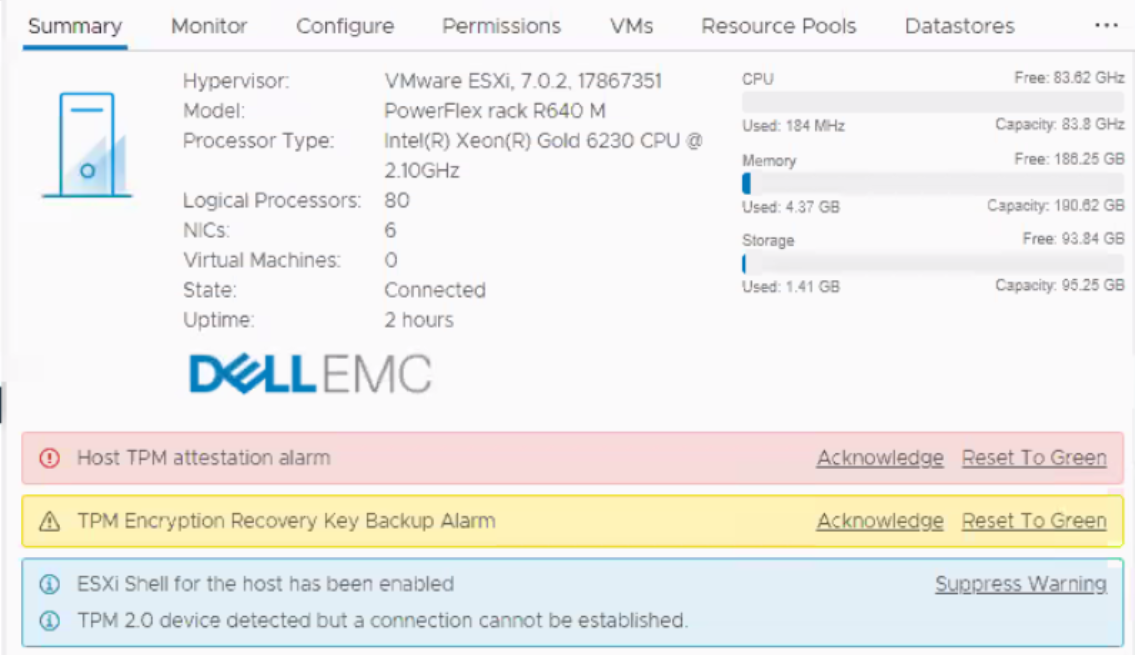
Summary: 此訊息可能會在進行新的部署、安裝或擴充時出現。所有主機的 vCenter 都會顯示警示,指出「偵測到 TPM 2.0 裝置,但無法建立連線。 警告:主機 TPM 證明警報。」
This article applies to
This article does not apply to
This article is not tied to any specific product.
Not all product versions are identified in this article.
Symptoms
在 vCenter 中發出警報:

Cause
如需更多有關 vCenter 6.7 環境中的可信賴平台模組 (TPM) 2.0 版的詳細資訊,請參閱 vSphere 安全性
上的 VMware 說明文件 ESXi vCenter 會查詢主機 BIOS,查看其是否有 TPM 晶片。如果有,則會發出警報,因為晶片存在且未啟用而無法進行通訊。這本質上是化妝品,可以忽略不計。

Resolution
PowerFlex 個人化模組預設為停用 TPM。此功能未得到適當支援,但預計將在未來版本中提供。
選項 1:
停用 TPM 並安全地忽略此訊息。工程部門正在調查日後隱藏此訊息的最佳方式,但在此之前,請停用 TPM。

選項 2:
使用命令列使用 RacADM 安全地停用 TPM:
(# 後的指令檔附註為註解,不是命令的一部分。)
racadm -r <ip addr> -u root -p XXXXX get Bios.SysSecurity.TpmSecurity              # command to check effective value

racadm -r <ip addr> -u root -p XXXXX set Bios.SysSecurity.TpmSecurity Off          # command to disable it.

racadm -r <ip addr> -u root -p XXXXX get Bios.SysSecurity.TpmSecurity              # command to check the pending value

racadm -r <ip addr> -u root -p XXXXX jobqueue create BIOS.Setup.1-1 -r pwrcycle    # command soft-reboots the host immediately and applies
Affected Products
Converged Infrastructure, PowerFlex rackArticle Properties
Article Number: 000317199
Article Type: Solution
Last Modified: 05 Jun 2025
Version: 2
Find answers to your questions from other Dell users
Support Services
Check if your device is covered by Support Services.