Avamar: During VM Image Restore, the AUI omits datastore information when configuring the destination datastore
Summary: When selecting the destination VM datastore in the Avamar AUI, datastore information is omitted from the drop-down menu.
This article applies to
This article does not apply to
This article is not tied to any specific product.
Not all product versions are identified in this article.
Symptoms
In the Avamar AUI, when restoring to a VM on an ESX host, the following appears on Step 7 of the restore.

Cause
The cause of the issue can be seen in the vSphere Managed Object Viewer (MOB).
The ComputeResource: ha-computer-res moref has a different name from the ha-folder-host moref.
The ha-compute-res moref has an additional "." added at the end.
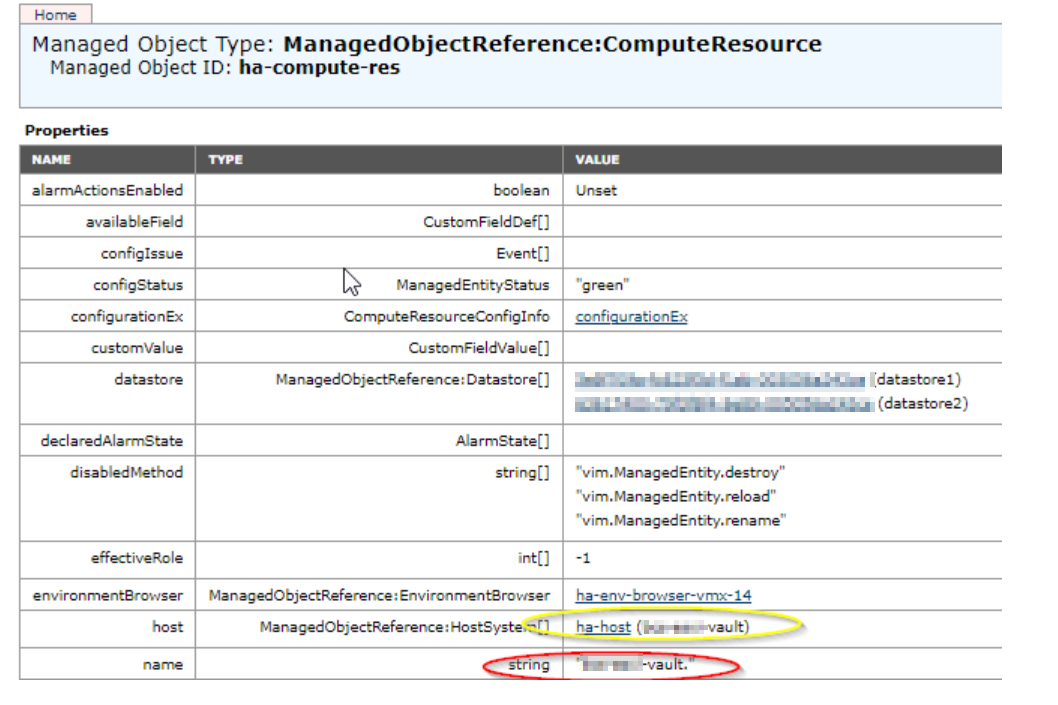
The issue only appears to happen when the hostname of the ESX host does not contain domain information.
The ComputeResource: ha-computer-res moref has a different name from the ha-folder-host moref.
The ha-compute-res moref has an additional "." added at the end.
The issue only appears to happen when the hostname of the ESX host does not contain domain information.
Resolution
Change the hostname of the ESX host to contain a domain.
For this to work, we had to change the name twice. Once to a temporary hostname, then to the correct hostname that contains a domain.
The following steps resolve the issue.
1. Log in to the ESX host.
2. Change the ESX hostname in the DNS Configuration, to a temporary hostname.
3. Save and confirm the change.
3. Repeat step 2 again, but this time, change the hostname to one with a domain.
Once complete, the datastores populate when restoring to a New VM.
For this to work, we had to change the name twice. Once to a temporary hostname, then to the correct hostname that contains a domain.
The following steps resolve the issue.
1. Log in to the ESX host.
2. Change the ESX hostname in the DNS Configuration, to a temporary hostname.
3. Save and confirm the change.
3. Repeat step 2 again, but this time, change the hostname to one with a domain.
Once complete, the datastores populate when restoring to a New VM.
Affected Products
Avamar Client for VMwareArticle Properties
Article Number: 000205010
Article Type: Solution
Last Modified: 20 Jul 2023
Version: 3
Find answers to your questions from other Dell users
Support Services
Check if your device is covered by Support Services.