NetWorker:NetWorker 使用的 PostgreSQL 版本
Summary: 本文详细介绍了 NetWorker 管理控制台 (NMC) 和 NetWorker Web 用户界面 (NWUI) 服务器使用的不同 PostgreSQL 版本。它还演示了如何识别活动 NMC 和 NWUI 数据库使用的 PostgreSQL 版本。
This article applies to
This article does not apply to
This article is not tied to any specific product.
Not all product versions are identified in this article.
Instructions
NetWorker 管理控制台 (NMC) 和 NetWorker Web 用户界面 (NWUI) 服务器包括 Postgres 数据库。每个组件使用的 Postgres 版本因安装的 NetWorker 版本而异。NetWorker 通常会升级主要和累积热修复程序版本中的 Postgres 版本。
NetWorker Management Console (NMC) PostgreSQL 版本:
- NetWorker 版本 19.10.0.0 使用 11.21
- NetWorker 版本 19.10.0.4、19.11.0.0 使用 12.18
- NetWorker 版本 19.10.0.7、19.11.0.3、19.12.0.0 使用 16.4
- NetWorker 版本 19.11.0.5、19.12.0.1 使用 16.6
- NetWorker 版本 19.11.0.6、19.12.0.2、19.13.0.0 使用 16.8
- NetWorker 版本 19.12.0.3、19.13.0.2 使用 16.9
- NetWorker 版本 19.13.0.3、19.14.0.0 使用 16.10
- NetWorker 版本 19.14.0.1 预计发布到 16.14(或更高版本)
NetWorker Web 用户界面 (NWUI) 方法
- NetWorker 版本 19.10.0.0 使用 12.16
- NetWorker 版本 19.10.0.4、19.11.0.0 使用 12.18
- NetWorker 版本 19.13.0.0 使用 16.6
- NetWorker 版本 19.13.0.3、19.14.0.0 使用 16.10
- NetWorker 版本 19.14.0.1 预计将使用 16.14(或更高版本)
注意: 仅列出 PostgreSQL 版本更改的版本。未明确列出的任何 NetWorker 版本都使用与所示的最新先前版本相同的 PostgreSQL 版本。无法在 NetWorker 软件包升级之外升级 PostgreSQL。
如何验证正在使用的 PostgreSQL 版本:
Linux:
- NetWorker Management Console (NMC) 服务器: 从 NMC 服务器上的提升提示符中,运行:
systemctl status gst
注意: The NMC
gst 服务必须正在运行。
输出显示 nmcdb,其中包括 PostgreSQL 版本:
[root@nsr ~]# systemctl status gst
● gst.service - NetWorker Management Console
   Loaded: loaded (/usr/lib/systemd/system/gst.service; enabled; vendor preset: disabled)
   Active: active (running) since Fri 2026-07-24 16:20:03 EDT; 2 weeks 2 days ago
 Main PID: 190533 (gstd)
    Tasks: 35 (limit: 35992)
   Memory: 145.8M
   CGroup: /system.slice/gst.service
           ├─190533 /opt/lgtonmc/bin/gstd
           ├─190540 /opt/lgtonmc/apache/bin/httpd -f /opt/lgtonmc/apache/conf/httpd.conf
           ├─190541 /opt/lgtonmc/apache/bin/httpd -f /opt/lgtonmc/apache/conf/httpd.conf
           ├─190588 /opt/lgtonmc/postgres/16.10/bin/postgres -D /nsr/nmc/nmcdb/pgdata
           ├─190589 postgres: logger
           ├─190590 postgres: checkpointer
           ├─190591 postgres: background writer
           ├─190593 postgres: walwriter
           ├─190594 postgres: autovacuum launcher
           ├─190595 postgres: logical replication launcher
           ├─190622 postgres: lgtogst lgto_gst ::1(15058) idle
           └─190652 /opt/lgtonmc/bin/gstsnmptrapd -d -Le -f -C -c /opt/lgtonmc/etc/snmptrapd.conf

Jul 24 16:20:02 nsr.amer.lan systemd[1]: Starting NetWorker Management Console...
Jul 24 16:20:03 nsr.amer.lan gst_linux.sh[190508]: Starting GST:
Jul 24 16:20:03 nsr.amer.lan gst_linux.sh[190527]: GST Services, Version 19.14.0
Jul 24 16:20:03 nsr.amer.lan gst_linux.sh[190508]: done.
Jul 24 16:20:03 nsr.amer.lan systemd[1]: Started NetWorker Management Console.
或者,如果 NMC gst 服务 未运行,请查看 postgres_latest 中使用的符号链接 /opt/lgtonmc 文件夹
[root@nsr ~]# ls -l /opt/lgtonmc/
total 20
drwxr-xr-x. 8 nsrnmc nsrnmc   82 Jul 24 16:19 apache
drwxr-xr-x. 2 nsrnmc nsrnmc 4096 Jul 24 16:20 bin
drwx------. 3 nsrnmc nsrnmc   42 Aug 11 09:25 cores
drwxr-xr-x. 2 nsrnmc nsrnmc 4096 Jul 24 16:20 cst
drwxr-xr-x. 2 nsrnmc nsrnmc 4096 Jul 24 16:20 etc
drwxr-xr-x. 3 nsrnmc nsrnmc   17 Jul 24 16:19 lib64
drwxr-xr-x. 2 nsrnmc nsrnmc  105 Aug 10 14:00 logs
drwxr-xr-x. 2 nsrnmc nsrnmc 4096 Jul 24 16:19 mod
drwxr-xr-x. 6 nsrnmc nsrnmc   56 Jul 24 16:19 postgres
lrwxrwxrwx. 1 root   root     27 Jul 24 16:19 postgres_latest -> /opt/lgtonmc/postgres/16.10
drwxr-xr-x. 4 nsrnmc nsrnmc 4096 Jul 24 16:20 web
- NetWorker Web 用户界面 (NWUI): 从 NWUI 服务器上的提升提示符处,运行:
systemctl status nwui
记下 。
nwui 服务必须正在运行。
输出显示了 nwuidb 正在使用:
[root@nsr ~]# systemctl status nwui
● nwui.service - NetWorker Management Web UI Server
   Loaded: loaded (/opt/nwui/scripts/nwui.service; enabled; vendor preset: disabled)
   Active: active (running) since Wed 2026-07-22 15:02:01 EDT; 2 weeks 5 days ago
 Main PID: 66189 (nwuictld)
    Tasks: 68 (limit: 35992)
   Memory: 368.6M
   CGroup: /system.slice/nwui.service
           ├─  66189 /opt/nwui/bin/nwuictld -s
           ├─  66192 /bin/sh /nsr/nwui/monitoring/nwuidb/bin/nwuidb start
           ├─  66207 /opt/nwui/monitoring/postgres/16/bin/postgres -D /nsr/nwui/monitoring/nwuidb/pgdata
           ├─  66208 postgres: logger
           ├─  66209 postgres: checkpointer
           ├─  66210 postgres: background writer
           ├─  66212 postgres: walwriter
           ├─  66213 postgres: autovacuum launcher
           ├─  66214 postgres: logical replication launcher
           ├─  66215 /opt/nre/java/latest/bin/java -Dlogsdir=/nsr/nwui/monitoring/app/logs -Dpropertiesfile=/nsr/nwui/monitoring/app/conf/monitoring-app.properties -Dlogging.config=/nsr/nwui/monitoring/app/conf/log4j2.xml -jar monitoring-app.>
           ├─2679799 postgres: nwuiuser nwui 127.0.0.1(13064) idle
           ├─2679857 postgres: nwuiuser nwui 127.0.0.1(34414) idle
           ├─2679906 postgres: nwuiuser nwui 127.0.0.1(47692) idle
           ├─2679941 postgres: nwuiuser nwui 127.0.0.1(43294) idle
           ├─2680021 postgres: nwuiuser nwui 127.0.0.1(26064) idle
           ├─2680050 postgres: nwuiuser nwui 127.0.0.1(19822) idle
           ├─2680102 postgres: nwuiuser nwui 127.0.0.1(38068) idle
           ├─2680118 postgres: nwuiuser nwui 127.0.0.1(52826) idle
           ├─2680721 postgres: nwuiuser nwui 127.0.0.1(18198) idle
           └─2681330 postgres: nwuiuser nwui 127.0.0.1(60860) idle

Jul 22 15:02:01 nsr.amer.lan systemd[1]: Starting NetWorker Management Web UI Server...
Jul 22 15:02:01 nsr.amer.lan nwui.sh[66161]: Starting nwuictld...
Jul 22 15:02:01 nsr.amer.lan nwui.sh[66161]: done.
Jul 22 15:02:01 nsr.amer.lan systemd[1]: Started NetWorker Management Web UI Server.
要查看使用的次要 PostgreSQL 版本,请使用上述命令返回的 PostgreSQL 路径运行以下命令: strings /opt/nwui/monitoring/postgres/##/bin/postgres | grep "(PostgreSQL)"
[root@nsr ~]# strings /opt/nwui/monitoring/postgres/16/bin/postgres | grep "(PostgreSQL)"
postgres (PostgreSQL) 16.10
[root@nsr ~]#
Windows:
- NetWorker 管理控制台 (NMC):
-
- 在 NMC 服务器上打开 Windows 任务管理器 。
- 转至详情选项卡。
- 确保 已启用命令行 列。
- 查找
postgres.exe与 NetWorker Management Console 服务器的nmcdb安装路径命令行路径显示 PostgreSQL 版本:

记下 。
gstd (EMC GST 服务)必须正在运行。
或者,从 PowerShell 提示符处使用以下命令检查 postgres_latest NMC 安装路径中的符号链接: (Get-Item "C:\Program Files\EMC NetWorker\Management\GST\postgres_latest").Target

- NetWorker Web 用户界面 (NWUI):
-
- 在 NWUI 服务器上打开 Windows 任务管理器 。
- 转至详情选项卡。
- 确保 已启用命令行 列。
- 查找
postgres.exe与 NetWorker Web UI 服务器的nwuidb安装路径命令行路径显示主要 PostgreSQL 版本
记下 。
nwui (NetWorker WebUI 数据库)服务必须正在运行。

-
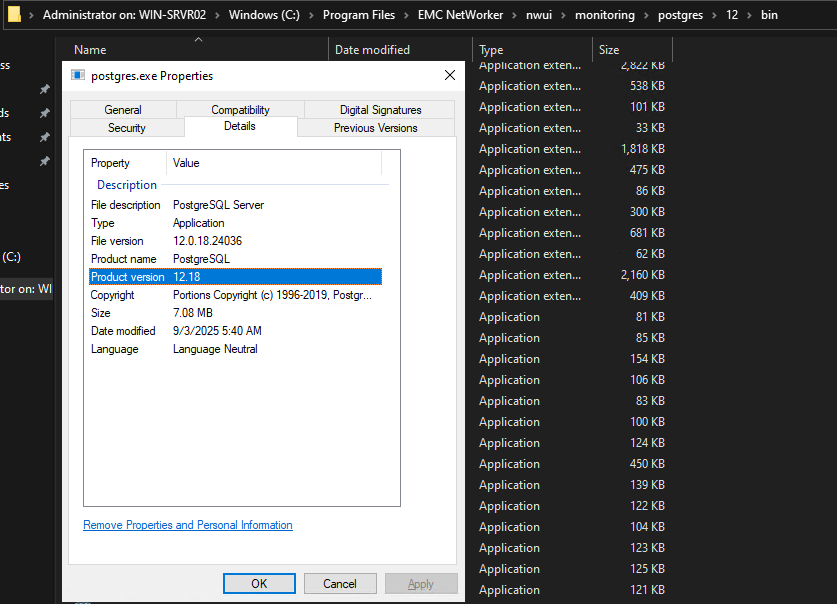
- 要获取次要 Postgres 版本,请打开 Windows 文件资源管理器 并转至
postgres.exe命令行列中显示的路径。 - 右键单击
postgres.exe并单击 属性。 - Details选项卡显示完整的 Postgres 版本:
- 要获取次要 Postgres 版本,请打开 Windows 文件资源管理器 并转至
Additional Information
Affected Products
NetWorker, NetWorker Management ConsoleProducts
NetWorker FamilyArticle Properties
Article Number: 000497958
Article Type: How To
Last Modified: 12 Aug 2026
Version: 1
Find answers to your questions from other Dell users
Support Services
Check if your device is covered by Support Services.