NetWorker: vCenter plug-in and VCUI login fails with "vCenter not registered with NetWorker server"
Summary: When logging into the NetWorker vCenter User Interface (VCUI) plug-in in VMware vSphere, an error states "vCenter not registered with NetWorker server." However, the vCenter is registered and viewable from other NetWorker tools. All data protection operations are successful from other NetWorker user interfaces. ...
This article applies to
This article does not apply to
This article is not tied to any specific product.
Not all product versions are identified in this article.
Symptoms
- Logging in to the NetWorker plug-in in the VMware vCenter web client or through the NetWorker vCenter User Interface (VCUI) returns an error stating "vCenter not registered with NetWorker server"
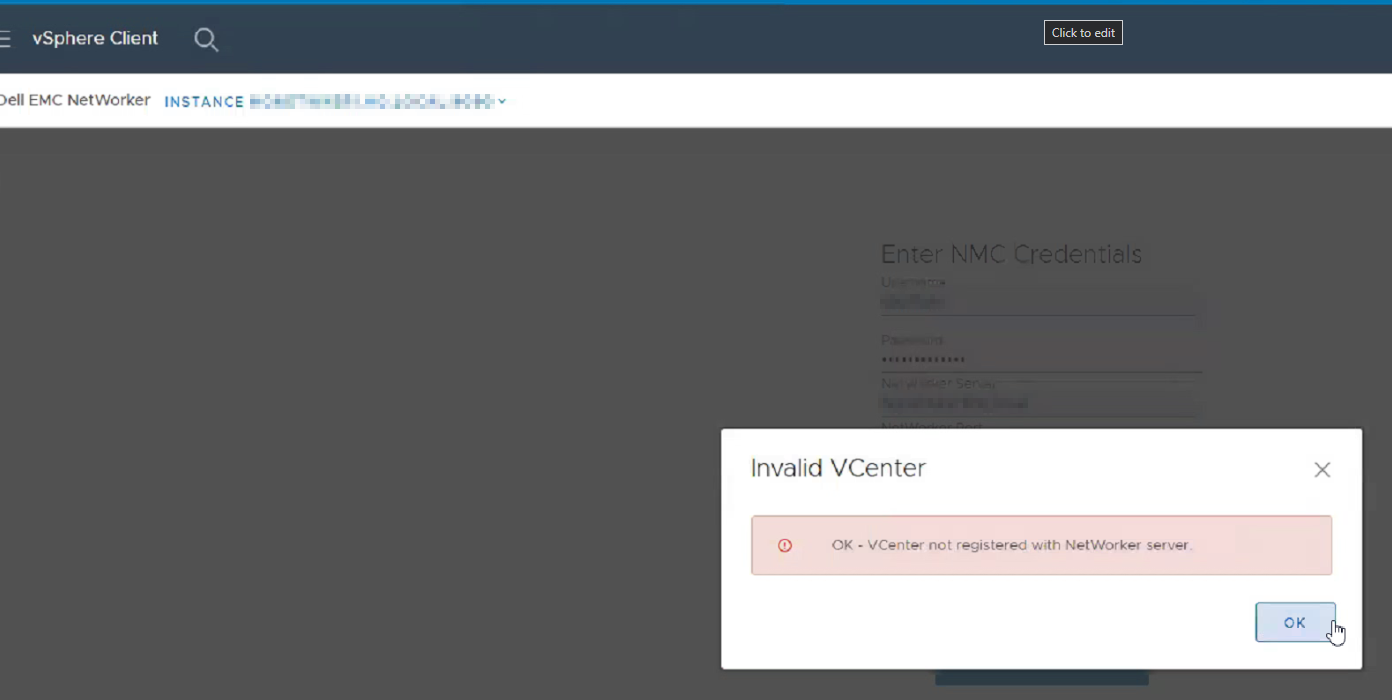
- The
vcui.logon the NetWorker (authc) server shows:
YYYY-MM-DD HH:mm:SS [https-jsse-nio-9090-exec-9] ERROR c.d.e.n.s.AuthenticationServiceImpl.assertValidNetWorkerLogin 94 - NetWorker login failed - vCenter isn't correctly registered with NetWorker server Location:
Linux:
Windows:
/nsr/authc/logs/vcui.log
Windows:
C:\Program Files\EMC NetWorker\nsr\authc-server\tomcat\logs\vcui.log
Cause
The vCenter server was added to NetWorker using its short name alias. The NetWorker VMware Integration Guide states that using a different Fully Qualified Domain Name (FQDN) alias or short name alias for the vCenter server is not supported for VCUI.
The VMware Integration Guide is available through: https://www.dell.com/support/product-details/product/networker/docs
Resolution
You cannot use the vCenter web client's NetWorker plug-in or VCUI if the vCenter is added to NetWorker using its short name alias. There is no supported method for removing a vCenter added using a short name alias and adding it back using the Fully Qualified Domain Name (FQDN). Doing so would make it impossible to recover any Virtual Machine (VM) backups that were completed when the vCenter was registered with the short name. The vCenter would need to be added back using the exact same name that was used during existing VM backups. This statement is true even if the source vCenter is decommissioned or offline: NVP vProxy: How To Restore VMs From Offline vCenter to An Alternate vCenter.
NOTE: The VCUI is not required for performing NetWorker VMware Protection (NVP). All management actions can be performed from the NetWorker Management Console (NMC) and NetWorker Web User Interface (NWUI). VM users can perform self-service MSVMAPPAGENT (SQL) restores and File Level Restore (FLR) using the Data Protection Restore Client from. See: NVP: How To Perform a VM FLR Using the 'Data Protection Restore Client' Web user interface.
Additional Information
VM backups do not index each VM backup separately. All VMs are treated as a 'save set" of the parent vCenter resource. For example, the save sets are seen in the media database as:
vm:UUID:vCenter-Name
[root@nsr ~]# mminfo -kvot
 volume        type   client           date     time         size ssid      fl   lvl name
ddve01VMbackup.001 Data Domain vcsa.amer.lan 03/27/2025 12:33:04 PM 41 GB 4259675586 cr full vm:503edaab-e481-b0e7-1433-835e23dd2a5d:vcsa.amer.lan
ddve01VMbackup.001 Data Domain vcsa.amer.lan 03/27/2025 12:33:05 PM 94 GB 4242898370 cr full vm:503e178f-6982-0b07-36b2-c46c6d3ec4c9:vcsa.amer.lan
ddve01VMbackup.001 Data Domain vcsa.amer.lan 03/27/2025 12:33:06 PM 94 GB 4226121154 cr full vm:503e7439-7053-9fc0-6c26-02f5f021b289:vcsa.amer.lan
ddve01VMbackup.001 Data Domain vcsa.amer.lan 03/27/2025 06:00:10 PM 104 GB 4192586347 cr full vm:503ea434-0331-8ed6-8b19-b9cd408cce7a:vcsa.amer.lan
ddve01VMbackup.001 Data Domain vcsa.amer.lan 03/27/2025 06:00:15 PM 41 GB 4175809135 cr full vm:503edaab-e481-b0e7-1433-835e23dd2a5d:vcsa.amer.lan
ddve01VMbackup.001 Data Domain vcsa.amer.lan 03/27/2025 06:00:16 PM 94 GB 4159031919 cr full vm:503e7439-7053-9fc0-6c26-02f5f021b289:vcsa.amer.lan
ddve01VMbackup.001 Data Domain vcsa.amer.lan 03/27/2025 06:00:17 PM 94 GB 4142254703 cr full vm:503e178f-6982-0b07-36b2-c46c6d3ec4c9:vcsa.amer.lan
This functionality does not use Domain Name System (DNS) resolution or aliasing. Adding the vCenter under a different alias would be treated as an entirely new resource.
Affected Products
NetWorkerProducts
NetWorker Family, NetWorker SeriesArticle Properties
Article Number: 000217199
Article Type: Solution
Last Modified: 28 Mar 2025
Version: 2
Find answers to your questions from other Dell users
Support Services
Check if your device is covered by Support Services.