Data Domain: SDPM opnieuw initialiseren en opschonen | NVRAM
Summary: In dit artikel wordt beschreven hoe u de instellingen voor softwaregedefinieerd permanent geheugen (SDPM) in het BIOS opschoont en opnieuw configureert en hoe u een succesvolle initialisatie controleert nadat het systeem is teruggekeerd naar DDOS. ...
This article applies to
This article does not apply to
This article is not tied to any specific product.
Not all product versions are identified in this article.
Instructions
Van toepassing op:
- DD9910, DD9410, DD6410 DD9910F systemen na vervanging van de NVRAM-module (VOSS).
- PowerProtect Data Domain systemen die SDPM gebruiken op een VOSS-module.
- iDRAC-evenement:
SDPM7108 - Critical Diagnostic Event (Sanitize Required) - Alle ondersteunde softwareversies (DDOS)
Vereiste acties:
Initialiseer de SDPM opnieuw:
- Start het systeem opnieuw op.
- Toegang tot het systeem-BIOS <F2>: Instellingen >systeem-BIOS-geheugen > Permanent geheugen
- Stel Sanitize All NVDIMMs in op
Enabled
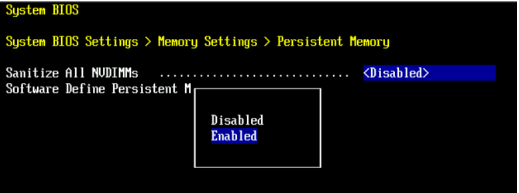
- Stel SDPM-geheugengrootte in op
32 GB
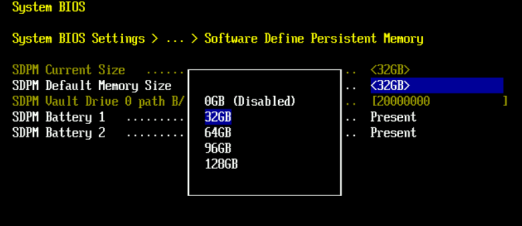
- Bevestig het opschonen van de SDPM en start opnieuw op.
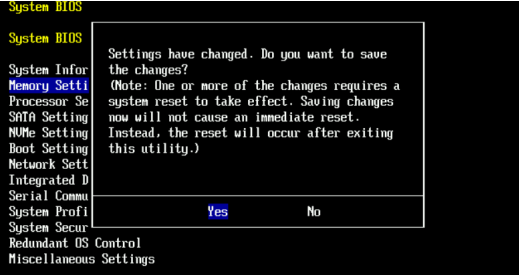
- Het systeem toestaan opnieuw op te starten naar DDOS
- Controleer de SDPM door te controleren op meldingen over NVRAM-fouten en door te zorgen dat het bestandssysteem is ingeschakeld.
-
# alerts show current
-- There should be no outstanding alert relating to the NVRAM subsystem.
Caution: It may take one to two minutes for the system to clear the NVRAM failure alert.

# system show nvram
Note: The battery must be at least 80% charged for the file system to start.

# filesys status
-- The Filesystem should be Enabled & Running
-
Controlelijst voor validatie:
Bevestig al het volgende:
-
- Het opschonen van SDPM is voltooid.
- Er zijn geen actieve NVRAM-gerelateerde waarschuwingen aanwezig.
- De NVRAM-status rapporteert normaal.
- De lading van de NVRAM-batterij is minimaal 80%.
- Het bestandssysteem toont "Enabled".
- Het bestandssysteem wordt uitgevoerd.
Als een validatiestap mislukt, verzamelt u een supportbundel en neemt u contact op met Dell Data Protection Support.
Additional Information
Deze acties kunnen ook worden voltooid in iDRAC:
Configuration > BIOS Settings > Memory Settings > Persistent Memory- Instelling
Sanitize All NVDIMMsTotENABLED>- Zorg ervoor dat SDPM Default Memory Size is ingesteld op <
32GB> 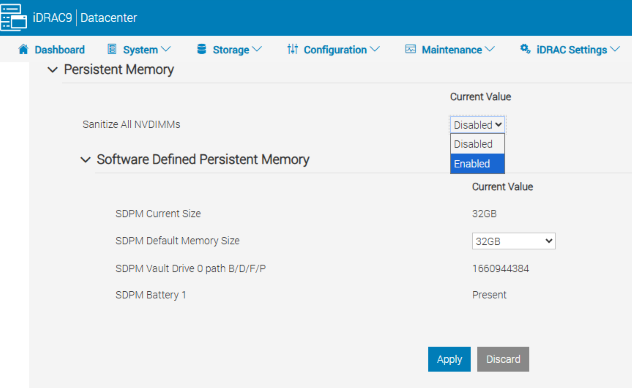
- Zorg ervoor dat SDPM Default Memory Size is ingesteld op <
- Selecteer Toepassen Dan "OK".
- Selecteer Bij volgende keer opnieuw opstarten (onderaan de pagina)
- Instelling
- Start de DD-eenheid opnieuw op (bijvoorbeeld met behulp van DD-CLI:
#system reboot)
Verwijzingen:
Data Domain: SDPM diagnosticeren en oplossen | NVRAM-waarschuwingen
Data Domain: waarschuwing voor NVRAM-hardwarefout | EVT-NVRAM-00201
iDRAC (v7.x) naslaggids voor fout- en gebeurtenisberichten
Affected Products
Data Domain, DD6410 Appliance, DD9410 Appliance, DD9910 Appliance, DD9910F ApplianceProducts
Data Domain Deduplication Storage SystemsArticle Properties
Article Number: 000283787
Article Type: How To
Last Modified: 27 júl 2026
Version: 2
Find answers to your questions from other Dell users
Support Services
Check if your device is covered by Support Services.