Why Does HDR Look Washed Out on Dell Monitors in Windows and How to Fix It
Summary: Why does HDR look washed out or look so bad on your monitor on Windows 10 or 11? Read more here. Learn how to fix HDR issues and understand why HDR makes your screen darker.
This article applies to
This article does not apply to
This article is not tied to any specific product.
Not all product versions are identified in this article.
Symptoms
Cause
Monitor colors are faded and washed out when High Dynamic Range is enabled in Windows 11 and Windows 10 Display Settings.
Colors are Faded
When you enable High Dynamic Range (HDR) in Windows 11 and Windows 10 Display Properties to use with Dell Monitors, all non-HDR content (including all windows backgrounds and basic applications) appears dull and faded.
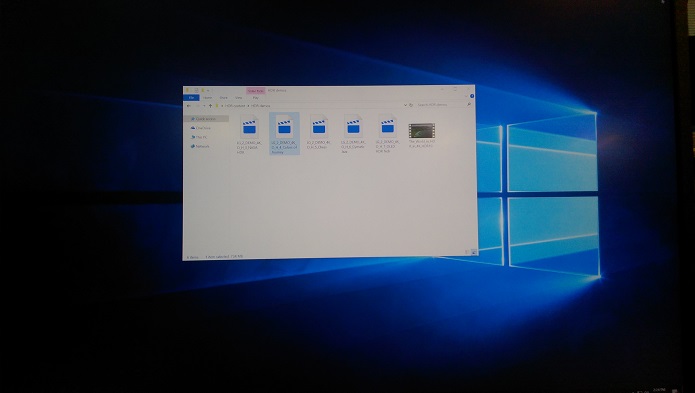

If you configure Windows 11 and Windows 10 Display settings to HDR off, the colors of standard Windows applications are crisp and vivid.


When you view real HDR content with HDR off in display settings, the colors are oversaturated and distorted.

If you view the same HDR content after clicking the HDR option in Display settings, then again, the colors are sharp and vivid.

Streaming HDR Content is Faded
Another HDR content viewing issue is the playing of streaming HDR content. If played using an HDR online stream (YouTube, so on) you may encounter dim or dull video. If you download the same content and play it locally on the system, the HDR content appears clear and crisp. The images below show local HDR content on the left, and online streaming on the right.


Resolution
Solution
In both these situations, the HDR capabilities on the Dell Monitors are functioning within the design specification.
When HDR is enabled in Windows 11 and Windows 10 Display Properties, non-HDR content, including the system background, desktop, and menus appear dull and flat. Only real HDR content appears normally.
It is recommended that you only enable the HDR capability in the Display Settings when you are going to watch HDR content. When done viewing content, simply return the HDR toggle to the off position and the system returns to a normal appearance.
If you encounter streaming HDR content that does not appear to look, like HDR content should appear (see images above). Then it is recommended to download the HDR content to the system locally. When played from the local system the HDR streaming issue does not appear to occur.
Article Properties
Article Number: 000143830
Article Type: Solution
Last Modified: 22 Jul 2025
Version: 14
Find answers to your questions from other Dell users
Support Services
Check if your device is covered by Support Services.