安装作系统后,Ubuntu 默认音频输入将静音
Summary: 本文提供有关 Latitude 3340/3440/3540 的信息 安装作系统后,Ubuntu 的默认音频输入将静音。
This article applies to
This article does not apply to
This article is not tied to any specific product.
Not all product versions are identified in this article.
Symptoms
Ubuntu 的默认音频输入已静音
终端用户在安装 Ubuntu作系统后首次使用音频输入功能(如麦克风)时,将不会有音频输入,因为声音输入音量在设置中设置为静音。
受影响的平台:
- Latitude 3340
- Latitude 3440
- Latitude 3540
Cause
Resolution
方法 1
通过 System Settings→ Sound → Input Volume调整 音频输入音量 。
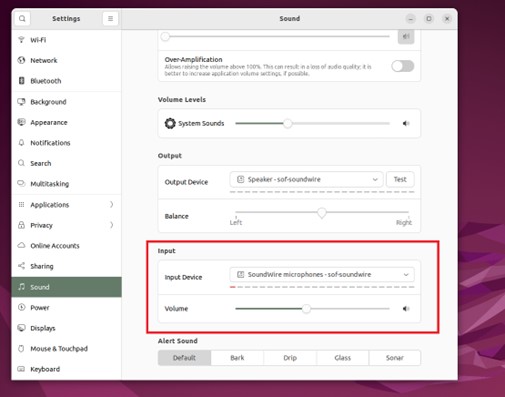
图1 - 声音设置
方法 2
通过在应用程序中进行设置(例如缩放)来调整 音频输入音量 。
修复
当联机更新可用时,升级 Ubuntu。
提醒:这两种方法都需要通过网络连接
方法 1
- 在 Ubuntu 上打开终端
- 运行以下命令:
sudo apt update
- 运行以下命令:
sudo apt upgrade
- 重新启动 计算机
方法 2
- 在线更新可用后, 自动系统更新通知 将显示在桌面上。或打开 软件更新程序

- 单击 立即安装 以下载并安装更新。

- 重新启动 计算机
此解决方案是将 Capture 开关设置为 default。计划出厂安装 (FI) 将在 5 月时间段中断。
Affected Products
Latitude 3340, Latitude 3440Products
Latitude 3540Article Properties
Article Number: 000211167
Article Type: Solution
Last Modified: 16 Apr 2025
Version: 3
Find answers to your questions from other Dell users
Support Services
Check if your device is covered by Support Services.