Latitude 7320 Detachable Battery Draining When in Sleep Mode
Summary: This article provides steps to resolve a power battery draining while in sleep mode on the Latitude 7320 Detachable.
This article applies to
This article does not apply to
This article is not tied to any specific product.
Not all product versions are identified in this article.
Symptoms
In Power Options, there maybe minutes listed under Hibernation. This is located under the Sleep and Hibernate subsections. The example below shows 35,791,394 Minutes.
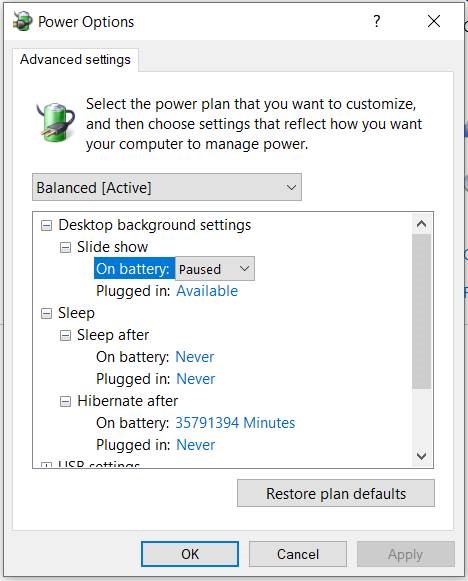
The value is normal, and it is the default value by Microsoft in Windows 10, to let the computer use modern standby.
Cause
"Sleep" is a Modern Standby session (Hibernate). It turns off the screen, disables some hardware, and leaves other hardware in low-power mode. It is intended to be used when you are traveling short distances, not overnight.
Hibernate offers a reliable method of saving battery power while preserving your session. However, it is the most time-consuming option to process a shutdown and resume.
The machine does not go into Deep Sleep and stays in Normal Sleep. Applications remain in Low-Power mode + Network Staying in Low-Power mode + Network. This allows the system to wake up instantly when needed. However, this can drain battery power.
More information about Modern Standby on the Microsoft website:

Resolution
Use the steps in this article The Battery drains quicker than expected on a Dell notebook with Modern Standby mode enabled to resolve the battery power draining.
Affected Products
Latitude 7320 DetachableArticle Properties
Article Number: 000190571
Article Type: Solution
Last Modified: 25 Sept 2025
Version: 3
Find answers to your questions from other Dell users
Support Services
Check if your device is covered by Support Services.