La penna attiva Dell non è elencata in Dell Display and Peripheral Manager
Summary: Questo articolo fornisce informazioni sull'opzione Penna attiva Dell mancante in Dell Display and Peripheral Manager (DDPM).
This article applies to
This article does not apply to
This article is not tied to any specific product.
Not all product versions are identified in this article.
Symptoms
Prodotti interessati:
- Penna attiva Dell Pro Premium PN5122W
- Penna attiva Dell Pro Premium PN7522W
Piattaforme interessate:
- Dell 14 Plus DB14250
- Dell 16 Plus DB16250
- Dell 14 Plus 2-in-1 DB04250
- Dell 16 Plus 2-in-1 DB06250
- Dell 14 Plus 2-in-1 DB04255
- Inspiron 14 7440 2 in 1
- Inspiron 14 7445 2 in 1
- Inspiron 14 7430 2 in 1
- Inspiron 16 7630 2 in 1
- Inspiron 14 7435 2 in 1
- Inspiron 16 7635 2 in 1
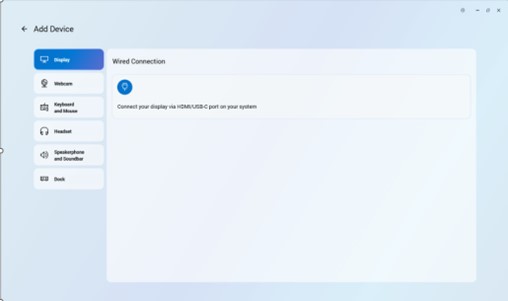
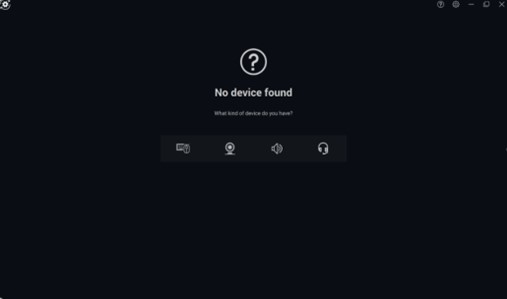
Non è possibile aggiungere una penna attiva Dell nell'applicazione Dell Peripheral Manager perché l'icona a forma di penna non è presente.
Cause
Problema relativo al driver
Resolution
Il reparto Engineering sta lavorando a una correzione da rilasciare in DDPM che elimina la necessità di installare separatamente il driver della penna attiva Dell. L'aggiornamento a DDPM verrà pubblicato nella pagina di supporto del computer non appena sarà disponibile. L'ETA per il rilascio è febbraio 2026.
L'aggiornamento del driver della penna attiva Dell sulla versione A00-00 o successiva sul computer risolve il problema. Per istruzioni su come scaricare e installare il driver, consultare Come scaricare e installare i driver Dell .
Affected Products
Dell Pro Plus Active Pen PN5122W, Dell Pro Premium Active Pen PN7522W, Dell 14 Plus 2-in-1 DB04250, Dell 14 Plus 2-in-1 DB04255, Dell 16 Plus 2-in-1 DB06250, Dell 14 Plus DB14250, Dell 16 Plus DB16250, Inspiron 14 7430 2-in-1, Inspiron 14 7435 2-in-1
, Inspiron 14 7440 2-in-1, Inspiron 14 7445 2-in-1, Inspiron 16 7630 2-in-1, Inspiron 16 7635 2-in-1
...
Article Properties
Article Number: 000325971
Article Type: Solution
Last Modified: 24 Sept 2025
Version: 5
Find answers to your questions from other Dell users
Support Services
Check if your device is covered by Support Services.