Dell Active-pennen er ikke oppført i Dell Display og Peripheral Manager
Summary: Denne artikkelen inneholder informasjon om alternativet manglende Dell aktiv penn i Dell Display and Peripheral Manager (DDPM).
This article applies to
This article does not apply to
This article is not tied to any specific product.
Not all product versions are identified in this article.
Symptoms
Berørte produkter:
- Dell Pro Premium aktiv penn PN5122W
- Dell Pro Premium aktiv penn PN7522W
Berørte plattformer:
- Dell 14 Plus DB14250
- Dell 16 Plus DB16250
- Dell 14 Plus 2-i-1-DB04250
- Dell 16 Plus 2-i-1-DB06250
- Dell 14 Plus 2-i-1-DB04255
- Inspiron 14 7440 2-i-1
- Inspiron 14 7445 2-i-1
- Inspiron 14 7430 2-i-1
- Inspiron 16 7630 2-i-1
- Inspiron 14 7435 2-i-1
- Inspiron 16 7635 2-i-1
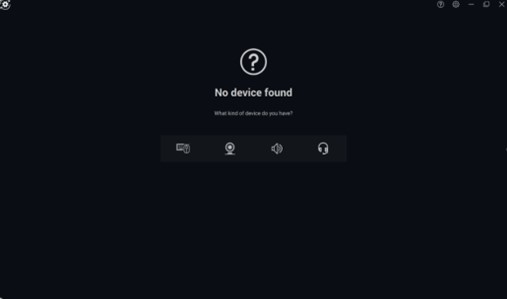
En Dell Active-penn kan ikke legges til i Dell Peripheral Manager-applikasjonen fordi pennikonet mangler.

Cause
Driverrelatert problem
Resolution
Teknisk avdeling jobber med en løsning som skal lanseres i DDPM som eliminerer behovet for å installere driveren for Dell Active-pennen separat. Oppdateringen for DDPM blir lagt ut på datamaskinens støtteside så snart den blir tilgjengelig. ETA for utgivelse er februar 2026.
Du kan løse problemet ved å oppdatere driveren for Dell Active-pennen til versjon A00-00 eller nyere på datamaskinen. Se Laste ned og installere Dell-drivere for instruksjoner om hvordan du laster ned og installerer driveren.
Affected Products
Dell Pro Plus Active Pen PN5122W, Dell Pro Premium Active Pen PN7522W, Dell 14 Plus 2-in-1 DB04250, Dell 14 Plus 2-in-1 DB04255, Dell 16 Plus 2-in-1 DB06250, Dell 14 Plus DB14250, Dell 16 Plus DB16250, Inspiron 14 7430 2-in-1, Inspiron 14 7435 2-in-1
, Inspiron 14 7440 2-in-1, Inspiron 14 7445 2-in-1, Inspiron 16 7630 2-in-1, Inspiron 16 7635 2-in-1
...
Article Properties
Article Number: 000325971
Article Type: Solution
Last Modified: 24 Sept 2025
Version: 5
Find answers to your questions from other Dell users
Support Services
Check if your device is covered by Support Services.