ECS: Blokada węzła kończy się niepowodzeniem z powodu ogranicznika szybkości SSH w węźle
Summary: Po uaktualnieniu do ECS 4.0 próby zablokowania węzła mogą zakończyć się niepowodzeniem, jeśli ogranicznik szybkości SSH jest aktywny w węźle. Powoduje to, że stan węzła jest wyświetlany jako "nieznany" lub "zablokowany" w interfejsie internetowym ECS, a dostęp SSH pozostaje dostępny. Reguła STIG, która stosuje ogranicznik szybkości SSH, który nie jest zgodny z SLES15, powoduje ten problem. ...
This article applies to
This article does not apply to
This article is not tied to any specific product.
Not all product versions are identified in this article.
Symptoms
Problem zaobserwowany po uaktualnieniu do ECS 4.0.
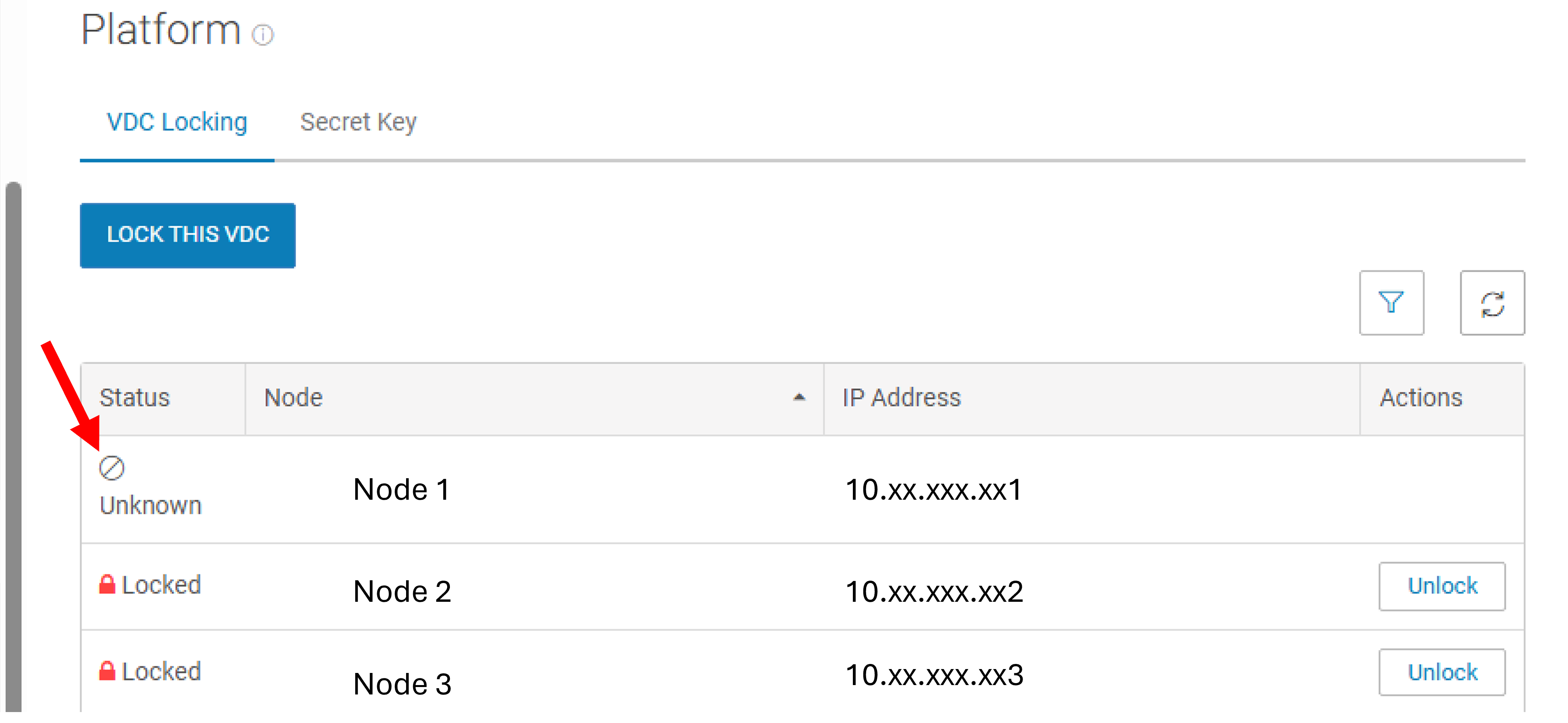
Stan węzła jest wyświetlany w interfejsie sieciowym ECS jako "nieznany" lub "zablokowany".
Nie można uruchomić
polecenia blokady interfejsu wiersza poleceń.Dostęp SSH do węzła pozostaje dostępny pomimo próby blokady.
Cause
Ten problem powoduje obecność ogranicznika szybkości SSH zastosowanego przy użyciu reguły STIG (SLES-12-030040). Ta reguła nie jest zgodna z systemem SLES15, a po zastosowaniu nie można jej cofnąć przy użyciu struktury SLES12 STIG.
Poniższe polecenie wyświetla informacje o systemie operacyjnym:
admin@node1:~> cat /etc/os-release
NAME="SLES"
VERSION="15-SP4"
VERSION_ID="15.4"
PRETTY_NAME="SUSE Linux Enterprise Server 15 SP4"
ID="sles"
ID_LIKE="suse"
ANSI_COLOR="0;32"
CPE_NAME="cpe:/o:suse:sles:15:sp4"
DOCUMENTATION_URL="https://documentation.suse.com/"
Resolution
Aby rozwiązać ten problem, usuń ogranicznik szybkości SSH z węzła lub węzłów, których dotyczy problem:
- Sprawdź ogranicznik szybkości SSH:
admin@node1:~> sudo iptables -L | grep limit  | grep ssh
LOG        tcp  --  anywhere             anywhere             limit: avg 3/min burst 5 tcp dpt:ssh ctstate NEW recent: CHECK seconds: 60 hit_count: 3 name: ssh side: source mask: 255.255.255.255 LOG level warning tcp-options ip-options prefix "SFW2-INext-DROPr "
- Przywróć regułę STIG:
admin@node1:~> cd /opt/emc/security/hardening/root/sbin; sudo ./revert-harden -i SLES-12-030040
Changes reverted: FW_SERVICES_ACCEPT_EXT="0/0,tcp,22,,hitcount=3,blockseconds=60,recentname=ssh"
FW_SERVICES_ACCEPT_EXT="0/0,tcp,22,,hitcount=3,blockseconds=60,recentname=ssh"
Changes reverted: TCP="ssh"
Restarting SuSEfirewall2.service ...
SuSEfirewall2.service restarted successfully.
Reverted STIG ID: SLES-12-030040 on /etc/sysconfig/SuSEfirewall2.d/services/sshd successfully
- Sprawdź zmiany:
admin@node1:/opt/emc/security/hardening/root/sbin> sudo iptables -L | grep limit | grep ssh
- Zablokuj węzeł za pomocą interfejsu sieciowego lub interfejsu wiersza poleceń:
admin@node1:~> sudo -i lockdown set lock
[lockdown] :Info: Suspend fabric agent firewall check
INFO: Parsing /opt/emc/nile/etc/conf/nan/emc-firewall-cfg
dev_ext: public - dev_int: private private.4 pslave-0 pslave-1
INFO: Updating /etc/sysconfig/SuSEfirewall2.d/services/emc-ecs-custom
INFO: Updating /etc/sysconfig/SuSEfirewall2
<38>Jun 25 10:34:47 SuSEfirewall2[32514]: Firewall rules unloaded.
<38>Jun 25 10:34:47 SuSEfirewall2[32594]: Setting up rules from /etc/sysconfig/SuSEfirewall2 ...
<38>Jun 25 10:34:47 SuSEfirewall2[32594]: using default zone 'ext' for interface docker0
<38>Jun 25 10:34:47 SuSEfirewall2[32594]: using default zone 'ext' for interface public_mgmt
<38>Jun 25 10:34:47 SuSEfirewall2[32594]: using default zone 'ext' for interface slave_0
<38>Jun 25 10:34:47 SuSEfirewall2[32594]: using default zone 'ext' for interface slave_1
<38>Jun 25 10:34:47 SuSEfirewall2[32594]: Firewall custom rules loaded from /opt/emc/nile/etc/conf/nan/nan_pbr_rules
<38>Jun 25 10:34:48 SuSEfirewall2[32594]: /proc/sys/net/ipv4/conf/all/rp_filter override in /etc/sysctl.d/70-nan-performance.conf, not setting it
<38>Jun 25 10:34:48 SuSEfirewall2[32594]: /proc/sys/net/ipv4/conf/default/rp_filter override in /etc/sysctl.d/70-nan-performance.conf, not setting it
<38>Jun 25 10:34:48 SuSEfirewall2[32594]: /proc/sys/net/ipv4/conf/docker0/rp_filter override in /etc/sysctl.d/70-nan-performance.conf, not setting it
<38>Jun 25 10:34:48 SuSEfirewall2[32594]: /proc/sys/net/ipv4/conf/lo/rp_filter override in /etc/sysctl.d/70-nan-performance.conf, not setting it
<38>Jun 25 10:34:48 SuSEfirewall2[32594]: /proc/sys/net/ipv4/conf/private/rp_filter override in /etc/sysctl.d/70-nan-performance.conf, not setting it
<38>Jun 25 10:34:48 SuSEfirewall2[32594]: /proc/sys/net/ipv4/conf/pslave-0/rp_filter override in /etc/sysctl.d/70-nan-performance.conf, not setting it
<38>Jun 25 10:34:48 SuSEfirewall2[32594]: /proc/sys/net/ipv4/conf/pslave-1/rp_filter override in /etc/sysctl.d/70-nan-performance.conf, not setting it
<38>Jun 25 10:34:48 SuSEfirewall2[32594]: /proc/sys/net/ipv4/conf/public/rp_filter override in /etc/sysctl.d/70-nan-performance.conf, not setting it
<38>Jun 25 10:34:48 SuSEfirewall2[32594]: /proc/sys/net/ipv4/conf/slave-0/rp_filter override in /etc/sysctl.d/70-nan-performance.conf, not setting it
<38>Jun 25 10:34:49 SuSEfirewall2[32594]: /proc/sys/net/ipv4/conf/slave-1/rp_filter override in /etc/sysctl.d/70-nan-performance.conf, not setting it
<38>Jun 25 10:34:49 SuSEfirewall2[32594]: Firewall rules successfully set
INFO: Updating /etc/sysconfig/SuSEfirewall2
<38>Jun 25 10:34:57 SuSEfirewall2[35003]: Firewall rules unloaded.
<38>Jun 25 10:34:57 SuSEfirewall2[35084]: Setting up rules from /etc/sysconfig/SuSEfirewall2 ...
<38>Jun 25 10:34:57 SuSEfirewall2[35084]: using default zone 'ext' for interface docker0
<38>Jun 25 10:34:57 SuSEfirewall2[35084]: using default zone 'ext' for interface public_mgmt
<38>Jun 25 10:34:57 SuSEfirewall2[35084]: using default zone 'ext' for interface slave_0
<38>Jun 25 10:34:57 SuSEfirewall2[35084]: using default zone 'ext' for interface slave_1
<38>Jun 25 10:34:57 SuSEfirewall2[35084]: Firewall custom rules loaded from /opt/emc/nile/etc/conf/nan/nan_pbr_rules
<38>Jun 25 10:34:57 SuSEfirewall2[35084]: /proc/sys/net/ipv4/conf/all/rp_filter override in /etc/sysctl.d/70-nan-performance.conf, not setting it
<38>Jun 25 10:34:57 SuSEfirewall2[35084]: /proc/sys/net/ipv4/conf/default/rp_filter override in /etc/sysctl.d/70-nan-performance.conf, not setting it
<38>Jun 25 10:34:57 SuSEfirewall2[35084]: /proc/sys/net/ipv4/conf/docker0/rp_filter override in /etc/sysctl.d/70-nan-performance.conf, not setting it
<38>Jun 25 10:34:57 SuSEfirewall2[35084]: /proc/sys/net/ipv4/conf/lo/rp_filter override in /etc/sysctl.d/70-nan-performance.conf, not setting it
<38>Jun 25 10:34:57 SuSEfirewall2[35084]: /proc/sys/net/ipv4/conf/private/rp_filter override in /etc/sysctl.d/70-nan-performance.conf, not setting it
<38>Jun 25 10:34:58 SuSEfirewall2[35084]: /proc/sys/net/ipv4/conf/pslave-0/rp_filter override in /etc/sysctl.d/70-nan-performance.conf, not setting it
<38>Jun 25 10:34:58 SuSEfirewall2[35084]: /proc/sys/net/ipv4/conf/pslave-1/rp_filter override in /etc/sysctl.d/70-nan-performance.conf, not setting it
<38>Jun 25 10:34:58 SuSEfirewall2[35084]: /proc/sys/net/ipv4/conf/public/rp_filter override in /etc/sysctl.d/70-nan-performance.conf, not setting it
<38>Jun 25 10:34:58 SuSEfirewall2[35084]: /proc/sys/net/ipv4/conf/slave-0/rp_filter override in /etc/sysctl.d/70-nan-performance.conf, not setting it
<38>Jun 25 10:34:58 SuSEfirewall2[35084]: /proc/sys/net/ipv4/conf/slave-1/rp_filter override in /etc/sysctl.d/70-nan-performance.conf, not setting it
<38>Jun 25 10:34:59 SuSEfirewall2[35084]: Firewall rules successfully set
locked
[lockdown] :Info: Resume fabric agent firewall check
Additional Information
To obejście ma zastosowanie tylko do węzłów z systemem SLES15, w których wcześniej zastosowano strukturę SLES12 STIG. Przed zastosowaniem lub przywróceniem reguł STIG upewnij się, że jest on zgodny.
Affected Products
ECS Appliance Gen 3, ECS Appliance Hardware Gen3 EX500, ECS Appliance Hardware SeriesProducts
ECS, ObjectScale, ECS Appliance Hardware Gen3 EX5000, ECS Appliance, ECS Appliance Hardware Gen3 EX300, ECS Appliance Hardware Gen3 EX3000, ECS Appliance Hardware Gen3 EXF900, ECS Appliance Software with Encryption
, ECS Appliance Software without Encryption
...
Article Properties
Article Number: 000337531
Article Type: Solution
Last Modified: 24 Sept 2025
Version: 2
Find answers to your questions from other Dell users
Support Services
Check if your device is covered by Support Services.