La penna attiva non può essere associata a Dell Display and Peripheral Manager
Summary: Questo articolo fornisce informazioni sull'impossibilità di associare la penna attiva a Dell Display and Peripheral Manager (DDPM).
This article applies to
This article does not apply to
This article is not tied to any specific product.
Not all product versions are identified in this article.
Symptoms
Nota: Questo articolo non viene più mantenuto. Per informazioni aggiornate, fare riferimento a La penna attiva Dell non è elencata in Dell Display and Peripheral Manager .
Piattaforme interessate:
- Dell 14 Plus 2-in-1 DB04250
- Dell 16 Plus 2-in-1 DB06250
- Dell 14 Plus 2-in-1 DB04255
- Inspiron 14 7440 2 in 1
- Inspiron 14 7445 2 in 1
- Inspiron 14 7430 2 in 1
- Inspiron 16 7630 2 in 1
- Inspiron 14 7435 2 in 1
- Inspiron 16 7635 2 in 1
Prodotti interessati
- Penna attiva Dell Pro Plus PN5122W
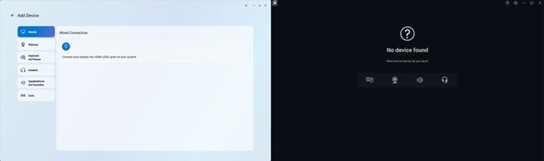
Quando si apre DDPM o Dell Peripheral Manager (DPeM), non è possibile visualizzare l'icona di una penna per associare una penna attiva.
Cause
Il supporto dei driver per pannelli touch specifici non è ancora incluso in DDPM e richiede l'installazione di un driver aggiuntivo.
Resolution
Scaricare e installare il driver dei componenti Wacom per la penna attiva Dell Pro Plus PN5122W.
Dell rilascerà una nuova versione di DDPM a settembre 2025, che include il driver necessario.
Nota: DPeM è alla fine del ciclo di vita e non è più aggiornato. DDPM ha sostituito DPeM.
Affected Products
Dell Pro Plus Active Pen PN5122W, Dell 14 Plus 2-in-1 DB04250, Dell 14 Plus 2-in-1 DB04255, Dell 16 Plus 2-in-1 DB06250, Inspiron 14 7430 2-in-1, Inspiron 14 7435 2-in-1, Inspiron 14 7440 2-in-1, Inspiron 14 7445 2-in-1, Inspiron 16 7630 2-in-1
, Inspiron 16 7635 2-in-1
...
Article Properties
Article Number: 000343273
Article Type: Solution
Last Modified: 25 Sept 2025
Version: 5
Find answers to your questions from other Dell users
Support Services
Check if your device is covered by Support Services.