Nie można sparować aktywnego pióra z programem Dell Display i Peripheral Manager
Summary: Ten artykuł zawiera informacje na temat braku możliwości sparowania aktywnego pióra z programem Dell Display an Peripheral Manager (DDPM).
This article applies to
This article does not apply to
This article is not tied to any specific product.
Not all product versions are identified in this article.
Symptoms
Uwaga: Ten artykuł nie jest już aktualizowany. Aby uzyskać aktualne informacje, zapoznaj się z informacjami na temat braku aktywnego pióra Dell w Menedżerze wyświetlaczy i urządzeń peryferyjnych firmy Dell .
Dotyczy platform:
- Dell 14 Plus 2 w 1 DB04250
- Dell 16 Plus 2 w 1 DB06250
- Dell 14 Plus 2 w 1 DB04255
- Inspiron 14 7440 2 w 1
- Inspiron 14 7445 typu "2 w 1"
- Inspiron 14 7430 2 w 1
- Inspiron 16 7630 2 w 1
- Inspiron 14 7435 2 w 1
- Inspiron 16 7635 typu "2 w 1"
Produkty, których dotyczy problem
- Aktywne pióro Dell Pro Plus PN5122W
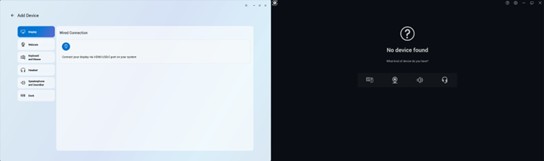
Podczas otwierania programu DDPM lub Dell Peripheral Manager (DPeM) nie widać ikony pióra parującego aktywne pióro.
Cause
Obsługa sterowników dla określonych paneli dotykowych nie jest jeszcze uwzględniona w DDPM i wymaga zainstalowania dodatkowego sterownika.
Resolution
Pobierz i zainstaluj sterownik Wacom Components dla aktywnego pióra Dell Pro Plus PN5122W.
We wrześniu 2025 r. firma Dell wyda nową wersję programu DDPM, która zawiera niezbędny sterownik.
Uwaga: Aplikacja DPeM osiągnęła koniec żywotności i nie jest już aktualizowana. DDPM zastąpił DPeM.
Affected Products
Dell Pro Plus Active Pen PN5122W, Dell 14 Plus 2-in-1 DB04250, Dell 14 Plus 2-in-1 DB04255, Dell 16 Plus 2-in-1 DB06250, Inspiron 14 7430 2-in-1, Inspiron 14 7435 2-in-1, Inspiron 14 7440 2-in-1, Inspiron 14 7445 2-in-1, Inspiron 16 7630 2-in-1
, Inspiron 16 7635 2-in-1
...
Article Properties
Article Number: 000343273
Article Type: Solution
Last Modified: 25 Sept 2025
Version: 5
Find answers to your questions from other Dell users
Support Services
Check if your device is covered by Support Services.