ECS: errori I/O remoti di NFS; la modifica del proprietario del bucket per il bucket abilitato per il file system può rendere impossibile per le applicazioni e/o gli utenti accedere ai file NFS (in inglese)
Summary: Previous Bucket Owner is not allowed or restricted ObjectControllerException: Metodo updateObjectInternal non consentito per il proprietario del bucket precedente
This article applies to
This article does not apply to
This article is not tied to any specific product.
Not all product versions are identified in this article.
Symptoms
Modifica apportata dall'utente alla pagina del proprietario del bucket nell'interfaccia utente:
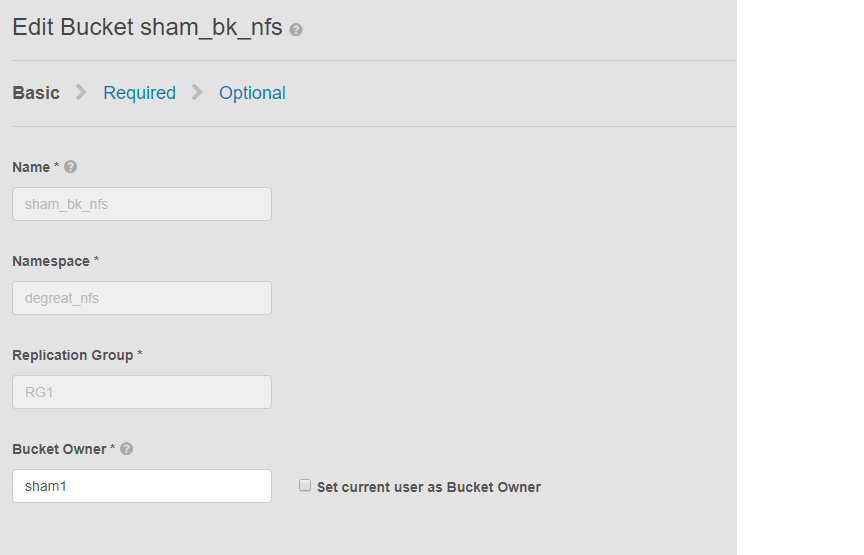
Questo problema si applica ai bucket abilitati per NFS e a una modifica del proprietario del bucket da parte dell'interfaccia utente. Ciò può causare la perdita di accesso al bucket sul file system Linux da parte di applicazioni o utenti connessi. Anche se si ripristina la modifica al proprietario originale, l'accesso non sarà possibile, con conseguente non disponibilità dei dati.
In questo esempio:
il proprietario del bucket è stato modificato in "bucket2" utilizzando l'interfaccia utente. A causa di una limitazione in ECS, anche dopo aver modificato il nome del proprietario del bucket in "1". ECS non cambierà nuovamente il proprietario del bucket in "bucket1" utilizzando l'interfaccia utente. Questa operazione può essere eseguita solo per il momento con la CLI che utilizza un'API con payload per resetowner flag su true.
Come identificare il problema, sul computer Linux chiedere all'utente di toccare un file, ad esempio:
Questo problema si applica ai bucket abilitati per NFS e a una modifica del proprietario del bucket da parte dell'interfaccia utente. Ciò può causare la perdita di accesso al bucket sul file system Linux da parte di applicazioni o utenti connessi. Anche se si ripristina la modifica al proprietario originale, l'accesso non sarà possibile, con conseguente non disponibilità dei dati.
In questo esempio:
il proprietario del bucket è stato modificato in "bucket2" utilizzando l'interfaccia utente. A causa di una limitazione in ECS, anche dopo aver modificato il nome del proprietario del bucket in "1". ECS non cambierà nuovamente il proprietario del bucket in "bucket1" utilizzando l'interfaccia utente. Questa operazione può essere eseguita solo per il momento con la CLI che utilizza un'API con payload per resetowner flag su true.
Come identificare il problema, sul computer Linux chiedere all'utente di toccare un file, ad esempio:
admin@node1~>touch file
touch: setting times of `file': Remote I/O error

se svc_log with the string  "method updateObjectInternal "

Command:
# svc_log -a -sr dataheadsvc | grep "method updateObjectInternal"
Example:
admin@node1~>svc_log -a -sr dataheadsvc | grep "method updateObjectInternal"
svc_log v1.0.22 (svc_tools v1.5.3)                 Started 2019-06-06 10:45:04

Running on nodes:              <All nodes>
Time range:                    2019-06-05 10:45:04 - 2019-06-06 10:45:04
Filter string(s):              <All messages>
Show nodename(s):              True
Search reclaim logs (if any):  False

com.emc.storageos.data.object.exception.ObjectControllerException: method updateObjectInternal not allowed for previous bucket owner sham1
Caused by: com.emc.storageos.data.object.exception.ObjectControllerException: method updateObjectInternal not allowed for previous bucket owner sham1
Cause
Creazione di un bucket con un utente specifico come owner, seguito da una modifica della proprietà del bucket. Infine, il controllo completo del proprietario originale tramite la pagina ACL ha esito negativo con l'eccezione del registro ECS:
ObjectControllerException: method updateObjectInternal not allowed for previous bucket owner <ownerid>
This is a known issue currently being evaluated by Dell EMC at this time.
Resolution
La soluzione alternativa consiste nel modificare il proprietario del bucket utilizzando l'API tramite cli con payload per reimpostare il flagowner su true.
1. Determinare il proprietario del bucket corrente.
2. Creare un file xml semplice utilizzando l'editor vi. Nell'esempio riportato di seguito viene chiamato /tmp/bucket-owner.xml. Questo è un processo in due fasi. Dobbiamo impostarlo su un nuovo proprietario temporaneamente di 2. Come in questo esempio riportato di seguito, prima di tornare all'immagine originale del proprietario1, confermare l'output:
. 7. Una volta completata la modifica alla configurazione, non dovrebbe più essere visualizzato lo stesso errore
1. Determinare il proprietario del bucket corrente.
Richiedere la password root dell'interfaccia utente per generare il TOKEN. Ad esempio:
admin@ecsnode1:~> tok=$(curl -iks https://XX.XX.XX.XX:4443/login -u 'root:ChangeMe' | grep X-SDS-AUTH-TOKEN)
Verificare l'owner del bucket corrente (sostituire bucket e namespace nella situazione):
admin@node1:~> curl -s -k -X GET -H "$tok" https://XX.XX.XX.XX:4443/object/bucket/sham_bk_nfs/info?namespace=degreat_nfs | xmllint --format - | grep '<owner>'
  <owner>sham2</owner>
In questo modo si conferma il parametro reset_previous_owners è necessario impostare su true. L'owner del bucket ripristinato si trova nell'interfaccia utente, ma l'API tramite CLI conferma che ECS sta ancora visualizzando l'owner del bucket come "bucket2".
2. Creare un file xml semplice utilizzando l'editor vi. Nell'esempio riportato di seguito viene chiamato /tmp/bucket-owner.xml. Questo è un processo in due fasi. Dobbiamo impostarlo su un nuovo proprietario temporaneamente di 2. Come in questo esempio riportato di seguito, prima di tornare all'immagine originale del proprietario1, confermare l'output:
admin@node1:~ # vi /tmp/bucket-owner.xml

admin@ecsnode1:~ # cat /tmp/bucket-owner.xml
<object_bucket_update_owner>
   <namespace>degreat_nfs</namespace>
   <new_owner>sham2</new_owner>
   <reset_previous_owners>true</reset_previous_owners>
</object_bucket_update_owner>

3. Change the bucket owner to the temporary owner.
La sintassi DELL'API richiesta per modificare il proprietario del bucket in "bucket2" tramite il file xml è la seguente:
admin@ecsnode1:~> curl -v -k -X "POST" "https://xx.xx.xx.xx:4443/object/bucket/sham_bk_nfs/owner" -H "$tok" -H "Content-Type: application/xml" -H "ACCEPT:application/xml" -d @/tmp/bucket-owner.xml -v
* Hostname was NOT found in DNS cache
*   Trying xx.xx.xx.xx...
* Connected to xx.xx.xx.xx (xx.xx.xx.xx) port 4443 (#0)
* successfully set certificate verify locations:
*   CAfile: none
  CApath: /etc/ssl/certs/
* SSLv3, TLS unknown, Certificate Status (22):
* SSLv3, TLS handshake, Client hello (1):
* SSLv3, TLS handshake, Server hello (2):
* SSLv3, TLS handshake, Certificate (11):
* SSLv3, TLS handshake, Server key exchange (12):
* SSLv3, TLS handshake, Server finished (14):
* SSLv3, TLS handshake, Client key exchange (16):
* SSLv3, TLS change cipher, Client hello (1):
* SSLv3, TLS handshake, Finished (20):
* SSLv3, TLS change cipher, Client hello (1):
* SSLv3, TLS handshake, Finished (20):
* SSL connection using TLSv1.2 / ECDHE-RSA-AES256-GCM-SHA384
* Server certificate:
*        subject: CN=localhost
*        start date: 2019-03-25 09:53:41 GMT
*        expire date: 2029-03-22 09:53:41 GMT
*        issuer: CN=localhost
*        SSL certificate verify result: self signed certificate (18), continuing anyway.
> POST /object/bucket/sham_bk_nfs/owner HTTP/1.1
> User-Agent: curl/7.37.0
> Host: xx.xx.xx.xx:4443
> X-SDS-AUTH-TOKEN: BAAcUy9KYlhxTlVYb2M0bnF3bTNscEsvSEdDeWhJPQMAjAQASHVybjpzdG9yYWdlb3M6VmlydHVhbERhdGFDZW50ZXJEYXRhOmJhOGQ3ZTkzLTMyMGYtNDNmNy05Y2FkLWM4YWQzMWFiMzY1MAIADTE1NTk3Mzk3OTA2MDgDAC51cm46VG9rZW46YjQ4NGNiZjEtNTkwNy00YWI3LTgzYTctM2Y3OGRhM2RiY2NiAgAC0A8=
> Content-Type: application/xml
> ACCEPT:application/xml
> Content-Length: 179
>
* upload completely sent off: 179 out of 179 bytes
< HTTP/1.1 200 OK
< Date: Thu, 06 Jun 2019 10:56:08 GMT
< Content-Length: 0
< Connection: keep-alive
<
* Connection #0 to host xx.xx.xx.xx left intact
4. Edit the simple.xml file previously created in step 2 and this time insert original owner of sham1
admin@node1:~ # vi /tmp/bucket-owner.xml

admin@ecsnode1:~ # cat /tmp/bucket-owner.xml
<object_bucket_update_owner>
   <namespace>degreat_nfs</namespace>
   <new_owner>sham1</new_owner>
   <reset_previous_owners>true</reset_previous_owners>
</object_bucket_update_owner>

5. Change the bucket owner back to the original owner
The API syntax required to change the bucket owner back to "sham1" through the xml file is as follows:
admin@ecsnode1:~> curl -v -k -X "POST" "https://xx.xx.xx.xx:4443/object/bucket/sham_bk_nfs/owner" -H "$tok" -H "Content-Type: application/xml" -H "ACCEPT:application/xml" -d @/tmp/bucket-owner.xml -v
* Hostname was NOT found in DNS cache
*   Trying xx.xx.xx.xx...
* Connected to xx.xx.xx.xx (xx.xx.xx.xx) port 4443 (#0)
* successfully set certificate verify locations:
*   CAfile: none
  CApath: /etc/ssl/certs/
* SSLv3, TLS unknown, Certificate Status (22):
* SSLv3, TLS handshake, Client hello (1):
* SSLv3, TLS handshake, Server hello (2):
* SSLv3, TLS handshake, Certificate (11):
* SSLv3, TLS handshake, Server key exchange (12):
* SSLv3, TLS handshake, Server finished (14):
* SSLv3, TLS handshake, Client key exchange (16):
* SSLv3, TLS change cipher, Client hello (1):
* SSLv3, TLS handshake, Finished (20):
* SSLv3, TLS change cipher, Client hello (1):
* SSLv3, TLS handshake, Finished (20):
* SSL connection using TLSv1.2 / ECDHE-RSA-AES256-GCM-SHA384
* Server certificate:
*        subject: CN=localhost
*        start date: 2019-03-25 09:53:41 GMT
*        expire date: 2029-03-22 09:53:41 GMT
*        issuer: CN=localhost
*        SSL certificate verify result: self signed certificate (18), continuing anyway.
> POST /object/bucket/sham_bk_nfs/owner HTTP/1.1
> User-Agent: curl/7.37.0
> Host: xx.xx.xx.xx:4443
> X-SDS-AUTH-TOKEN: BAAcUy9KYlhxTlVYb2M0bnF3bTNscEsvSEdDeWhJPQMAjAQASHVybjpzdG9yYWdlb3M6VmlydHVhbERhdGFDZW50ZXJEYXRhOmJhOGQ3ZTkzLTMyMGYtNDNmNy05Y2FkLWM4YWQzMWFiMzY1MAIADTE1NTk3Mzk3OTA2MDgDAC51cm46VG9rZW46YjQ4NGNiZjEtNTkwNy00YWI3LTgzYTctM2Y3OGRhM2RiY2NiAgAC0A8=
> Content-Type: application/xml
> ACCEPT:application/xml
> Content-Length: 179
>
* upload completely sent off: 179 out of 179 bytes
< HTTP/1.1 200 OK
< Date: Thu, 06 Jun 2019 10:56:08 GMT
< Content-Length: 0
< Connection: keep-alive
<
* Connection #0 to host xx.xx.xx.xx left intact


6.  Confirm the bucket owner change is reflected.
Verificare che la modifica del proprietario del bucket sia ora "bucket1".
admin@ecsnode1:~> curl -s -k -X GET -H "$tok" https://XX.XX.XX.XX:4443/object/bucket/sham_bk_nfs/info?namespace=degreat_nfs | xmllint --format - | grep '<owner>'
<owner>sham1</owner>
Una volta ripristinato il proprietario del bucket sull'API, verificare che l'host possa ora accedere al bucket sul file system Linux.
. 7. Una volta completata la modifica alla configurazione, non dovrebbe più essere visualizzato lo stesso errore
svc_log -f "method updateObjectInternal not allowed" -start "20 hour ago" -sr all -sh -st hour
svc_log v1.0.22 (svc_tools v1.6.8)                 Started 2020-01-23 09:28:17

Running on nodes:              <All nodes>
Time range:                    2020-01-22 13:28:17 - 2020-01-23 09:28:17
Filter string(s):              'method updateObjectInternal not allowed'
Show nodename(s):              True
Search reclaim logs (if any):  False

Count of message occurrences per hour:

2020-01-22 13:xx - 5066
2020-01-22 14:xx - 9580
2020-01-22 15:xx - 9574
2020-01-22 16:xx - 9580
2020-01-22 17:xx - 9570
2020-01-22 18:xx - 9576
2020-01-22 19:xx - 9564
2020-01-22 20:xx - 9576
2020-01-22 21:xx - 9576
2020-01-22 22:xx - 9572
2020-01-22 23:xx - 9564
2020-01-23 00:xx - 9586
2020-01-23 01:xx - 9574
2020-01-23 02:xx - 9572
2020-01-23 03:xx - 4564
2020-01-23 04:xx - 0
2020-01-23 05:xx - 0
2020-01-23 06:xx - 0
2020-01-23 07:xx - 0
2020-01-23 08:xx - 0
2020-01-23 09:xx - 0


Dell EMC is aware of this issue and are working on a fix in a future release.
Additional Information
Articoli della Knowledge Base su NFS correlati:
È possibile iscriversi agli aggiornamenti seguendo le istruzioni riportate nell'articolo della Knowledge Base riportato di seguito:
DELL EMC: Come iscriversi alle pagine dei prodotti - Supporto Dell?
- ECS: come creare un'esportazione NFS di base e montarla su un client
- ECS: NFS non è in grado di scrivere o eliminare oggetti (in inglese)
- ECS: scritture NFS di grandi dimensioni da ESXi potrebbero non riuscire dopo l'aggiornamento alla versione 3.2 (in inglese)
- ECS: reimpostazione della configurazione dell'esportazione NFS dopo l'aggiunta di una nuova esportazione in un ambiente multi-VDC (in inglese)
- ECS: errore di streaming del registro dataheadsvc: LINK della procedura NFSv3 non supportato nella richiesta ReadLinkRequest (in inglese)
- ECS: errore di cookie duplicati durante la creazione di un elenco NFS (in inglese)
- ECS: mounting di NFS non riuscito con errore No such file or directory o ERROR_OBJECT_NOT_FOUND (in inglese)
- ECS: la creazione di un elenco di file del bucket NFS contenente più di 2 milioni di file potrebbe essere lenta o non riuscire (in inglese)
- ECS: La sottocartella o la directory creata utilizzando il browser S3 non è elencata dal computer client NFS/Linux, ma il contenuto della sottocartella viene visualizzato nella directory principale o root
- ECS: errore di I/O remoto ricevuto quando si tenta di scrivere in un bucket con NFS (in inglese)
- ECS: Errori I/O remoti NFS; La modifica dell'owner del bucket per il bucket abilitato per FS può comportare l'impossibilità per applicazioni/utenti di accedere ai file NFS
- ECS: la scrittura in NFS genera un errore di I/O dopo una determinata quantità di dati. (in inglese)
- ECS: utilizzo della condivisione file NFS da ECS con un datastore NFS VMware (in inglese)
- ECS: best practice per il mounting delle esportazioni NFS ECS (in inglese)
- ECS: come montare la condivisione NFS su un client Windows (in inglese)
- ECS: NFS non riesce a eseguire il mounting dopo aver modificato le impostazioni di esportazione dei file nell'interfaccia utente (in inglese)
- ECS: Oracle WebCenter Content (WCC) è compatibile con ECS? (in inglese)
È possibile iscriversi agli aggiornamenti seguendo le istruzioni riportate nell'articolo della Knowledge Base riportato di seguito:
DELL EMC: Come iscriversi alle pagine dei prodotti - Supporto Dell?
Affected Products
Elastic Cloud StorageProducts
ECS Appliance, ECS Appliance Software with Encryption, ECS Appliance Software without Encryption, Elastic Cloud StorageArticle Properties
Article Number: 000055535
Article Type: Solution
Last Modified: 25 Mar 2025
Version: 4
Find answers to your questions from other Dell users
Support Services
Check if your device is covered by Support Services.