VNX: Unable to find OU details in Unisphere (User Correctable)
Summary: How to find OU details of nas server from host end
This article applies to
This article does not apply to
This article is not tied to any specific product.
Not all product versions are identified in this article.
Symptoms
Unable to see the OU - Organizational Unit details from GUI
Unisphere do not show OU option in CIFS server properties:
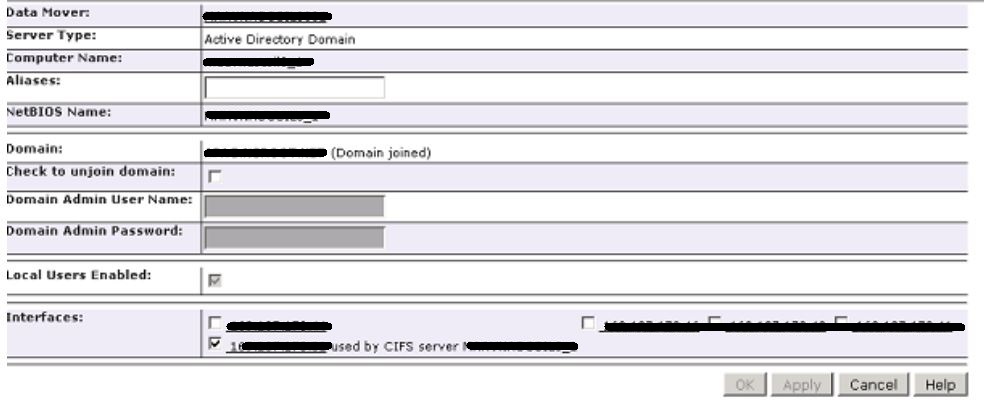
Resolution
Customer can check the OU details of CIFS server from a windows host with below command:
Run on host cmd prompt:
Example:
Run on host cmd prompt:
C:\> setspn -l <CIFS server name>
Example:
C:\>setspn -l TestServer
Registered ServicePrincipalNames for CN=TestServer,OU=Laptops,OU=CN Clients,
DC=corp,DC=emc,DC=com
Registered ServicePrincipalNames for CN=TestServer,OU=Laptops,OU=CN Clients,
DC=corp,DC=emc,DC=com
Additional Information
Default OU for VNX is : ou=Computers,ou=EMC VNX
Affected Products
VNX2 SeriesProducts
Dell EMC Unity Family, VNX1 Series, VNX2 Series, VNXe1 Series, VNXe2 Series, VNX/VNXeArticle Properties
Article Number: 000055634
Article Type: Solution
Last Modified: 07 Nov 2025
Version: 3
Find answers to your questions from other Dell users
Support Services
Check if your device is covered by Support Services.