Avamar backups or restores to or from the Data Domain fails or completes with exceptions with error messages mentioning "5341" and "SSL library error"
Summary: This article provides the resolution when Avamar backups or restores to or from the Data Domain fails or completes with exceptions with error messages mentioning "5341" and "SSL library error". ...
This article applies to
This article does not apply to
This article is not tied to any specific product.
Not all product versions are identified in this article.
Symptoms
By default, we use high encryption and Auth module for Data Domain connectivity for version 5.5 (5.4 would still work in this scenario without any issues) and if any customer is using a WAAS (WAN optimization devices such as CISCO WAAS) device in their environment it would cause the backups to fail for these clients, or other security devices that analyze traffic.
When DDBoost TCP traffic is passed to a WAAS, TCP data is analyzed and then regenerated to achieve several optimizations. None of these optimizations are helpful for DDBoost.
When the Client Hello RPC packet sent by DDBoost is intercepted by the appliance, it never reaches the DDR. This causes the SSL handshake between DDBoost and DDR to fail.
Consequently, DDBoost fails to establish TLS connection to DDR.
Since, these WAAS devices/Firewalls conducts optimization based on the TCP port, resolution would be to exclude all DD/Avamar communication ports on these devices.
After upgrading to Avamar 7.1 backups are failing with ddr authentication issues.
All VM backup policy groups were set to no encryption, since 7.1 auto blocks 27000 they have now changed that to High, also in dataset Data Domain encryption is set to default.
For restores, the operation may restore the file(s) to the specified location on the client. However, the restored file is corrupted and unusable.
The following error messages can be found the client logs (avtar logs ) on the Avamar Administrator GUI or on the client itself
Sample Output 1 (restore):
2015-11-12 15:56:48 avtar Error : Data Domain server "avamar.emc.corp" open failed DDR result code: 5341, desc: SSL library error
2015-11-12 15:56:48 avtar Error : Problem logging into the DDR server index:2
2015-11-12 15:56:54 avtar Error : Unable to open container file for location media: 2
2015-11-12 15:56:55 avtar Error : INTERNAL CYCLE ERROR: Unable to restore data for file 'D:\Text.txt' (code:3 - pax container object not existant).
Sample Output 2:
Sample Output 3:
When DDBoost TCP traffic is passed to a WAAS, TCP data is analyzed and then regenerated to achieve several optimizations. None of these optimizations are helpful for DDBoost.
When the Client Hello RPC packet sent by DDBoost is intercepted by the appliance, it never reaches the DDR. This causes the SSL handshake between DDBoost and DDR to fail.
Consequently, DDBoost fails to establish TLS connection to DDR.
Since, these WAAS devices/Firewalls conducts optimization based on the TCP port, resolution would be to exclude all DD/Avamar communication ports on these devices.
After upgrading to Avamar 7.1 backups are failing with ddr authentication issues.
All VM backup policy groups were set to no encryption, since 7.1 auto blocks 27000 they have now changed that to High, also in dataset Data Domain encryption is set to default.
For restores, the operation may restore the file(s) to the specified location on the client. However, the restored file is corrupted and unusable.
The following error messages can be found the client logs (avtar logs ) on the Avamar Administrator GUI or on the client itself
Sample Output 1 (restore):
2015-11-12 15:56:48 avtar Error : Data Domain server "avamar.emc.corp" open failed DDR result code: 5341, desc: SSL library error
2015-11-12 15:56:48 avtar Error : Problem logging into the DDR server index:2
2015-11-12 15:56:54 avtar Error : Unable to open container file for location media: 2
2015-11-12 15:56:55 avtar Error : INTERNAL CYCLE ERROR: Unable to restore data for file 'D:\Text.txt' (code:3 - pax container object not existant).
Sample Output 2:
Establishing a connection to the Data Domain system with encryption (Connection mode: A:3 E:2)
Calling DDR_OPEN returned result code:5341 message:SSL library error
Calling DDR_OPEN returned result code:5341 message:SSL library error
Sample Output 3:
2015-11-11 00:06:46 avtar Info <15261>: Getting '/cur/363e5aac188001e345fbd9da90d5a411c578cc03/1D11B4CEB494D52/ddr_files.xml' stored on DD system from previous backup
2015-11-11 00:06:46 avtar Info <19156>: - Establishing a connection to the Data Domain system with encryption (Connection mode: A:3 E:2).
2015-11-11 00:20:59 avtar Info <8688>: Status 2015-11-11 00:20:59, 19.90 KB (10.98 KB, 47.60% new) 464MB 46% CPU 89600 input bytes, VMFiles/1/virtdisk-flat.vmdk
2015-11-11 00:22:17 avtar Warning <18133>: Calling DDR_MOPEN returned result code:(5341) SSL library error message:DDRInstance::Connect: Unable to connect to DDR: testdd.emc.com
[ 1555] [140390943770368] Wed Nov 11 00:22:17 2015
ddp_connect_with_config() failed, Hostname: testdd.emc.com, Err: 5341-SSL_connect returned 5
[ 1555] [140390944823040] Wed Nov 11 00:06:46 2015
ddp_stat() failed, Path avamar-1360770814//STAGING/363e5aac188001e345fbd9da90d5a411c578cc03/BACKUP-B7DE7686F2B32D2C6F85FC1CAC4337C12230845A/DBB0C8BCEAEE7366D005CA2146F21BC21BB5B1AE, Err: 5004-nfs lookup failed (nfs: No such file or directory)
[ 1555] [140391168526080] Wed Nov 11 00:05:58 2015
ddp_mkdir() failed, Path avamar-1360770814/cur/363e5aac188001e345fbd9da90d5a411c578cc03, mode 511, Err: 5056-nfs mkdir failed (nfs: File already exists)
2015-11-11 00:06:46 avtar Info <19156>: - Establishing a connection to the Data Domain system with encryption (Connection mode: A:3 E:2).
2015-11-11 00:20:59 avtar Info <8688>: Status 2015-11-11 00:20:59, 19.90 KB (10.98 KB, 47.60% new) 464MB 46% CPU 89600 input bytes, VMFiles/1/virtdisk-flat.vmdk
2015-11-11 00:22:17 avtar Warning <18133>: Calling DDR_MOPEN returned result code:(5341) SSL library error message:DDRInstance::Connect: Unable to connect to DDR: testdd.emc.com
[ 1555] [140390943770368] Wed Nov 11 00:22:17 2015
ddp_connect_with_config() failed, Hostname: testdd.emc.com, Err: 5341-SSL_connect returned 5
[ 1555] [140390944823040] Wed Nov 11 00:06:46 2015
ddp_stat() failed, Path avamar-1360770814//STAGING/363e5aac188001e345fbd9da90d5a411c578cc03/BACKUP-B7DE7686F2B32D2C6F85FC1CAC4337C12230845A/DBB0C8BCEAEE7366D005CA2146F21BC21BB5B1AE, Err: 5004-nfs lookup failed (nfs: No such file or directory)
[ 1555] [140391168526080] Wed Nov 11 00:05:58 2015
ddp_mkdir() failed, Path avamar-1360770814/cur/363e5aac188001e345fbd9da90d5a411c578cc03, mode 511, Err: 5056-nfs mkdir failed (nfs: File already exists)
Cause
None
Resolution
To allow the failing clients backup you can add these flags to disable the Data Domain authentication that is causing the failures mentioned above.
Avtar is using Authentication and Encryption set to high for this Data Domain connection, please use the following flags in avtar.cmd
--ddr-auth-enabled=false
--ddr-encrypt-strength=none
--ddr-auth-mode=3 (18.1+)
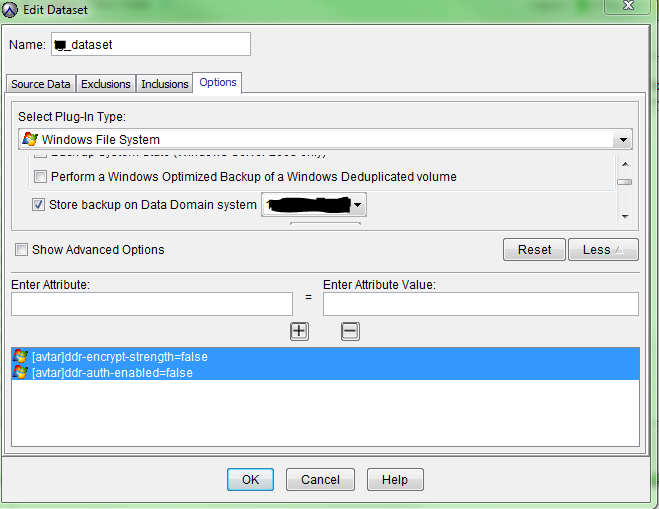
If customer has large number of clients, add the following flags to the Data set to apply this change on all the clients
After logging into the Avamar Administrator GUI:
Sample Output:
For Windows File system restore jobs, change the value of the "Encryption method from Data Domain system" option in the dataset from "High" to "None". This value disables SSL encryption for the restore operation.
Avtar is using Authentication and Encryption set to high for this Data Domain connection, please use the following flags in avtar.cmd
--ddr-auth-enabled=false
--ddr-encrypt-strength=none
--ddr-auth-mode=3 (18.1+)
If customer has large number of clients, add the following flags to the Data set to apply this change on all the clients
After logging into the Avamar Administrator GUI:
- Select Tools menu
- Manage Datasets
- Select the Dataset
- Click Edit button
- Select Options button from the popup window
- Select the correct plugin from the "Select Plug-In Type:" drop-down
- Click More button
And enter the following attributes:
[avtar]ddr-encrypt-strength=none
[avtar]ddr-auth-enabled=false
[avtar]ddr-auth-mode=3 (18.1+)
[avtar]ddr-encrypt-strength=none
[avtar]ddr-auth-enabled=false
[avtar]ddr-auth-mode=3 (18.1+)
For Windows File system restore jobs, change the value of the "Encryption method from Data Domain system" option in the dataset from "High" to "None". This value disables SSL encryption for the restore operation.
Affected Products
AvamarProducts
Avamar, Avamar ClientArticle Properties
Article Number: 000057830
Article Type: Solution
Last Modified: 05 Sep 2025
Version: 4
Find answers to your questions from other Dell users
Support Services
Check if your device is covered by Support Services.