Dell Encryption Personal kan ikke konfigurere for kryptering
Summary: Etter installasjon av Dell Encryption (tidligere Dell Data Protection | Kryptering), og når du går gjennom konfigurasjonsveiviseren, får du meldingen "Unable to Configure for Encryption" (Kan ikke konfigurere for kryptering). ...
This article applies to
This article does not apply to
This article is not tied to any specific product.
Not all product versions are identified in this article.
Symptoms
Berørte produkter:
- Dell Encryption Personal
- Dell Data Protection | Personal Edition
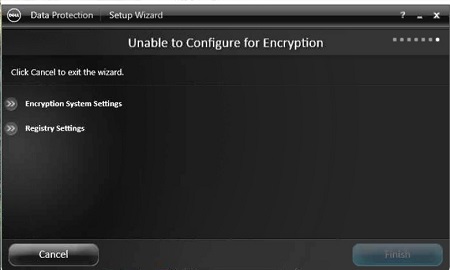
Figur 1: (Bare på engelsk) Installasjonsveiviser for Dell Data Protection
Hvis du vil kontrollere årsaken til problemet, åpner du LMS output.log in C:\Program Files\Dell\Dell Data Protect\Encryption\LMS\Logs eller LogBundleName\ProgramFiles-DDP\Encryption\LMS\Logs fra en pakke med diagnostikkinformasjon. Nedenfor finner du et eksempel på en feil:
20xx-xx-x xx:xx:xx,xxx ERROR CONTAINER [4] - Credant.Common.Security.SecurityException: Error trying to protect databaseSettings ---> System.Configuration.ConfigurationErrorsException: Failed to decrypt using provider 'LmsRsaProvider'. Error message from the provider: The RSA key container could not be opened. (C:\Program Files\Dell\Dell Data Protection\Encryption\LMS\Database.config line 2) ---> System.Configuration.ConfigurationErrorsException: The RSA key container could not be opened.
Cause
Ikke aktuelt
Resolution
Slik løser du dette problemet:
- Avinstallere Dell Encryption Personal (tidligere Dell Data Protection | Personal Edition).
- Når Dell Encryption er fjernet, og du har bekreftet at alle filene er dekryptert.
- Slett krypteringsmappen i
C:\Program Files\Dell\Dell Data Protection. - Fra og med v8.15 og nyere må du slette følgende mappe:
c:\programdata\dell\dell data protection\encryption.
- Slett krypteringsmappen i
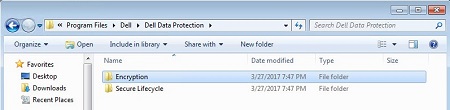
Figur 2: (Bare på engelsk) Dell Encryption-mappe i Windows Utforsker
- Fjern den
credsecagent$adminlokale kontoen fra datamaskinen.
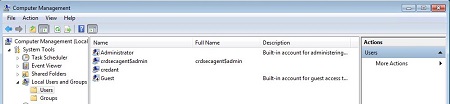
Figur 3: (Bare på engelsk) Datamaskinbehandling
- Installere Dell Encryption.
Windows Home Edition inneholder ikke lokale brukere og grupper i snapin-modulen for datamaskinbehandling . Du kan validere og fjerne credsecagent$admin kontoen ved hjelp av PowerShell som administrator.
I en administrativ PowerShell-økt:
Se etter lokale brukere:
Get-WmiObject -Class Win32_UserAccount -Filter "LocalAccount='True'"
credsecagent$admin Hvis kontoen blir funnet, kan de fjernes ved å kjøre følgende kommando i den samme administrative PowerShell-økten:
net user ‘credsecagent$admin’ /DELETE
MERK: Enkelttilbudene er nødvendig, slik at $ ikke vises som en operatør.
Hvis du vil kontakte kundestøtte, kan du se følgende artikkel i Dells kunnskapsbase: Dell Data Security International Support Phone Numbers.
Gå til TechDirect for å generere en forespørsel om teknisk støtte på Internett.
For ytterligere innsikt og ressurser kan du bli med i Dell Security Community Forum.
Additional Information
Videos
Affected Products
Dell EncryptionArticle Properties
Article Number: 000124655
Article Type: Solution
Last Modified: 28 Mar 2023
Version: 7
Find answers to your questions from other Dell users
Support Services
Check if your device is covered by Support Services.