Active Directory Groups: "group not found" In Dell Security Management Server and Dell Security Management Server Virtual
Summary: Following the latest release of the Dell Security Management Server (Formerly Dell Data Protection | Enterprise Edition) or Dell Security Management Server Virtual (formerly Dell Data Protection | Virtual Edition) v9.7 server, Active Directory computer groups can now be used when adding or modifying Endpoint Groups. ...
This article applies to
This article does not apply to
This article is not tied to any specific product.
Not all product versions are identified in this article.
Symptoms
Affected Products:
- Dell Security Management Server
- Dell Security Management Server Virtual
- Dell Data Protection | Enterprise Edition
- Dell Data Protection | Virtual Edition
Affected Versions:
- v9.7 or Later
Affected Operating Systems:
- Windows 2016
- Windows 2008 RS, 2012 RS
Searching for the specific Active Directory computer group under Endpoint Groups, Add Endpoint Group, Select the type of Endpoint Group, and Active Directory Group might return no results for the new Active Directory computer group under Choose AD Group.
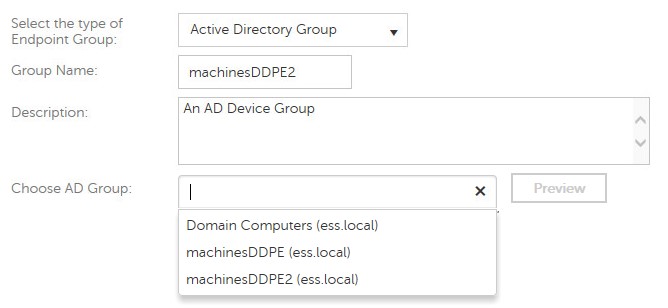
Figure 1: (English Only) Search for Active Directory Group
Cause
Not Applicable
Resolution
Dell Security Server collects Active Directory information from endpoints on the client side and makes this data available to the server for Endpoint Group specification during an inventory push to the Dell Security Server.
No Active Director device group can be added to the WebUI until at least one endpoint that belongs to that Active Directory group has been successfully activated against the Dell Security Server.
Caution: The Shield sends an inventory during its initial activation, starting with Shield v8.12. This way the Dell Security server knows from the start the group that the endpoint belongs to and can assign the correct policies. Endpoints running older versions of the shield cannot be assigned to the Active Directory Endpoint Group until an inventory reporting their Active Directory group membership is sent to the server.
To contact support, reference Dell Data Security International Support Phone Numbers.
Go to TechDirect to generate a technical support request online.
For additional insights and resources, join the Dell Security Community Forum.
Affected Products
Dell EncryptionArticle Properties
Article Number: 000124807
Article Type: Solution
Last Modified: 03 Apr 2024
Version: 8
Find answers to your questions from other Dell users
Support Services
Check if your device is covered by Support Services.