Active Directoryグループ:Dell Security Management ServerおよびDell Security Management Server Virtualで「グループが見つかりません」
Summary: Dell Security Management Server(旧Dell Data Protection | Enterprise Edition)またはDell Security Management Server Virtual(旧Dell Data Protection |Virtual Edition)v9.7サーバーの最新リリース以降では、エンドポイント グループを追加または変更するときにActive Directoryコンピューター グループを使用できるようになりました。 ...
This article applies to
This article does not apply to
This article is not tied to any specific product.
Not all product versions are identified in this article.
Symptoms
対象製品:
- Dell Security Management Server
- Dell Security Management Server Virtual
- Dell Data Protection | Enterprise Edition
- Dell Data Protection | Virtual Edition
影響を受けるバージョン:
- v9.7以降
対象オペレーティング システム:
- Windows 2016
- Windows 2008 RS、2012 RS
[Endpoint Groups]、[Add Endpoint Group]、[Select the type of Endpoint Group]、[Active Directory Group]で特定のActive Directoryコンピューター グループを検索すると、[Choose AD Group]で新しいActive Directoryコンピューター グループに対する結果が返されない場合があります。
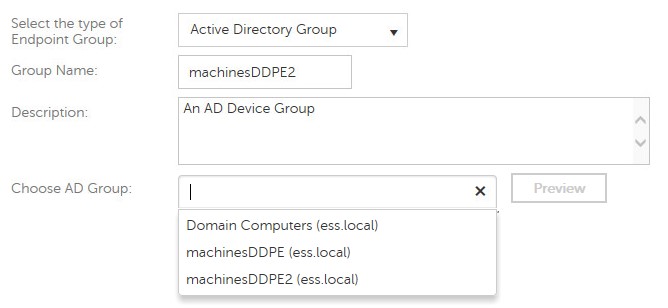
図1: (英語のみ)Active Directoryグループの検索
Cause
-
Resolution
Dell Security Serverは、クライアント側のエンドポイントからActive Directory情報を収集し、Dell Security Serverへのインベントリー プッシュ中に、このデータをサーバーがエンドポイント グループを指定するために使用できるようにします。
Active Directoryグループに属する少なくとも1つのエンドポイントがDell Security Serverに対して正常にアクティブ化されるまで、Active Directorデバイス グループをWebUIに追加することはできません。
注意:Shield V8.12以降では、最初のアクティブ化中にインベントリーを送信します。これにより、Dell Security Serverは、エンドポイントが属するグループを最初から認識し、正しいポリシーを割り当てることができます。古いバージョンのShieldを実行しているエンドポイントは、Active Directoryグループ メンバーシップを報告するインベントリーがサーバーに送信されるまで、Active Directoryエンドポイント グループに割り当てることはできません。
サポートに問い合わせるには、「Dell Data Securityのインターナショナル サポート電話番号」を参照してください。
TechDirectにアクセスして、テクニカル サポート リクエストをオンラインで生成します。
さらに詳しい情報やリソースについては、「デル セキュリティ コミュニティー フォーラム」に参加してください。
Affected Products
Dell EncryptionArticle Properties
Article Number: 000124807
Article Type: Solution
Last Modified: 03 Apr 2024
Version: 8
Find answers to your questions from other Dell users
Support Services
Check if your device is covered by Support Services.