Unable to access Dell Data Protection Enterprise Edition Management Console in Google Chrome
Summary: Attempting to access Dell Data Protection | Enterprise Edition Management Console through Google Chrome, Microsoft Silverlight shows a download screen, even if Silverlight has been installed. ...
This article applies to
This article does not apply to
This article is not tied to any specific product.
Not all product versions are identified in this article.
Symptoms
Affected Products:
- Dell Data Protection | Enterprise Edition
Affected Versions:
- v7.1.3 to 9.1.5
Cause
Not Applicable
Resolution
Silverlight must be enabled to resolve the issue within Chrome.
Note: Silverlight is no longer supported as of build 45, reference https://learn.microsoft.com/en-us/previous-versions/troubleshoot/visualstudio/silverlight/silverlight-not-work-google-chrome  .
.
.
Version 39-41
Note: Versions 39, 40 and 41 do not automatically allow plug-ins.
Follow the steps below to enable:
- Type chrome://flags/#enable-npapi This opens some advanced Chrome settings and select the option that you must enable.
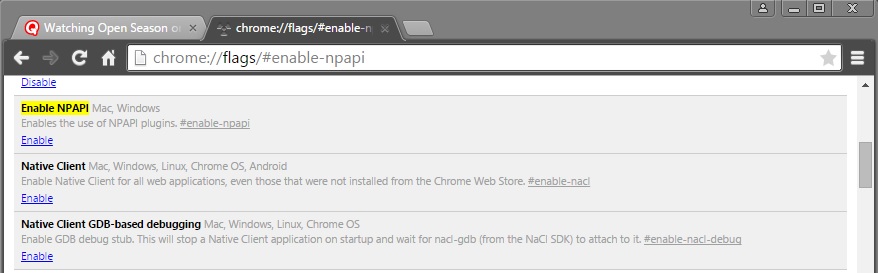
- Click the Enable link at the bottom of the Enable NPAPI entry.
- You must now restart Chrome so this takes effect. Ensure that you close all the open Chrome tabs before you restart Chrome.
After Chrome Restarts: - Type chrome://plugins in the address bar.
- Look for Silverlight. If it is disabled, it appears as gray and show an Enable link.
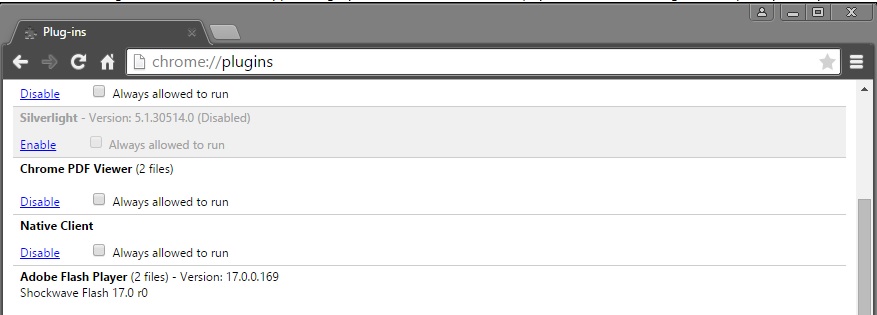
- If you do not see Silverlight as an option, you must restart your computer to ensure that Chrome has applied your earlier changes; or Silverlight may not be installed.
- Once Silverlight is enabled, you can access Dell Data Protection | Enterprise Edition Management Console.
Version 42
To enable Silverlight, follow the steps below:
- Open the Google Chrome Browser.
- In the URL bar in the upper right of your page, Click the Red X icon.
- Select Always allow plug-ins.
- Click Done.
To contact support, reference Dell Data Security International Support Phone Numbers.
Go to TechDirect to generate a technical support request online.
For additional insights and resources, join the Dell Security Community Forum.
Affected Products
Dell EncryptionArticle Properties
Article Number: 000125940
Article Type: Solution
Last Modified: 23 Sep 2025
Version: 14
Find answers to your questions from other Dell users
Support Services
Check if your device is covered by Support Services.