無法在 Google Chrome 中存取 Dell Data Protection Enterprise Edition 管理主控台
Summary: 嘗試存取 Dell Data Protection |透過 Google Chrome Enterprise Edition 管理主控台,Microsoft Silverlight 會顯示下載畫面,即使已安裝 Silverlight 也一樣。
This article applies to
This article does not apply to
This article is not tied to any specific product.
Not all product versions are identified in this article.
Symptoms
受影響的產品:
- Dell Data Protection | Enterprise Edition
受影響的版本:
- v7.1.3 至 9.1.5
Cause
不適用
Resolution
必須啟用 Silverlight,才能解決 Chrome 內的問題。
注意:參考 https://learn.microsoft.com/en-us/previous-versions/troubleshoot/visualstudio/silverlight/silverlight-not-work-google-chrome  ,自組建 45 起不再支援 Silverlight。
,自組建 45 起不再支援 Silverlight。
版本 39-41
注意:版本 39、40 和 41 不會自動允許使用附掛程式。
請按照以下步驟啟用:
- 輸入 chrome://flags/#enable-npapi 這會開啟一些進階 Chrome 設定,然後選取您必須啟用的選項。
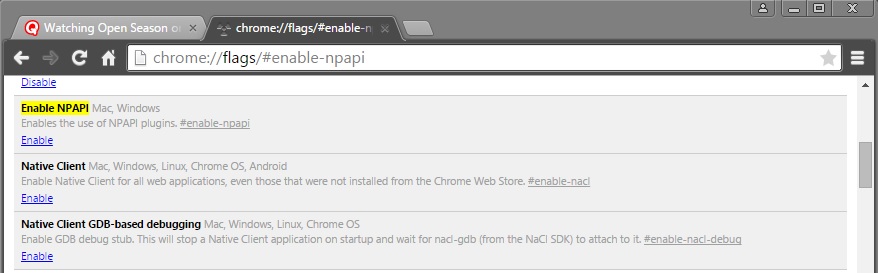
- 按一下啟用 NPAPI 項目底部的啟用連結。
- 您現在必須重新啟動 Chrome,才能生效。重新啟動 Chrome 之前,請務必關閉所有開啟的 Chrome 標籤頁。
Chrome 重新啟動後: - 在位址列中鍵入 chrome://plugins 。
- 尋找銀光。如果停用,則會顯示灰色,並顯示 「啟用 」連結。
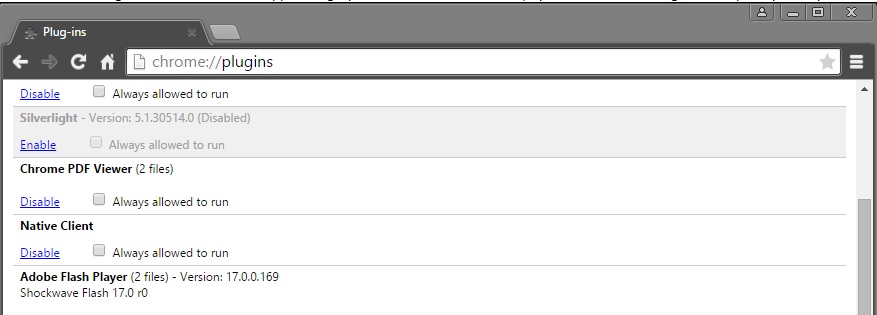
- 如果您沒有看到 Silverlight 選項,則必須重新啟動電腦以確保 Chrome 已應用您之前的更改;或者可能無法安裝 Silverlight。
- 啟用 Silverlight 後,您可以存取 Dell Data Protection |企業版管理主控台。
版本 42
若要啟用 Silverlight,請按照以下步驟操作:
- 開啟 Google Chrome 瀏覽器。
- 在頁面右上角的 URL 欄中, 按兩下 紅色 X 圖示。
- 選取 一律允許附掛程式。
- 按一下完成。
如要聯絡支援部門,請參閱 Dell Data Security 國際支援電話號碼。
請前往 TechDirect,以線上產生技術支援要求。
如需更多深入見解與資源,請加入 Dell 安全性社群論壇。
Additional Information
Videos
Affected Products
Dell EncryptionArticle Properties
Article Number: 000125940
Article Type: Solution
Last Modified: 23 Sep 2025
Version: 14
Find answers to your questions from other Dell users
Support Services
Check if your device is covered by Support Services.