Fel vid nedladdning av nyckelmaterial från nyckelservern i Dell Data Protection Enterprise Edition
Summary: Den här artikeln innehåller information om Dell Data Protection | Det går inte att hämta nyckelmaterial från nyckelservern i Enterprise Edition.
This article applies to
This article does not apply to
This article is not tied to any specific product.
Not all product versions are identified in this article.
Symptoms
Berörda produkter:
- Dell Data Protection | Enterprise Edition
Berörda versioner:
- v7.0 till 8.0
Du kan försöka ladda ner nyckelmaterialet från nyckelservern med antingen administrationsverktyget för hämtning CMGAd.exeeller avinstallationsprogrammet Shield.
Du får sedan ett felmeddelande om:
Servern påträffade ett fel när begäran behandlades.
Nedladdningen misslyckades
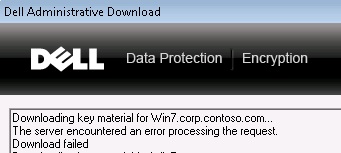
Bild 1: (Endast på engelska) Dell Encryption-fel
Enhetsservern output.log visar ett fel som:

Bild 2: (Endast på engelska) Server output.log
Cause
Åtkomst till Forensic Administrator måste vara aktiverad för att enhetsservern och nyckelservern ska distribuera krypteringsnycklar.
Resolution
Redigera filen context.properties manuellt i mappen Device Server Configuration (standardplats C:\Program Files\Dell\Enterprise Edition\Device Server\conf)). Detta visas i bilden nedan.
Ställ in service.forensic.enable=true
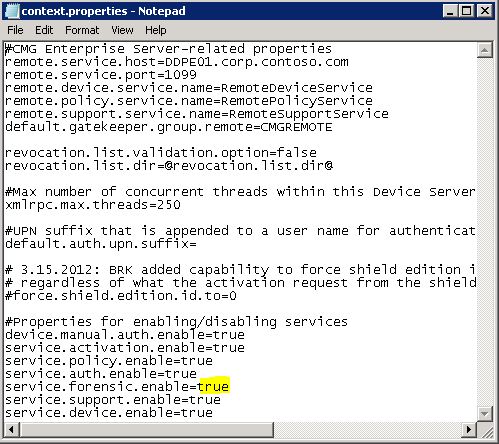
>Bild 3: (Endast på engelska)service.forensic.enable=true
Om du vill kontakta support, se Dell Data Security telefonnummer till internationell support.
Gå till TechDirect för att skapa en begäran om teknisk support online.
Om du vill ha mer information och resurser kan du gå med i Dell Security Community-forumet.
Affected Products
Dell EncryptionArticle Properties
Article Number: 000126040
Article Type: Solution
Last Modified: 03 Oct 2023
Version: 10
Find answers to your questions from other Dell users
Support Services
Check if your device is covered by Support Services.