Resolving VMware HCMon USB Arbitration Driver Error in Dell Encryption
Summary: Endpoints receive the error "VMware HCMon USB arbitration driver" running Dell Encryption Enterprise Shield (formerly Dell Data Protection | Enterprise Edition Shield).
This article applies to
This article does not apply to
This article is not tied to any specific product.
Not all product versions are identified in this article.
Symptoms
Affected Products:
- Dell Encryption
- Dell Data Protection | Encryption
- VMware
When Dell Encryption (formerly Dell Data Protection | Encryption) is installed on a Windows host machine, the error message "hcmon, event ID 0:. Detected unrecognized USB driver (\Driver\CmgPCS)" may be seen in the Windows event log. This is a known issue regarding VMware detecting the Dell Encryption Port Control driver that is inserted into the USB stack. This warning indicating there is another driver injecting, and results in no loss of functionality.
Error Message:
"hcmon, event ID 0:. Detected unrecognized USB driver (\Driver\CmgPCS)"
VMware HCMon USB arbitration driver errors in the Windows event log about an unknown driver
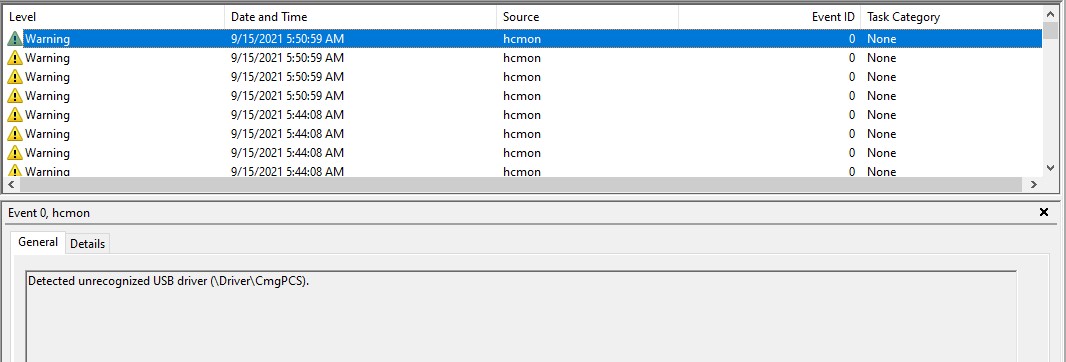
Figure 1: (English only) "hcmon, event ID 0:. Detected unrecognized USB driver (\Driver\CmgPCS)" example in Event Viewer
Cause
Not Applicable
Resolution
These errors can be safely ignored, as they are indicating that the VMware USB Arbitrator is detecting the Dell Encryption Port Control Driver. No loss of functionality is incurred.
For reference, click here to the view VMware KB addressing similar issues Host USB device fails to function in a VMware Workstation or Player virtual machine 
To contact support, reference Dell Data Security International Support Phone Numbers.
Go to TechDirect to generate a technical support request online.
For additional insights and resources, join the Dell Security Community Forum.
Affected Products
Dell EncryptionArticle Properties
Article Number: 000126155
Article Type: Solution
Last Modified: 10 Nov 2025
Version: 14
Find answers to your questions from other Dell users
Support Services
Check if your device is covered by Support Services.