TPM Ownership is taken where it is not wanted or needed
Summary: Dell Encryption (Formerly Dell Data Protection | Encryption) takes ownership of the Trusted Platform Module (TPM), when it is not in use.
This article applies to
This article does not apply to
This article is not tied to any specific product.
Not all product versions are identified in this article.
Symptoms
Affected Products:
- Dell Encryption
- Dell Data Protection | Encryption
Affected Versions:
- v8.5 and later
The below solution should be used in the following situations:
- Non-Dell Systems
- Another application owns the TPM.
- We do not want to leverage any TPM detail.
TPM ownership requests may exhibit in multiple ways. The prompt below is an example of what may be seen when Dell Encryption attempts to take ownership of the TPM.
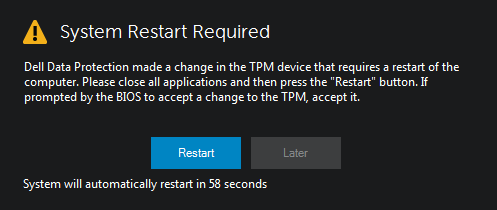
Figure 1: (English Only) Dell Encryption attempts to take ownership of TPM
Cause
Dell Encryption Management Agent (also known as the Client Security Framework) can manage multiple forms of encryption software, this includes Self-Encrypting Drives, BitLocker, and Software-Based Full Disk Encryption. When the Encryption Management Agent is installed to manage one of these encryption applications, the Encryption Management Agent attempts to consume ownership of the TPM.
Resolution
Warning: The next step is a Windows Registry edit:
- Back up the Registry before proceeding, reference How to Back Up and Restore the Registry in Windows
.
- Editing the Registry can cause the computer to become unresponsive on the next reboot.
- Contact Dell Data Security International Support Phone Numbers for assistance if you have concerns about performing this step.
A registry entry can be added to prevent the Dell Encryption product from attempting to take ownership of the TPM.
Add DisableTpmAssistMode to:
HKLM\SOFTWARE\Dell\Dell Data Protection type REG_DWORD 32 bit
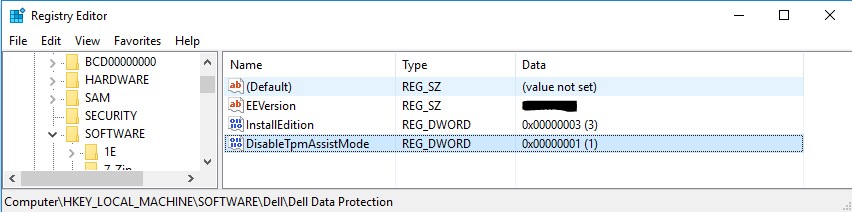
Figure 2: (English Only) Registry Editor
A Value of 1 turns this feature one, which means the TPM plug-in does not take ownership of the TPM and attempts to turn on the TPM or prompt for a TPM password.
If this registry does not exist, or is set to 0, the TPM plug-in functions as designed, attempting to take ownership of the TPM.
Also the TPM prompts the user for their password once per session.
To contact support, reference Dell Data Security International Support Phone Numbers.
Go to TechDirect to generate a technical support request online.
For additional insights and resources, join the Dell Security Community Forum.
Affected Products
Dell EncryptionArticle Properties
Article Number: 000129959
Article Type: Solution
Last Modified: 15 Apr 2024
Version: 10
Find answers to your questions from other Dell users
Support Services
Check if your device is covered by Support Services.