Dell Security Management Server Virtual 10.2.13 Does Not See the 10.2.14 update
Summary: After a failed upgrade to v10.2.14, the 1v0.2.13 Dell Security Management Server Virtual may no longer see the v10.2.14 update.
This article applies to
This article does not apply to
This article is not tied to any specific product.
Not all product versions are identified in this article.
Symptoms
Affected Products:
- Dell Security Management Server Virtual
Affected Versions:
- v10.2.13
Cause
During the upgrade process, the location of the Dell Security Management Server Virtual package repository is commented out and is not uncommented when certain failures occur.
Resolution
The following steps describe how to uncomment the repository location.
- Connect to the Dell Security Management Server Virtual Administration Console with
delluser. - Select Launch Shell from the Main Menu.
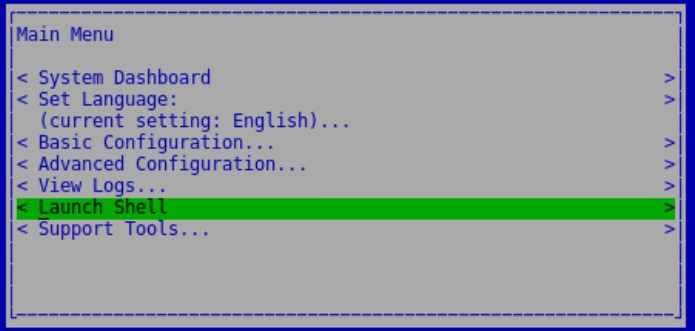
Figure 1: (English Only) Launch Shell
- Switch user to
dellsupportwith the commandsu dellsupport(Default Password:dellsupport).

Figure 2: (English Only) Switch users
- Run the command
sudo vi /etc/apt/sources.list.d/dsmsv.listto open the file in the vi editor.

Figure 3: (English Only) sudo vi /etc/apt/sources.list.d/dsmsv.list
- Once the file is open in vi, you should see the line below. Press the
ikey to enable insert mode.

Figure 4: (English Only) #deb https://dist.ddsproduction.com bionic main
- Use the arrow keys to move the cursor to the hash character at the start of the line, delete the character, and add a space at the beginning of the line.

Figure 5: (English Only) Delete #
- Exit insert mode by pressing the Esc key. Type
:wqand press Enter to save the file.

Figure 6: (English Only) type :wq and Press Enter
- Exit the
dellsupportuser context by typingexit. - Return to the console by typing
exitagain.
To contact support, reference Dell Data Security International Support Phone Numbers.
Go to TechDirect to generate a technical support request online.
For additional insights and resources, join the Dell Security Community Forum.
Affected Products
Dell EncryptionArticle Properties
Article Number: 000184182
Article Type: Solution
Last Modified: 04 Mar 2024
Version: 7
Find answers to your questions from other Dell users
Support Services
Check if your device is covered by Support Services.