WinPE Recovery May Not Populate Disks on Systems with Windows 11
Summary: Dell Encryption WinPE recovery image does not automatically mount drives on computers with Windows 11.
This article applies to
This article does not apply to
This article is not tied to any specific product.
Not all product versions are identified in this article.
Symptoms
Affected Products:
- Dell Encryption Personal
- Dell Encryption Enterprise
- Dell Encryption Enterprise Self-Encrypting Drive Manager
- Dell Full Disk Encryption
Affected Versions:
- v11.2
Affected Operating Systems:
- Windows 11
Cause
Not Applicable
Resolution
- Boot to the WinPE recovery image.
- Press X then enter to exit to the command prompt.
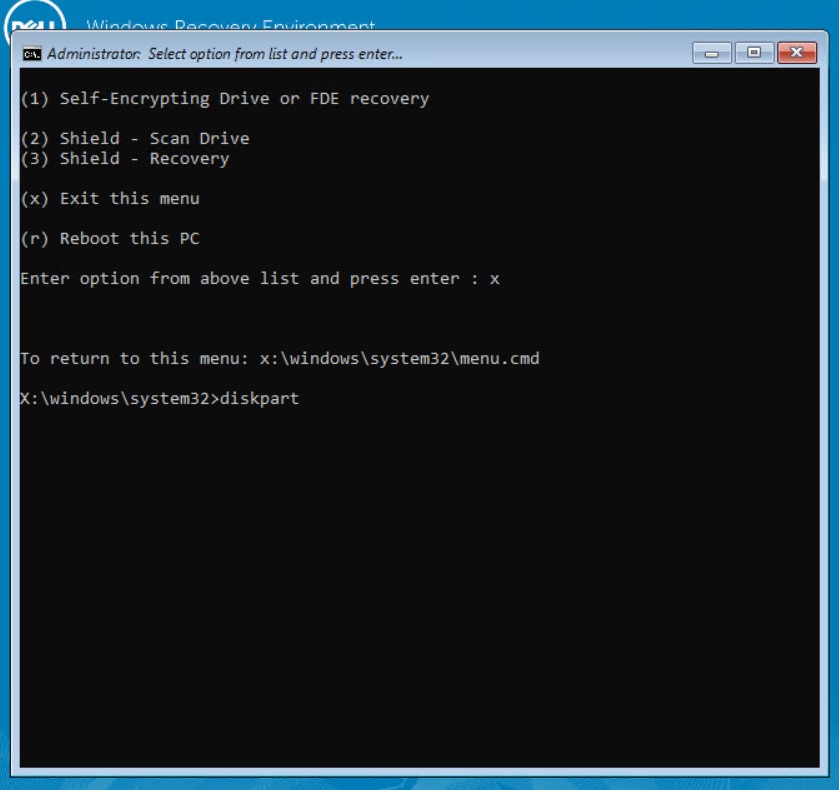
Figure 1: (English Only) Press x to Exit the menu
- At the command prompt, type
diskpartthen press enter. - At the
diskpartprompt, typelist volthen press enter to see available volumes.

Figure 2: (English Only) Type list vol
- Type
select volume x(where x is the volume number) then press enter. - Type
assign letter=x(where x is the drive letter that you want to assign to the volume) then press enter.

Figure 3: (English Only) Type assign letter=x
- Type
exitthen press enter to exit thediskpartutility. - Type
menu.cmdthen press enter to return to the main menu.
The target disk is mounted, and recovery can be performed.
Note: This issue will be resolved in a later version of the Dell Encryption WinPE recovery image.
To contact support, reference Dell Data Security International Support Phone Numbers.
Go to TechDirect to generate a technical support request online.
For additional insights and resources, join the Dell Security Community Forum.
Affected Products
Dell EncryptionArticle Properties
Article Number: 000193709
Article Type: Solution
Last Modified: 17 Jan 2024
Version: 6
Find answers to your questions from other Dell users
Support Services
Check if your device is covered by Support Services.