VxBlock: How to collect vCenter Server Appliance Logs
Summary: How to collect vCenter Server Appliance Logs
This article applies to
This article does not apply to
This article is not tied to any specific product.
Not all product versions are identified in this article.
Instructions
How to Collect Logs from vCenter Appliance
1) Log into the VCSA as user root using ssh.
2) Set the shell to bash
>shell.set --enabled true
>shell
3) Run command to collect the logs:
# vc-support -l
Logs are ouput to file: /storage/log/<VCSA Name>-<date>.tgz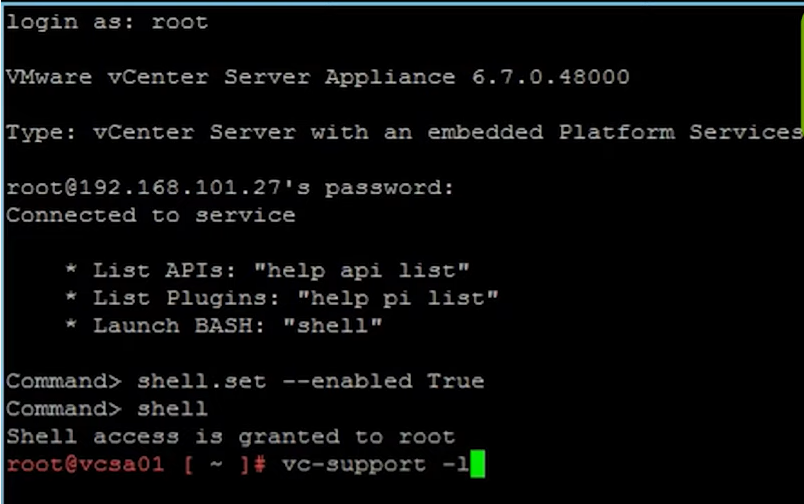
4) Use Win SCP to download.
When using WinSCP, set the SFTP server to shell /usr/libexec/sftp-server 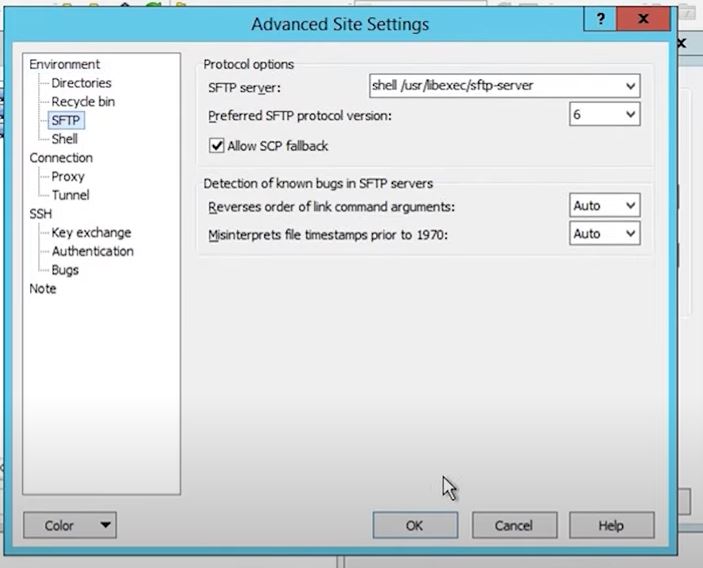
Login to VCSA as root.
Navigate to directory log bundle was collected to.
Click and drag to copy the file locally.
Remember to delete the file on VCSA once copied to conserve space.
Affected Products
Converged Infrastructure, VxBlock and Vblock Systems, VxBlock and vBlock Systems SeriesArticle Properties
Article Number: 000194994
Article Type: How To
Last Modified: 19 Nov 2025
Version: 2
Find answers to your questions from other Dell users
Support Services
Check if your device is covered by Support Services.